
In equipment design, the display format is not always chosen by what is easiest to buy. In many projects, the enclosure, user interface, and information layout are settled first, and the display has to work within those limits. That is where standard 16:9 or 4:3 screens can start to feel inefficient. When the usable space is long and narrow, a conventional display may leave too much inactive area, push the front housing to become larger than necessary, or make the interface look out of place on the product.
A bar type LCD display, also called a stretched LCD display or ultra-wide LCD display, is a screen with an elongated aspect ratio designed for narrow installation areas and linear information layouts. It is commonly used in transportation systems, retail shelf edges, kiosks, industrial equipment, and signage where a standard screen would waste space or complicate integration.
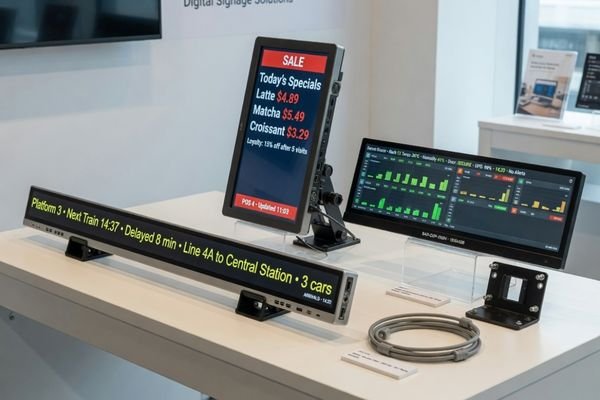
In actual product development, the need for a bar type LCD module usually shows up when the product structure becomes the main constraint. A standard screen may work in theory, but it often creates trade-offs in bezel size, mounting layout, visual balance, and UI efficiency. A bar type display addresses that mismatch by bringing the display format closer to the product’s mechanical layout and the way information is meant to be presented.
This format also gives product teams more freedom to place information where it is genuinely useful. Route information, shelf pricing, queue status, alarm banners, and compact operating data[^1] are all examples of content that fits a stretched display more naturally than a conventional screen. In many cases, the result is a cleaner front panel and a display area that feels like part of the product rather than an awkward add-on.
Why Standard Displays Do Not Always Fit Equipment
The first instinct in many projects is to start with a standard off-the-shelf screen. That can make sense when the installation space is conventional and the UI is built around a familiar aspect ratio. But many equipment products are not designed around a standard screen shape in the first place.
In real devices, the available display area may be limited by the width of a shelf edge, the space above a vehicle doorway, the top strip of a kiosk, or the remaining room on a control panel. In those cases, forcing a standard display into a narrow space often leads to a series of follow-on problems: wasted active area, oversized housings, inefficient front-panel layout, and a user interface that feels disconnected from the product itself.
This is the problem a bar type LCD display[^2] is meant to solve. Instead of asking the product to conform to the screen, it lets the display follow the product structure more naturally.
In early project discussions, this mismatch is often easier to spot from the enclosure and UI layout than from the display specification itself. In our engineering reviews, that usually means checking the available display window, the real information density, and the host-board constraints before the module format is frozen. Doing that work early can prevent a surprising amount of late-stage compromise.
What a Bar Type LCD Display Actually Means
A bar type LCD display is a display format with an unusually wide or tall aspect ratio compared with a standard screen. Depending on the context, it may also be described as a stretched LCD display, ultra-wide LCD display, or bar type TFT display.
The defining feature is not simply that the screen is long and narrow. The key point is that the display format is intended for applications where the installation space and information layout are both non-standard.
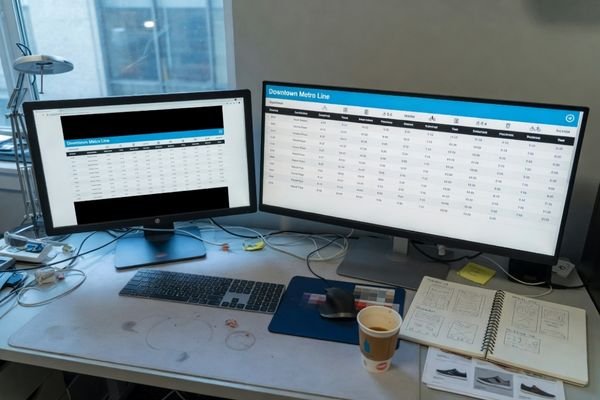
For that reason, a bar display should be understood as a purpose-driven format rather than a novelty shape. It is typically selected when the product only needs a narrow band of information, a linear user interface, or a display zone that does not suit a conventional rectangular screen. Within a broader range of display module options, this format exists to solve a specific integration problem.
A Purpose-Built Form Factor
Unlike a general-purpose display intended for full-screen content, a bar type LCD module is usually chosen for compact, structured information. That may include scrolling text, segmented status data, route indicators, queue information, pricing, alerts, or horizontal UI bands.
That is why it works well in positions where a standard screen would feel visually awkward or mechanically inefficient. Typical examples include above a doorway, along a shelf edge, across the top of a machine front panel, or in other narrow architectural or product spaces.
Engineering Behind the Format
The elongated format also changes how the module has to be engineered. Uniform brightness, stable scanning, cable routing, PCB layout, and mechanical support[^3] all become more sensitive when the active area is stretched.
Depending on the module design, the optical and driving structure may need to be adjusted to keep brightness consistent and operation reliable across the full length of the display. That is one reason a bar type display should be treated as a real integration component, not simply as a standard screen in an unusual shape.
Why Bar Type Displays Are Used in Equipment Design
Bar type displays are used because they make it easier to integrate visual information into products where space is limited and the content itself is linear. In many systems, the display does not need to dominate the front panel. It only needs to show a narrow but useful layer of information in a location that fits the product naturally.
This can improve both product design and usability. A narrow display strip[^4] can occupy otherwise unused panel space, reduce visual clutter, and keep key information in the user’s line of sight without increasing the product’s overall size. In that sense, the bar format is often chosen not because it looks unusual, but because it solves the layout more cleanly.
Common Applications for Bar Type LCD Displays
The value of a bar type display becomes clearer when looking at where it is actually used. Across different equipment application scenarios, this format is most effective when the display window is narrow and the information needs to be readable at a glance.
Bar type LCD displays are commonly used in transportation for route and destination information, in retail for shelf-edge pricing and promotions, in industrial equipment for status monitoring, and in kiosks or public systems for guidance, queue status, and secondary information display.
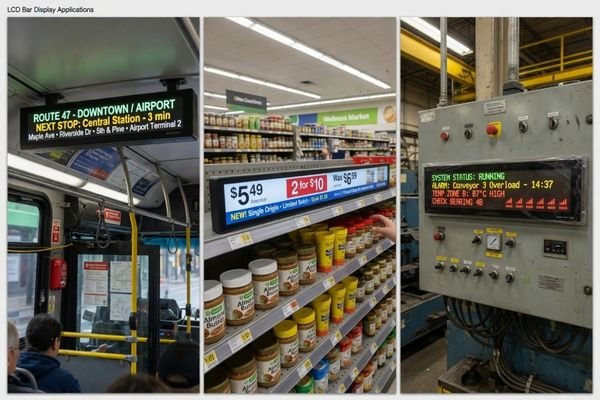
The reason varies slightly by application. In transportation, the format matches narrow installation zones and route-oriented information. In retail, it follows the shape of the shelf edge itself. In industrial equipment, it leaves more room for controls while still showing alarms or operating data. In kiosks and smart terminals, it works well for branding, status, queue information, or secondary UI layers.
| Application / Scenario | Usage Pattern | Why a Bar Type Display Fits |
|---|---|---|
| Public Transportation | Displaying route numbers, destinations, stop information, and status updates inside buses, trains, and trams. | Fits narrow spaces above windows or doorways and matches the linear way route information is presented. |
| Retail & Supermarkets | Electronic shelf-edge pricing, promotions, stock data, and product information. | Matches the horizontal shape of shelf edges and provides a cleaner replacement for paper labels or fragmented signage. |
| Industrial Control | Status indicators, alarm banners, compact parameter readouts, and operating states on machinery. | Uses minimal vertical space and allows critical information to be added without overcrowding the control panel. |
| Vending & Kiosk Machines | Payment status, user guidance, queue information, branding, or secondary messages. | Fits narrow front-panel areas and supports secondary information without requiring a major enclosure redesign. |
| Digital Signage[^5] & Public Guidance | Directional signs, queue status, reception guidance, and constrained-format advertising. | Works well in hallways, columns, counters, and other architectural areas where a standard screen would be impractical. |
In all of these cases, the display works because it supports both the enclosure design and the information pattern more efficiently than a standard screen.
What to Check Before Selecting a Bar Type Module
Choosing a bar type LCD module is not just a matter of selecting a length and width. The format may look simple, but the project only succeeds when the module fits the product mechanically, electrically, visually, and commercially.
Before selecting a bar type LCD module, it is important to confirm the physical dimensions, aspect ratio, resolution, brightness, viewing angle, interface compatibility, mounting method, and expected supply lifecycle.

A useful review usually starts with the display itself and then moves outward to the host system and product lifecycle.
Core Display Specifications
The first set of checks is about whether the display will present the content clearly and fit the available space correctly.
- Resolution and Aspect Ratio: The aspect ratio should match the intended UI layout, and the resolution should support the text, icons, or graphics that need to be shown. If the resolution is too low for the interface density, readability will suffer even if the module physically fits.
- Brightness and Viewing Angle: Many bar type displays are used in public, industrial, or semi-outdoor environments. If the brightness is too low or the viewing angle is too narrow, the display may be difficult to read from the actual installation position.
Integration and Reliability Factors
Even when the visual specifications look right, integration problems can still create project risk.
- Interface Compatibility[^6]: The module interface must match what the host processor or controller board can support. If the display uses LVDS, eDP, MIPI, or HDMI in a way the system does not support directly, extra adapter hardware may be required, adding cost, board space, and failure points.
- Mechanical Integration: Mounting tabs, bracket design, bezel constraints, FPC routing, connector position, and cover structure all need to be checked early. A module that looks fine on paper can still create enclosure trouble once those mechanical details are reviewed in the actual product.
- Supply Longevity: For products with multi-year production plans, supply continuity matters. If lifecycle visibility is poor, the project may face avoidable redesign pressure later.
In practice, early review usually focuses on a few items before the display choice is frozen: interface support, cable direction, mounting constraints, UI readability, brightness target, and lifecycle expectations. In our project evaluations, these are often the areas that show whether a standard module is truly suitable or only appears suitable at first glance.
For teams evaluating stretched formats more broadly, it often makes sense to review the available module categories here before freezing a design direction.
When a Custom Bar Type Display Becomes Necessary
A standard bar type module may be suitable when the size, resolution, interface, and installation method already align with the product. In that case, using an existing module can reduce development effort and shorten the path to integration.
However, many projects do not align that neatly. A custom bar type display becomes necessary when the product needs a specific active area, a non-standard resolution, a particular electrical interface, higher brightness, a touch layer, a customized cover structure, or a mounting method that standard modules cannot support well.
In many real projects, the decision to customize is driven less by the display category itself and more by integration risk. If a standard module requires workarounds in mechanics, signal conversion, optical performance, or lifecycle planning, the project may benefit more from an early engineering review than from forcing a near-match part into the design.
In our project discussions, the first question is usually not whether customization is possible, but whether it is necessary to reduce downstream risk. A custom route often becomes easier to justify when it can remove adapter boards, avoid enclosure rework, improve optical performance, or support a more stable supply plan for volume production.
That does not mean every project needs a custom bar type display. It means customization becomes the more practical choice when the display has to match the product more precisely than standard options allow.
FAQ About Bar Type LCD Displays
Q: Are bar type LCD displays the same as stretched LCD displays?
A: In most contexts, yes. Terms such as bar type LCD display, stretched LCD display, and ultra-wide LCD display are often used interchangeably to describe elongated display formats. The exact wording may vary by supplier or product line.
Q: Are bar type LCD modules always custom-made?
A: No. Standard bar type LCD modules are available in some commonly used sizes. However, many equipment projects still require customization because the size, interface, brightness, mounting, or lifecycle requirements do not fully match those standard options.
Q: Can bar type LCD displays support touch integration?
A: Yes. Depending on the application, a bar type display can be integrated with PCAP or other touch technologies. The feasibility depends on the display size, cover structure, user interface design, and operating environment.
Q: Are bar type LCD displays suitable for outdoor use?
A: They can be, but not by default. Outdoor use usually requires higher brightness, reflection control, and sometimes optical bonding or additional environmental design measures. Whether a bar display is suitable for outdoor conditions depends on the actual application requirements.
Q: How do I know whether a standard bar module is enough for my project?
A: A standard module is usually sufficient when its active area, resolution, interface, brightness, and mounting approach already fit the product without significant workarounds. When those factors do not align cleanly, the project is more likely to need a custom solution.
Final Thoughts on Bar Type Display Selection
A bar type LCD display is valuable when the product structure, information layout, and user interaction do not fit a standard screen format. Its importance in equipment design comes from integration value rather than appearance alone.
In many projects, the real challenge is not identifying the bar display category. The harder part is confirming whether the module can support the product mechanically, electrically, visually, and over the intended lifecycle. That is usually where simple part selection ends and real project evaluation begins.
For teams comparing application fit, solution scenarios, module options, and engineering capabilities are usually the most useful next references. For direct project discussions, contact info@lcdmodulepro.com.