Retail shelf-edge and aisle signage fail when clarity, mounting, and interface choices are misaligned with real store conditions.
This guide focuses on selecting a stretched bar lcd module and integrating the LCD display MODULE into a retail player, mounting rail, and long-cable environment—so what works on the bench also works in-store.
Start by freezing the mechanical envelope, align native resolution with the content pipeline and interface, then balance brightness and optics with thermal limits. Validate mounting, power, and EMC to ensure the lcd module survives retail scale.
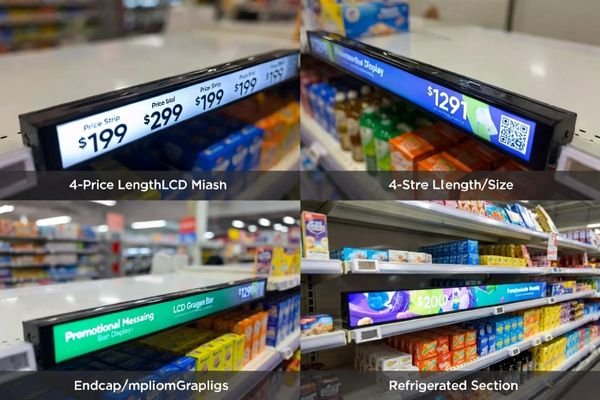
In my lcd module integration work, most problems trace to mismatched expectations: near-view shelf-edge text needs pixel height and optics tuned for short distances, while aisle signage demands contrast and motion stability. Signal scaling, long cables, and glare often turn a “good panel” into a poor deployment.
| Scenario | Key Constraint | Risk if Ignored | Recommended Focus |
|---|---|---|---|
| Shelf-edge price strips | Short viewing distance | Soft text, glare washout | Higher vertical pixels, anti-glare balance |
| Endcap/aisle signage | Longer viewing distance | Unreadable motion, low contrast | Native timing, interface robustness |
| Refrigerated sections | Condensation & cleaning | Fogging, adhesive failure | Optical/ sealing choices, thermal path |
| Long cable runs | EMI & drops | Flicker, resets | Interface selection, grounding/EMC |
Clarify shelf-edge use cases and dimensions for a bar lcd module
Retail teams often mix shelf-edge label needs with promotional signage expectations.
To choose the right bar lcd module for shelf-edge, first freeze the physical and usage boundaries: available active area in the rail, bezel/thickness limits, cable exit, viewing distance, and whether you will use one panel or segments. With those fixed, you can design the content layout confidently and avoid late mechanical rework.
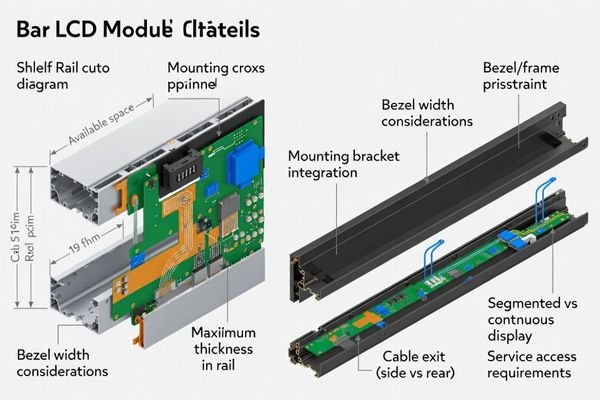
From an engineering standpoint, I usually start by “freezing the box1”: maximum active area that fits the shelf rail, bezel width and thickness, cable exit orientation, and whether one long panel or segmented displays will be used. This sets the physical boundaries that drive content layout—price cells, barcodes, promo icons, motion banners—and prevents late mechanical rework. If you need internal alignment across teams, capture these assumptions in a one-page spec before requesting quotes and samples.
When I review failed field installations, I often find hidden retail constraints were treated as afterthoughts—glare from overhead lights, reflections from glass doors, condensation near refrigerators, frequent cleaning chemicals, and accidental impacts. Treat these as input requirements. The result is a clear spec: viewing distance, target pixel height for crisp text, optical coating strategy, and mechanical resilience that keeps the lcd module viable across pilot and mass deployment.
Match resolution, aspect ratio, and interface for an LCD display MODULE
Teams often pick diagonal size first and ignore pixel height, scaling, and the end-to-end signal chain.
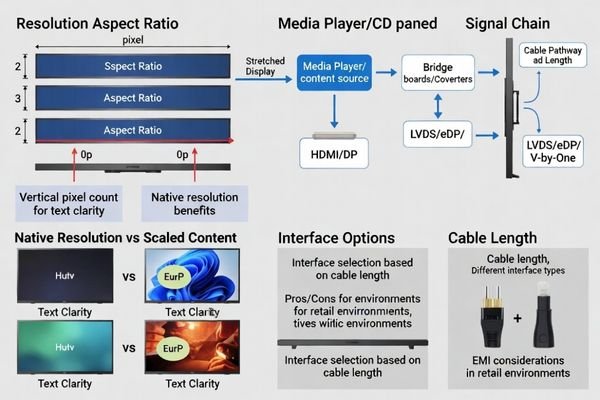
For an LCD display MODULE, clarity and stability come from native pixels and a clean signal chain. Select a resolution/aspect ratio that matches your layout, then work backward from the media player output to the panel interface (and any bridge board). Minimize scaling, control cable/EMI risks, and keep timing predictable.
Pixel height drives clarity
Based on the projects I support with OEMs and system integrators, vertical pixel count usually dictates perceived sharpness for shelf-edge pricing. Low pixel height2 softens typography at short distances, hurting barcode and small text legibility.
Native timing over resampling
When the CMS or player continuously resamples to a non-native resolution, thin lines shimmer and scrolling text looks unstable. I design content around the panel’s native resolution and timing to keep the lcd module predictable in mass deployments.
Interface strategy and cabling
From an engineering standpoint, I usually map the signal from the media player (HDMI/DP) to any needed bridge board, then to eDP/LVDS/V-by-One on the panel. Cable length, connector retention, EMI margin, and serviceability are baked in early.
| Player Output | Bridge Need | Panel Interface | Retail Risk | Practical Note |
|---|---|---|---|---|
| HDMI | Often yes | LVDS/eDP | Scaling blur if non-native output | Prefer native mapping and stable timing; avoid “always-on” resampling |
| DisplayPort | Often yes | eDP/V-by-One | EMI risk increases on long runs | Keep cable lengths realistic; plan grounding and shielding from day one |
| SoC eDP | Usually no | eDP | Connector stress over service life | Use retention + strain relief in shelf rails; validate touch/cleaning handling |
Set brightness, contrast, and optical treatments for aisle readability
Many projects chase maximum nits and overlook reflections, optical tradeoffs, and heat.
Set brightness for real store readability, not for a spec sheet. Evaluate glare and reflections first, then choose anti-glare/haze and contrast treatments that keep small text sharp. Finally, confirm power budget and thermal path so higher nits don’t create overheating, color shift, or accelerated backlight aging during long daily operation.
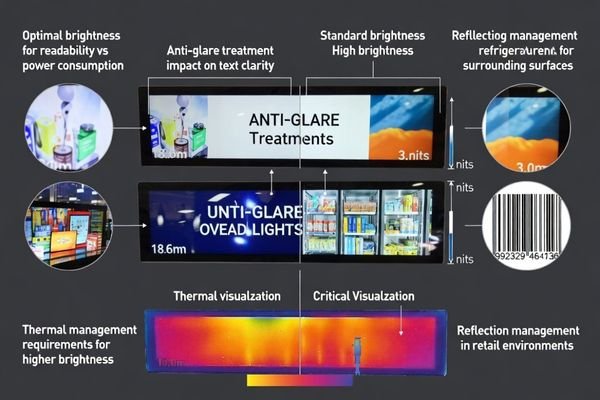
In my lcd module integration work, I set readability targets against store-real reflections first, then choose optics and brightness to meet that target without creating thermal debt. Overhead lights and glossy surroundings create veiling glare that can wash out content even at “bright” settings, so anti-glare3, haze, diffusion, and contrast management must be tuned carefully. The key tradeoff is simple: stronger anti-glare reduces mirror reflections, but too much haze can soften perceived sharpness—especially painful for small text on shelf-edge strips.
When I review failed field installations, I often find brightness targets were set without power and thermal budgeting. Higher nits raise power density and temperature, accelerating color shift, backlight aging, and adhesive or frame degradation. I link brightness, power architecture (adapter, centralized supply, PoE where applicable), and thermal path—backplate conduction, chassis coupling, limited airflow—so the display stays consistent beyond a short demo.
Design mounting, power, EMC, and reliability tests for scale-up
At scale, mechanical, electrical, and EMC details—not panel specs—determine survival in busy retail.
To scale beyond a pilot, engineer the non-display details that cause field failures: mounting rigidity and service access, protection for surges/ESD/hot-plug and voltage drop, and EMC control for long cables on metal shelving. Define store-real validation gates—burn-in, cycling, vibration, ESD, and power-abnormal tests—before mass rollout with clear pass/fail criteria.
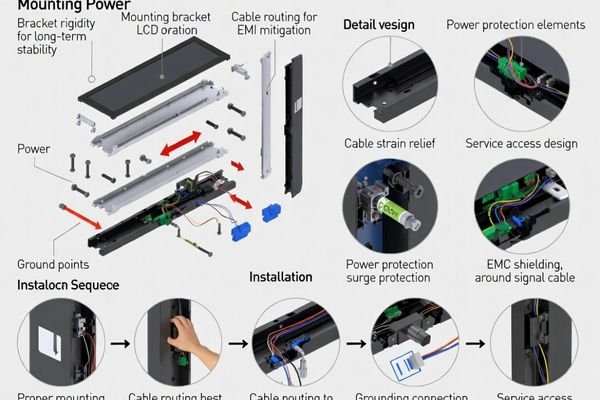
From an engineering standpoint, I usually treat mounting as a system: shelf tolerances, rapid install, and service access. Prototypes that look neat often loosen or warp after cleaning and minor impacts. Fasteners, bracket stiffness, retention features, and cable strain relief must be validated with real handling.
Based on the projects I support with OEMs and system integrators, power design must anticipate surges, hot-plug events, and voltage drops. Long cables along metal shelving behave like antennas, so grounding, shielding, and routed cable paths matter. Scale-up requires burn-in, temperature cycling, vibration, ESD/human-touch tests, and power-abnormal testing with clear pass/fail criteria and sampling plans for multi-batch consistency. To keep this reproducible, I recommend validating worst-case cable routing and defining repeatable ESD touch points (where staff actually touch/clean) so failures can be recreated and fixed instead of “disappearing” in the lab.
Recommended stretched lcd module options for shelf-edge and panoramic signage
Disciplined lcd module selection ties viewing distance, text sharpness, length, and deployment economics to the exact shelf or signage placement. MEIDAYINGNOU’s strengths are interface-fit engineering, optical/thermal experience for readability, rigorous reliability validation, controlled delivery consistency, and practical customization boundaries that keep timelines predictable. The table below maps typical retail scenarios to suitable models and integration notes.
| Application / Scenario | Usage Pattern | Display Requirements | Recommended Model | Key Integration Considerations |
|---|---|---|---|---|
| Near-view shelf-edge price strips | Static pricing + barcode | High vertical pixels, balanced anti-glare, crisp small text | BU123X | Short viewing distance; prioritize native timing and controlled haze to avoid soft text |
| Long shelf runs with standardized templates | Mixed pricing and promo icons | Wider active area, consistent resolution for CMS | BU156X | Cable exit orientation and bracket repeatability; manage EMI on repeating rails |
| Endcaps and aisle guidance | Rich motion content, mid-distance viewing | Higher contrast and motion stability | BU173X | Often consider eDP/V-by-One when the player and cable plan support stable timing; validate cable length, grounding, and EMI margin |
| Panoramic branding bands / wide signage | Immersive horizontal visuals | Large format with unified visuals | BU320S | Structural mounting and thermal spreading; ensure player outputs native timing |
| Non-standard length or interface/brightness needs | Special placements | Custom resolution/brightness/optics | Custom LCD Display Modules (6.8"–40", Custom Resolution, Custom Brightness) | Freeze envelope and interface early; define feasible brightness and optical tradeoffs |
From an engineering standpoint, this allocation aligns pixel height and optics with near-view shelf-edge use, while scaling length and interface robustness for endcaps and panoramic signage. Models co-exist in a chain-wide deployment: shelf-edge strips for pricing, mid-length units for guidance, and large panoramic bands for branding. By locking native resolutions and interface strategies per zone, future expansion stays consistent, spares are simplified, and maintenance costs remain controlled even across multi-batch rollouts.
FAQ: customization, lead time, and long-term supply consistency
-
What viewing distance should I assume for shelf-edge versus aisle signage?
Treat viewing distance as the first “spec driver.” Shelf-edge strips are typically read at close range (often sub-meter to around ~1 m), so small text sharpness and anti-glare tradeoffs matter more. Aisle/endcap signage is often read from farther away, so you can prioritize larger typography, stronger contrast under glare, and smoother motion content. Locking distance early prevents you from overpaying for pixels you can’t perceive—or under-spec’ing clarity where shoppers stand close—and you should confirm real behavior during a pilot. -
Should I prioritize eDP, LVDS, or V-by-One for a stretched bar display?
Start from your system output and reliability target. If your player outputs HDMI/DP, you may need a bridge board—so you should pick the panel-side interface that keeps timing stable, wiring manageable, and EMI risk low in long-cable retail installations. The “best” interface is the one that reduces conversions and simplifies the signal chain while staying serviceable and consistent in mass production. -
How do I balance high brightness with thermal limits in a slim enclosure?
Brightness, power, and heat are the same decision. Higher nits increase power density and temperature, which accelerates backlight aging, color shift, and adhesive/frame degradation. The practical approach is to set a readability target under your store lighting and reflections, then confirm power budget and thermal path (backplate conduction, chassis coupling, airflow assumptions) so the module can hold performance over time, not just on day one. -
What reliability tests matter most before rolling out to hundreds of stores?
Focus on store-real failure modes: burn-in to catch early-life issues, temperature cycling for material stress, vibration/handling for mounting and connectors, ESD for human touch and cleaning events, and power abnormal tests for surges/hot-plug/voltage drop. Define pass/fail criteria and sampling rules so the rollout isn’t a gamble based on a few prototypes. -
What can I customize in a bar lcd module without blowing up schedule and consistency?
Customization is safest when it stays around integration layers—mechanical mounting features, bezel/window, cable direction, brightness tuning within feasible ranges, and interface strategy that matches your host system. The highest schedule risk usually comes from constraints tied to panel sourcing or extreme specs. A clear “custom vs standard” boundary keeps lead time predictable and multi-batch consistency controllable.
Conclusion
Choosing a stretched bar lcd module for shelf-edge and signage works best with a disciplined sequence: freeze the real use case and mechanical envelope, align native resolution and interface, balance readability with optical/thermal limits, and validate mounting, power, and EMC for scale. That engineering approach keeps deployments predictable and reduces rollout risk.
MEIDAYINGNOU combines interface-fit design, optical/thermal tuning, and store-real reliability validation with consistent supply planning. If you share your target dimensions, viewing distance, player output/interface constraints, lighting/glare conditions, and mounting approach, we can respond with an engineering-backed recommendation. To discuss your shelf-edge or signage requirements and get an engineering-backed recommendation, please contact us via the email below.
✉️ 961531917@qq.com
🌐 https://lcdmodulepro.com/
-
Understanding ‘freezing the box’ is crucial for effective engineering design, ensuring all constraints are considered early in the process. ↩
-
Understanding pixel height is crucial for achieving optimal display clarity and legibility, especially in retail environments. ↩
-
Explore this link to discover effective anti-glare solutions that enhance display readability and reduce reflections. ↩