Starting a custom LCD project often feels harder than it really is. The difficulty usually does not come from the word custom itself. More often, the real problem is that the project begins with unclear assumptions about size, interface, environment, touch structure, or lifecycle. Once those gaps show up late, the team ends up revisiting the same decisions, reworking proposals, and losing time on questions that could have been framed much earlier.
To start a custom LCD project effectively, the most important inputs are a realistic mechanical envelope, a clear display and interface direction, meaningful optical and environmental targets, any touch or cover-lens requirements, and basic program expectations such as volume and lifecycle. The point is not to have every detail finalized on day one, but to define the right constraints early enough to support a real engineering discussion.
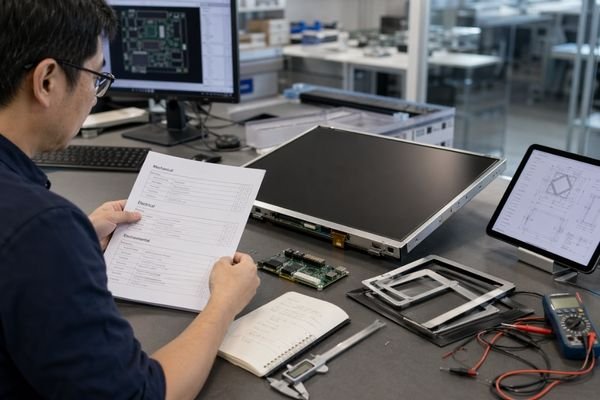
In early project reviews, I often find that delays are caused less by missing numbers themselves and more by unclear assumptions. A team may know it wants a 7-inch display, for example, but still have no clear thickness limit, no settled host interface direction, and no firm idea whether the product will face direct sunlight, a front cover lens, or a five-year service target. That is usually where the real friction begins.
The first discussion does not need to be perfect. It does need to be useful. That means giving the engineering side enough structure to judge feasibility, identify risks, and avoid proposing a solution that is already misaligned with the product.
At a practical level, the minimum starting inputs usually fall into five groups:
- mechanical and installation constraints1,
- display, interface, and electrical direction,
- optical, environmental, touch, and reliability conditions,
- program, volume, and lifecycle expectations,
- and a clear distinction between what is fixed and what is still flexible.
Why the Right Inputs Matter Before a Custom LCD Project Starts
A custom LCD project usually becomes slow when the starting assumptions are weak, not simply because the display is non-standard.
Clear and structured inputs at the beginning make feasibility review more accurate, reduce avoidable revisions, and keep the first proposed direction aligned with the real product constraints.
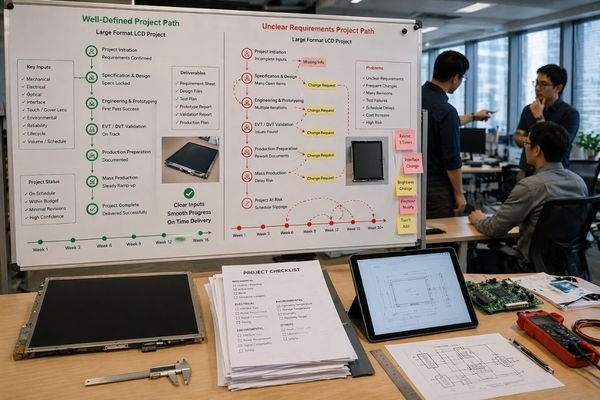
When the initial inputs are strong, the engineering team2 can evaluate the project with a reasonable level of confidence. It becomes easier to judge whether the requested form factor is realistic, whether the host interface is compatible, whether the brightness goal is sensible for the environment, and whether the commercial assumptions support the solution path being considered.
When the inputs are weak, the opposite happens. The team fills the gaps with assumptions. Some of those assumptions will be wrong. Once that happens, the proposal may still look polished, but it is already drifting away from the real product.
Setting a Realistic Technical Direction
The first inputs define the design space. A display concept that ignores thickness limits, connector routing, or host interface constraints may look technically possible, yet still be the wrong starting point. Clear inputs help the team rule out dead ends earlier.
Improving Quote Accuracy and Schedule Confidence
Cost and schedule are both shaped by the early constraints. Brightness, temperature range, touch structure, interface architecture, and volume all change the likely component path and development effort. If these inputs are vague, quote accuracy usually suffers with them.
👉 Engineering:
For projects that need a first-round review of inputs before development begins → Discuss your custom display project
Mechanical and Installation Information Comes First
Mechanical information is usually the first real boundary of the project. If the display cannot fit the product cleanly, nothing else matters much.
The most critical starting mechanical inputs are the available outline, active area expectations, thickness limit, mounting method, bezel constraints, connector exit direction, and the space available around the module inside the product.

In practice, the exact dimensions do not always need to be frozen at the start. What is needed is a realistic mechanical envelope. The engineering team needs to know the space the display must live in, not just the diagonal size someone hopes to use.
A 7-inch or 10.1-inch label, by itself, is not enough. The real questions are more specific:
- What is the maximum length, width, and thickness?
- How large does the visible area need to be?
- Does the front design allow a wider bezel, or is it tightly constrained?
- How will the module be mounted?
- Where does the cable or connector need to exit?
These points influence far more than fit. They also affect stack height3, connector layout, front appearance, and serviceability. In first-round reviews, I usually find that once the mechanical envelope is clear, half of the unrealistic solution paths disappear on their own.
Display, Interface, and Electrical Information Define the Technical Direction
Once the mechanical boundaries are clear enough, the next step is to define how the display is supposed to work and how it will connect to the host system.
The core technical starting inputs usually include target resolution, aspect ratio, display orientation, host interface type, connector preference, power conditions, and any known timing or control assumptions.
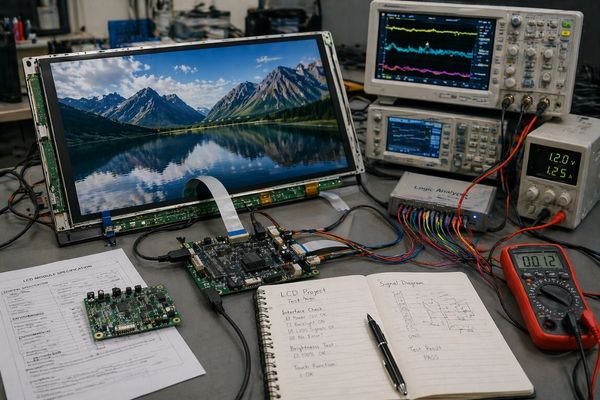
This part of the project often sets the architecture earlier than people expect. A display intended for LVDS is not the same discussion as one intended for MIPI DSI4 or eDP. The choice affects driver strategy, FPC design, signal routing, and sometimes even what glass options remain realistic.
The key is not that every electrical detail must be final. The key is that the project has enough clarity to avoid starting in the wrong direction.
The most useful first-round inputs in this category usually include:
- target resolution,
- aspect ratio,
- landscape or portrait orientation,
- host interface direction,
- connector preference or restriction,
- available power rails,
- and any known limitations in the host system.
If the interface is still completely open, the project can still be discussed, but the engineering side will be forced to work from broader assumptions. That usually increases iteration later.
👉 Modules:
To review common display directions before the architecture is locked → Explore our Modules
Optical, Environmental, Touch, and Reliability Conditions Shape the Display Stack
A custom LCD project is not only about fitting a panel into the housing. It is also about making the display usable in the real environment and reliable across the intended service life.
Brightness target, viewing conditions, ambient light, operating temperature, touch requirement, cover-lens structure, and reliability expectations all help define the actual display stack, not just the LCD itself.
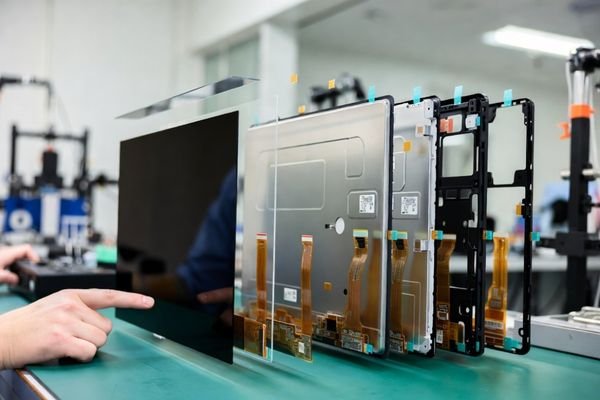
This is where many projects start to get more complex than they first appear. A display intended for a sealed handheld device, an indoor instrument, and an outdoor terminal may all share a similar size on paper, but they do not share the same stack or design assumptions.
The project needs to define enough context to answer questions like:
- How bright does the display really need to be?
- Will it sit behind a cover lens?
- Is touch required, and if so, what type?
- Will the unit see strong ambient light, gloves, moisture, or wide temperature swing?
- Is long-term brightness maintenance important?
- How sensitive is the application to optical quality and viewing angle?
| Required Starting Input | Why It Must Be Defined Early | What It Shapes Later |
|---|---|---|
| Target Brightness | Determines whether the display concept is realistic for the use environment | Backlight choice, power, thermal strategy |
| Ambient Light / Use Environment5 | Affects readability assumptions | Optical treatments, cover stack, contrast strategy |
| Operating Temperature | Defines material and component suitability | LCD fluid, polarizers, electronics, thermal design |
| Touch Requirement | Changes the display from a panel to a stack | Sensor type, controller, cover lens, bonding |
| Reliability / Lifetime Expectation | Sets durability targets | Component grade, validation plan, backlight life targets |
In first-round evaluations, these conditions do not always need exact final numbers, but they do need to be clear enough to guide the design. A project that only says “high brightness” or “outdoor use” is still too vague. A project that says “semi-outdoor kiosk behind cover lens with target 1000+ nits and daily long-hour operation” is much easier to assess.
👉 Solutions:
To see how environment and application type change display requirements → Explore our Solutions
👉 Modules:
To review module directions for high-brightness, optical-stack, and touch-related projects → Explore our Modules
Program, Lifecycle, and Volume Information Are Part of the Starting Inputs Too
A custom LCD project is not defined by engineering inputs alone. Program-level assumptions also matter very early.
Expected annual volume, target timing, service-life expectation, and replacement planning all influence whether a proposed display path is commercially and operationally realistic.

A technically feasible solution can still be the wrong choice if the schedule is too tight, the lifecycle is too long for the component path, or the annual demand does not support the intended level of customization.
The Impact of Volume and Timeline
Annual volume affects more than pricing. It can influence whether custom tooling is justified, whether a modified standard size is more sensible than a fully custom format, and how aggressively the team can optimize the solution. Timeline matters in the same way. Some paths are simply harder to support if the target launch window is too short.
Planning for Lifecycle and Replacement
Lifecycle expectation6 is just as important. A project that needs seven years of production and service support is operating under very different assumptions from a short-life commercial device. If lifecycle is important, the display path has to be evaluated with supply continuity and change control in mind from the beginning.
👉 Engineering:
For projects where timeline, lifecycle, and supply expectations will affect the solution path → Discuss your custom display project
Not Every Parameter Must Be Final, but the Critical Assumptions Must Be Clear
One of the most common misunderstandings is that a custom LCD project cannot start until every number is fully confirmed. That is rarely true.
A strong project start does not require complete information. It requires clarity about which inputs are already fixed, which are estimated, and which constraints are non-negotiable.

Many successful projects begin with a mix of fixed requirements and reasonable ranges. That is normal. The important part is separating hard constraints from adjustable targets.
Inputs That Usually Need Early Clarity
These are the inputs that usually need to be clear enough at the start to support engineering judgment:
- mechanical envelope,
- interface direction,
- target environment,
- brightness range,
- touch requirement,
- lifecycle expectation.
Inputs That Can Often Start as Estimates
These are often still flexible in the first round:
- final pinout details,
- exact lens thickness,
- secondary cosmetic refinements,
- precise annual quantity,
- final approval of every timing detail.
In first-round reviews, the real issue is not missing perfection. It is unclear assumptions7. A project moves much faster when the team can say, “these five things are fixed, these three are still being finalized.”
How to Organize the Information Before the First Engineering Discussion
The best project kickoffs are not the ones with the most attachments. They are the ones with the clearest structure.
Before the first engineering discussion, the available information should be grouped by decision type so the team can evaluate the project as a system instead of piecing it together from scattered notes.
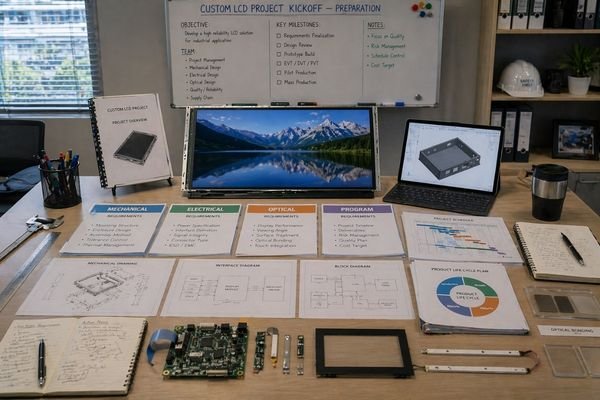
In practice, the most useful starting package is often a short, well-structured brief rather than a long stack of disconnected emails and sketches.
A practical structure usually looks like this:
- Mechanical constraints: outline, active area, thickness, mounting, connector direction
- Display and electrical direction: resolution, interface, orientation, power assumptions
- Optical and environmental conditions: brightness target, ambient light, temperature, touch, lens structure
- Program context: annual volume, target timing, lifecycle, service expectations
In first-round reviews at LCD Module Pro, the projects that move fastest are usually the ones where this information is already grouped clearly enough that the engineering team can see the real decision structure immediately.
👉 Engineering:
For a first-round review of your project inputs before custom LCD development begins → Discuss your custom display project
FAQ About Starting a Custom LCD Project
Do all mechanical dimensions need to be final before the first discussion?
No. A project usually does not need every dimension to be frozen at the beginning. What it does need is a realistic mechanical envelope and a clear distinction between what is fixed and what is still flexible.
Can a project start if the host interface is not fully confirmed yet?
Sometimes yes. A first discussion can still be useful if the architecture is clear enough to support a preliminary direction. Complete uncertainty on interface, however, usually increases iteration later.
Is annual volume really important before technical evaluation?
Yes, at least as an estimated range. Annual volume affects commercial feasibility, sourcing strategy, and sometimes the level of customization that makes sense for the project.
What if brightness or environmental requirements are still unclear?
The project can still move forward, but the technical direction becomes harder to judge confidently. In that situation, defining the intended use environment more clearly is usually the best next step.
Does the first discussion require a full drawing package or complete documentation?
No. Complete documentation is helpful, but it is not always necessary at the beginning. What matters more is whether the available information is realistic, structured, and sufficient for a first-round engineering judgment.
Conclusion: A Custom LCD Project Starts Better When the Critical Inputs Are Defined Early
A custom LCD project does not need perfect information to begin, but it does need the right information early enough. The strongest starts usually come from clear thinking around mechanics, interface, optics, environment, touch structure, lifecycle, and program expectations.
When those inputs are defined with enough clarity, the first engineering discussion becomes more useful, the technical direction becomes more reliable, and the project usually moves forward with fewer revisions and less wasted effort.
👉 Engineering:
To review your project inputs and define a workable starting direction → Discuss your custom display project
👉 Modules:
To explore display directions that may fit your project constraints → Explore our Modules
👉 Solutions:
To compare how different application conditions shape display requirements → Explore our Solutions
-
Exploring this topic can provide insights into optimizing designs and ensuring feasibility in engineering projects. ↩
-
Understanding the engineering team’s role can enhance your project’s success by ensuring effective evaluation and decision-making. ↩
-
Exploring stack height can reveal its impact on overall design efficiency and functionality in engineering applications. ↩
-
Understanding MIPI DSI is crucial for making informed decisions in display technology, ensuring optimal performance and compatibility. ↩
-
Exploring this topic helps in designing displays that are effective in various lighting conditions, enhancing user experience. ↩
-
Exploring lifecycle expectations can provide insights into long-term project viability and support strategies. ↩
-
Exploring the impact of unclear assumptions can help teams avoid pitfalls and enhance project efficiency. ↩