
Pixel defect specifications are a common source of friction between LCD display module suppliers and their customers. A vaguely worded quality clause can lead to costly disputes, production delays, and damaged partnerships when a shipment that the supplier considers acceptable is rejected at incoming inspection under different viewing conditions.
To write an executable pixel-defect clause, define the defect taxonomy (pixel, subpixel, cluster, line), lock the inspection conditions (display state, test patterns, lighting, distance, time), set zone-based acceptance limits with density rules, and structure the clause as a repeatable pass/fail protocol with sampling, traceability, and dispute governance.

In LCD Module Pro customer programs, many quality agreements fail because they are not executable. They use subjective phrases like “free from visual defects” or “no bad pixels,” but do not define what counts, how to inspect, and how to decide pass/fail. The result is predictable: the supplier inspects one way, the customer inspects another way, and the same module becomes “good” in one place and “reject” in another.
An executable clause is an engineering protocol1. It converts visual perception into measurable, repeatable rules so supplier outgoing QC and customer incoming inspection converge on the same conclusion. That alignment prevents line-down rejections, reduces sorting and return costs, and keeps quality expectations consistent across production and lifecycle changes.
Why do pixel-defect clauses become disputes if they aren’t “executable”?
Disputes over pixel defects almost always stem from ambiguity. When the rules are not clearly defined, both supplier and customer end up judging the same module under different conditions and assumptions.
Pixel-defect clauses become disputes when they lack a precise defect definition, fixed inspection conditions, and clear pass/fail thresholds. Without an executable protocol, the same module can pass supplier QC and fail customer incoming inspection purely due to differences in lighting, distance, patterns, and inspection behavior.

A weak clause creates two practical failures: subjective inspection and unstable supply-chain outcomes2.
The Problem of Subjective Inspection
Without fixed conditions, inspection becomes a moving target. One inspector may check in a dark room, another under bright factory lighting. One uses a pattern that highlights subpixel defects, another uses a pattern where they are barely visible. One inspects from 30 cm, another from 50 cm. This variability makes “compliance” a matter of opinion. An executable clause removes opinion by defining the variables and limiting “search time,” so different inspectors reproduce the same outcome.
The Impact on Supply Chain and Costs
When the customer rejects a lot that the supplier believes is compliant, production risk rises immediately. Sorting, returns, retest cycles, and engineering escalation consume time and money on both sides. A clause is executable only when it ensures that parts passing supplier outgoing inspection will predictably pass customer incoming inspection under the same defined protocol. Next step: align on a shared defect taxonomy before setting limits.
What defect taxonomy should your clause define (pixel, subpixel, cluster, line)?
Before you can set acceptance limits, both sides must agree on what is being counted and how defects are classified.
Your clause must define a defect taxonomy that separates bright pixels, dark pixels, and stuck subpixels, and also defines clusters and line defects with objective rules. It should clarify whether “pixel” means a full RGB triad or includes single subpixel defects, and how intermittent defects are treated.
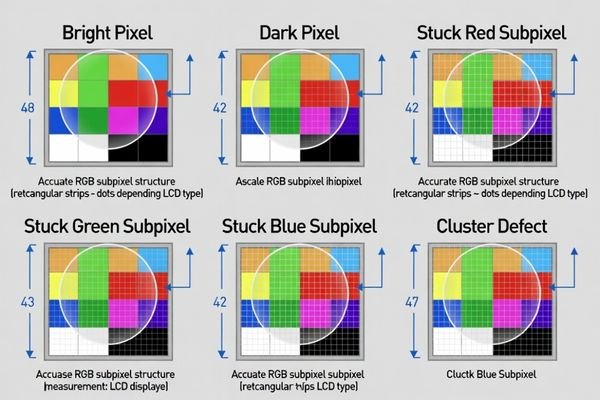
A shared dictionary prevents the most common argument: “we counted differently.”
- Bright Pixel: A full RGB pixel that is always on (typically most visible on black).
- Dark Pixel: A full RGB pixel that is always off (typically most visible on white).
- Stuck Subpixel: A single R/G/B subpixel locked on or off. Because visibility differs from full-pixel defects, it should be counted and limited separately.
- Counting rule (pixel vs subpixel)3: Explicitly state whether one stuck subpixel counts as a “subpixel defect” (recommended) or as a “pixel defect,” and how multiple subpixel defects in one pixel are counted.
- Cluster: Define how many defective pixels/subpixels within what radius qualifies as a cluster, and whether clusters are prohibited in certain zones.
- Line Defect: Define a continuous horizontal/vertical line failure (often treated as major and typically not allowed).
- Optional categories (only if relevant): If your product is sensitive to unevenness like mura/banding, define it separately because it is perceived differently than isolated pixels.
- Intermittent defects: Define whether intermittent or temperature-dependent defects count, and under what repeatable condition they are evaluated (e.g., after warm-up/soak).
Next step: lock inspection conditions so pass/fail does not depend on where and how someone looks.
Which inspection conditions must be fixed to make pass/fail repeatable?
A clear taxonomy still fails if inspection is inconsistent. Repeatability requires a fixed environment and procedure.
To make pass/fail repeatable, define the display state (warm-up and brightness), test patterns, viewing geometry (distance/angle), ambient lighting, observation time per pattern, and whether magnification is allowed. Also specify whether inspection is performed on the bare module or the final optical stack, because cover lens/touch layers can change defect visibility.
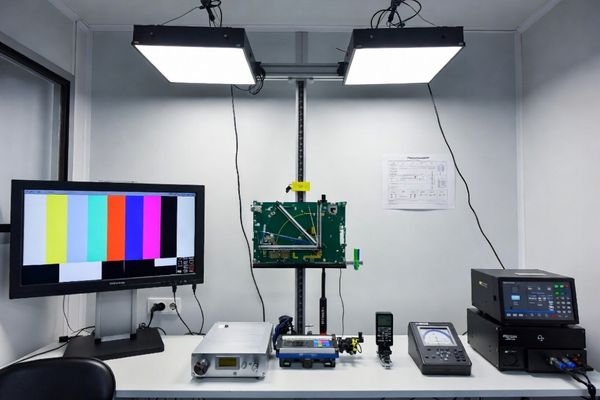
This is the most important “executable” step: lock the variables so the test is reproducible.
| Condition Category | Parameters to Define | Why It Matters |
|---|---|---|
| Display State | Warm-up time, brightness setting, backlight control mode, fixed input path (native mode, no scaling artifacts). | Optical behavior can change with warm-up and settings; scaling can create artifacts that look like defects. |
| Test Environment4 | Ambient lighting range, no direct glare, fixed viewing distance and angle limits. | Human perception of defects depends strongly on lighting and geometry. |
| Test Procedure | Test patterns (solid black/white/R/G/B, gray levels), max observation time per pattern, magnification allowed/prohibited. | Prevents “searching until you find something” and standardizes what gets counted. |
If the product ships with a cover lens or touch stack, define whether acceptance is based on the bare module or the final optical stack. Next step: convert taxonomy into zone-based limits with density rules that match the user experience.
How do you set acceptance limits by zone, density, and customer use-case?
Acceptance limits should reflect what end users notice and what your product can tolerate without service risk. Zone-based rules prevent over-specifying the entire screen.
Set acceptance limits by dividing the display into zones (critical center vs peripheral/edge) and applying stricter limits to the most visible region. Define separate counts for bright pixels, dark pixels, and stuck subpixels, and add density/cluster rules (minimum spacing, max per region) to prevent “legal but ugly” defect concentration.
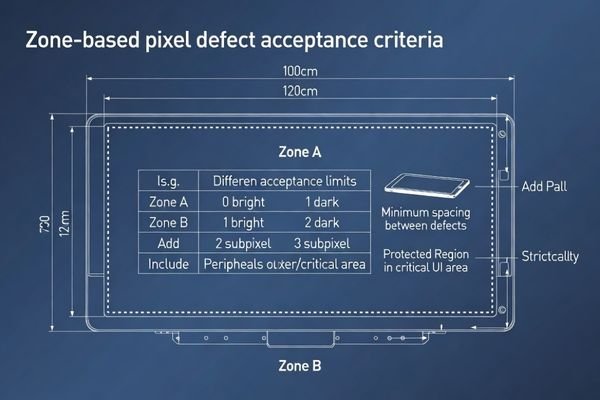
A practical structure is to define zones, then define limits by defect type within each zone.
Define Display Zones
Divide the active area into zones such as:
- Zone A (Critical zone): Central viewing/primary UI area—strictest limits.
- Zone B (Peripheral zone): Outer active area—more lenient limits where appropriate.
- Protected regions: If your UI has fixed critical elements (for example, confirmation prompts or safety indicators), define a protected rectangle where certain defect types are not allowed.
Set Separate Limits for Each Defect Type
Different defect types should not share one pooled limit. Define independent limits for bright pixels, dark pixels, and stuck subpixels per zone so the clause reflects real visibility.
Add Density and Cluster Rules5
Add rules that prevent concentration even when total counts are within limits:
- Cluster rule: Define what constitutes a cluster (radius and count) and whether clusters are prohibited in Zone A.
- Spacing rule: Define a minimum distance between defects (expressed in pixels or millimeters, as applicable to your inspection method).
Finally, define handling for borderline cases: whether supplier sorting is required, whether the customer may request additional screening, and how lots are handled under sampling plans. Next step: structure the clause so enforcement and disputes are practical.
What clause structure best prevents loopholes and makes enforcement practical?
A pixel-defect clause becomes enforceable when it reads like an inspection protocol plus a decision process, not a vague quality promise.
A practical clause structure combines defect taxonomy, fixed inspection conditions, zoning, and acceptance thresholds into a single protocol, then adds governance: sampling plan, traceability rules, reporting window, and dispute resolution. Clear ownership of sorting/rework costs and approval rules for any exceptions prevent loopholes and make enforcement practical.
A useful structure includes:
- Protocol section: taxonomy + counting rules + inspection conditions + patterns + viewing/time limits + zone map + numeric thresholds + density rules.
- Sampling and lot handling: define the sampling plan6, how failures are handled (100% screen, rescreen, or lot reject), and how retest is performed.
- Traceability: require revision/lot identification so issues can be isolated to specific shipments.
- Dispute governance: define the authority path (customer incoming inspection vs third-party arbitration), time window to report defects after receipt, and the evidence required (pattern, photo/video, conditions).
- Cost ownership: define who pays for sorting, rework, shipping, and downtime when lots fail or when inspection conditions were not followed.
- Lifecycle consistency: if module revisions change, define whether criteria remain fixed or require requalification to prevent silent shifts in acceptance.
This structure prevents “each side has its own standard” and keeps pass/fail aligned across the supply chain.
FAQ
Should we reference an industry pixel-defect class, or write our own limits?
You can reference an external class for baseline alignment, but you still need your own zoning, inspection conditions, and use-case rules to make it executable in your product context.
Do subpixel defects count the same as full pixel defects?
Often no. Their visibility differs, so executable clauses usually separate bright/dark pixel from stuck subpixel and apply different limits.
Should inspection be done on the bare module or with cover lens/touch?
It depends on what the customer receives and what end users see; define it explicitly because optical stacks can hide or amplify defects.
How do we handle intermittent or temperature-dependent pixel defects?
Define a repeatable stress/soak condition and whether intermittent defects count, otherwise disputes arise when defects appear only in certain states.
What makes a clause “enforceable” during incoming inspection?
Clear definitions, fixed viewing conditions, zoning limits, and a decision process that produces the same pass/fail result across different inspectors.
When is customization preferable for strict pixel quality requirements?
When the product has highly visible UI zones or strict brand perception requirements, customizing the optical stack and screening process can reduce risk.
Conclusion
Writing an executable pixel-defect clause is an act of engineering precision: define a shared defect taxonomy and counting rules, lock inspection conditions, set zone-based thresholds with density controls, and add governance for sampling, traceability, reporting windows, and disputes. Done correctly, the clause protects customers from unacceptable shipments and protects suppliers from inconsistent rejections—preventing line-down disruptions and reducing total quality cost.
At LCD Module Pro, we help teams align pixel-defect acceptance criteria with real use cases and integration realities so quality expectations remain repeatable across production and lifecycle changes.
✉️ info@lcdmodulepro.com
🌐 https://lcdmodulepro.com/
-
Exploring the role of engineering protocols can enhance your knowledge of quality control processes, leading to better alignment in inspections. ↩
-
Exploring supply-chain outcomes can provide insights into managing production risks and improving efficiency. ↩
-
Understanding the counting rules for pixel defects is crucial for accurate quality assessment in displays. ↩
-
Exploring the impact of the test environment can help you optimize conditions for accurate and reliable testing results. ↩
-
Implementing these rules helps maintain quality standards in UI, preventing defects from affecting user experience. ↩
-
Understanding sampling plans is crucial for effective quality control and ensuring product consistency. ↩