
Selecting an LCD display module for a commercial coffee machine is very different from choosing a screen for a consumer product. These machines work in demanding conditions where steam, splashes, long operating hours, repeated cleaning, and changing light conditions are part of normal daily use. The display is also one of the most heavily used parts of the machine, because it sits at the center of drink selection, parameter adjustment, status feedback, and service prompts.
Choosing the right LCD module for a commercial coffee machine requires a system-level evaluation of environmental durability, optical performance under variable lighting, reliable touch interaction, and long-term mechanical and electrical integration. A successful selection balances these factors to ensure consistent performance and usability in real-world café and self-service environments.

In LCD module integration projects, one of the most common problems I see is that the display gets chosen too early and with too little context. Teams often focus on size and resolution first, then try to solve steam, touch instability, glare, or mechanical conflicts later. By that stage, the cost of correction is much higher.
From an engineering perspective, the better approach is to start with the real working conditions1. A coffee machine display has to stay readable under bright lighting, remain stable when used repeatedly throughout the day, tolerate moisture and cleaning, and fit cleanly into the front-panel structure without creating service problems later. The best module is not the one with the highest numbers on paper. It is the one that still performs properly after long daily operation, repeated cleaning, and thousands of user interactions.
What Display Requirements Are Unique to Commercial Coffee Machine Panels?
The display requirements for a commercial coffee machine are shaped by both the operating environment and the way the panel is used. These are not typical indoor office-display conditions.
Commercial coffee machine panels require a unique combination of high readability in variable lighting, resistance to heat, moisture, and cleaning agents, and long-term operational reliability. The display must function as a durable HMI, not just an information screen.
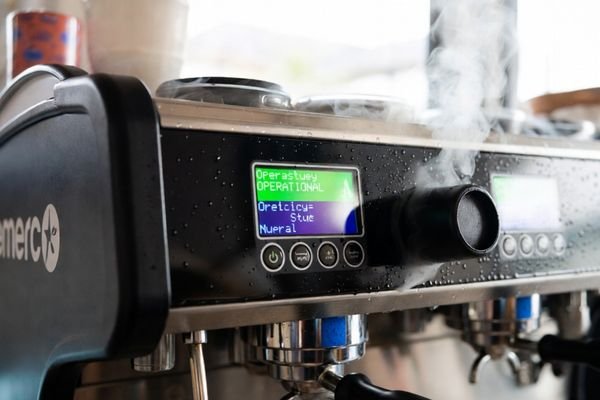
When I begin discussing a coffee machine project with an OEM, I usually start with the use case rather than the datasheet. A machine built for a high-volume café faces different stress than one used in an office pantry or a semi-self-service convenience setting. That difference affects brightness targets, touch expectations, front-panel sealing, and even service strategy.
Environmental and Operational Demands
A coffee machine panel is exposed to conditions that quickly reveal the weakness of an unsuitable display. Steam from brewing can raise the local humidity around the front panel. Water, milk, coffee, and syrup splashes are common. The surface is also wiped frequently, sometimes with strong detergents or disinfectant-like cleaning agents. Over time, these conditions can affect readability, surface appearance, touch performance, and even internal reliability if the front structure is not designed properly.
Daily use adds another layer of stress. Commercial machines may run for long shifts with frequent interface activity, repeated brightness load, and constant menu switching. In practical terms, this means the LCD module needs stable backlight performance2, durable front-surface treatment, and a structure that works reliably under thermal and moisture stress.
Human-Machine Interface (HMI) Functionality
The display is one of the main interfaces between the machine and the user. Baristas need to read settings quickly, switch drink profiles, monitor prompts, and respond to maintenance or alarm messages without hesitation. In self-service systems, the screen also has to guide end users who may have no training at all.
That makes usability just as important as raw display specifications. Text and icons need to stay clear from different viewing positions. Colors should remain stable enough for reliable status recognition. If touch is used, the response must feel consistent under real operating conditions, not just in a clean lab environment. In a commercial coffee machine, the LCD module is part of the workflow, not just part of the appearance.
Which Core Parameters Matter Most When Selecting an LCD Module?
Once the real operating conditions are clear, the next step is to translate them into practical display requirements. This is where LCD module selection becomes much more effective.
For a coffee machine LCD, the most critical parameters are brightness and viewing angle for readability, appropriate resolution for UI clarity, a long-life backlight for durability, and a compatible interface for seamless integration. These factors directly impact usability and long-term reliability.
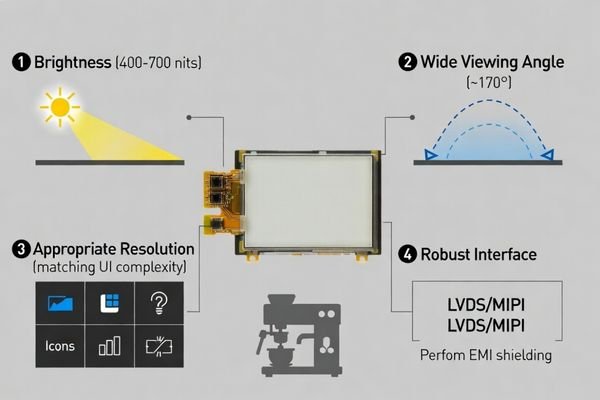
In actual integration work, I usually advise customers to rank parameters by functional impact rather than by headline specifications. A commercial coffee machine display does not need the most extreme specification in every category. It needs the right balance for its real installation and operating pattern.
- Brightness and Viewing Angle3: Brightness should be selected according to installation conditions, not by default. A machine placed near glass, strong overhead lighting, or an open service counter may need significantly higher brightness than one used in a more controlled indoor environment. Wide viewing angle is also important because the screen is rarely viewed from one fixed position. In most coffee machine panels, stable off-axis readability is more valuable than chasing unnecessary pixel density.
- Resolution: Resolution should match the UI complexity. The goal is to keep text, icons, and menu structures clear without adding avoidable processing load or interface complexity. In many commercial equipment projects, a moderate resolution gives a better balance than an aggressively high one.
- Backlight Lifetime: Long daily operating hours make backlight stability a serious consideration. A display that looks fine in early prototypes can become a maintenance problem later if brightness drops too quickly in the field.
- Interface: The module interface has to match the control board and the rest of the system architecture. Interface selection should also consider cable routing, EMI behavior, service access, and long-term integration stability, not just what the team is already familiar with.
Once these core parameters are defined, the next question is whether the chosen module can still perform reliably in the actual coffee machine environment.
How Do Environment and Daily Use Conditions Affect LCD Module Selection?
The operating environment of a commercial coffee machine influences LCD module selection just as much as resolution or interface type. In many cases, it matters more.
Steam, heat, condensation, and frequent cleaning demand a module with a wide operating temperature range, robust sealing, and potentially optical bonding. High-frequency daily use also puts stress on the backlight and touch components, making durability a key selection criterion.
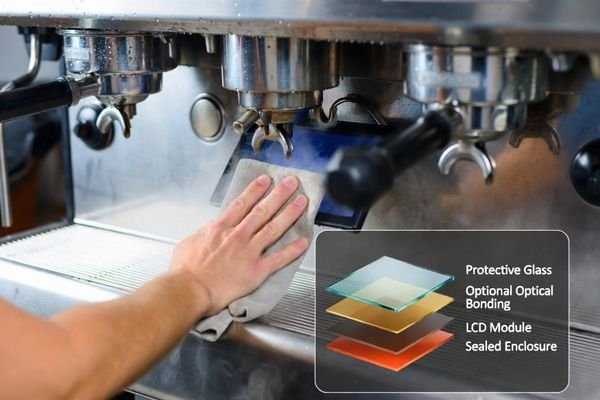
In field deployment, one of the most common causes of display trouble is underestimating environmental stress. A module that performs well in a normal indoor bench test may lose readability, show condensation effects, or develop touch inconsistency when moved into a hot, wet, service-heavy machine environment.
| Environmental Factor | Potential Problem | Required LCD Module Feature |
|---|---|---|
| Heat and Steam | Internal condensation, material degradation, backlight failure. | Wide operating temperature range, proper enclosure sealing, and thermal-aware front-panel design. |
| Moisture and Splashes | Short circuits, touch sensor malfunction, corrosion. | Front-panel sealing, moisture-resistant structural design, and in some cases optical bonding. |
| Frequent Cleaning | Scratches on the surface, chemical damage to coatings or plastics. | Durable cover surface, suitable surface treatment, and validation against repeated cleaning exposure. |
| Intensive Daily Use | Backlight dimming over time, touch instability, higher service risk. | Long-life backlight, durable touch structure, and good lifecycle planning. |
Optical bonding4 can be especially useful in this type of application because it reduces internal reflection, improves perceived contrast, and helps reduce the risk of visible condensation forming in the air gap between layers. That said, optical bonding is not a standalone fix for all moisture-related issues. It works best when combined with proper front-panel sealing, suitable cover design, and a structure that has already been developed with humidity and cleaning conditions in mind.
Environmental suitability alone, however, is still not enough if the module cannot be integrated cleanly with the control board, touch layer, and mechanical structure.
Why Do Interface, Touch, and Mechanical Design Matter So Much?
A coffee machine LCD module should never be evaluated as an isolated component. It has to work as part of the full machine system, and that is where interface, touch, and mechanical details become critical.
Seamless integration depends on aligning the LCD module’s interface with the mainboard, ensuring the touch technology meets use-case demands (like wet finger operation), and verifying that the mechanical dimensions and mounting points fit the machine’s chassis. Misalignment in any of these areas can cause major project delays.
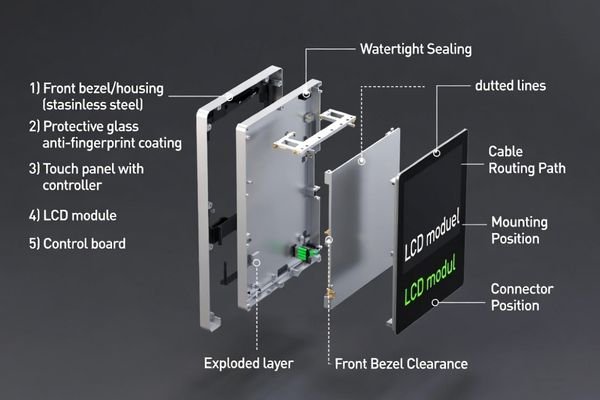
A lot of the late-stage problems I see in commercial equipment projects are not caused by image quality. They come from mismatches between the display module and the surrounding system. Connector direction, cable bending radius, touch tuning, front-glass thickness, shielding, and maintenance access all matter more than teams expect at the beginning.
Electrical and Interface Compatibility
The display interface must fit the control board architecture from the start. That includes not only LVDS, MIPI, eDP, or other signal compatibility, but also the way the signal behaves in the real machine. Cable routing, grounding, shielding, and nearby noise sources can all affect image stability. In commercial equipment, poor signal planning often shows up later as flicker, unstable startup, or intermittent display problems that are difficult to diagnose in the field.
Touch Technology and Performance
If the coffee machine uses touch control, the touch system has to be evaluated under real use conditions. Wet fingers, condensation, surface residue, and occasional gloves can all affect the user experience. In practice, touch performance depends not only on the sensor itself, but also on controller tuning, cover-lens thickness, surface material, and system noise control. A touch panel that feels fine on a clean development bench can become unreliable after installation if these factors are not considered together.
Mechanical Fit and Serviceability5
Mechanical integration affects both assembly and long-term maintenance. Engineers need to verify the module outline, active area, mounting method, connector position, cable clearance, front-bezel fit, and heat path early in the design process. It is also worth thinking ahead about field replacement. If the panel ever needs service, an overcomplicated mechanical design can increase downtime and maintenance cost more than expected.
This is exactly why a structured selection workflow is usually more effective than choosing from datasheet specs alone.
How Should You Build a Reliable Selection Process for a Coffee Machine LCD Module?
A dependable LCD module selection process should start with product definition and end with practical validation. Anything less usually leaves risk inside the project.
A reliable selection process starts with defining the product’s operational and environmental requirements, then moves to technical specification matching, and finishes with rigorous prototype testing and supply chain validation. This ensures the chosen LCD module is not just suitable on paper, but proven in practice.
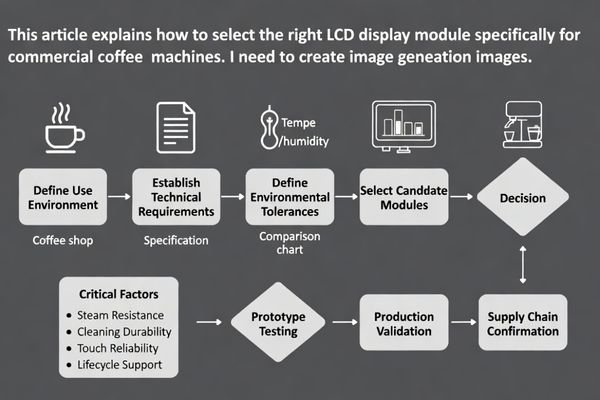
In commercial coffee machine projects, I usually recommend a step-by-step process that stays close to the actual machine design rather than relying too heavily on catalog filtering.
First, define the use case in detail. Clarify where the machine will be installed, how many hours it will run each day, who will use it, whether the UI is simple or menu-heavy, whether touch is required, and what kind of lighting, steam, and cleaning exposure the display will face.
Second, define the technical constraints. This includes panel size, viewing angle expectation, brightness target, interface condition, controller capability, front-panel structure, touch requirements, and electrical integration limits.
Third, build a shortlist of modules that are suitable not only in terms of optical specification, but also in terms of environmental tolerance, mechanical fit, and service feasibility. At this stage, lifecycle planning should already be included. Commercial equipment often stays in service for years, so supply continuity, batch consistency, and replacement strategy matter early.
Fourth, validate prototypes under realistic conditions. Check readability in the actual lighting environment. Check touch behavior with moisture and repeated operation. Check cleaning durability, thermal behavior, cable routing, and front-assembly fit. For commercial coffee machine panels, this stage usually reveals more useful information than the datasheet ever will.
Finally, confirm supplier stability6 before mass production. The long-term value of a coffee machine LCD module is not only its initial performance, but also whether the supplier can support stable production, consistent quality, and manageable lifecycle transition over time.
FAQ
What brightness level is usually suitable for a commercial coffee machine panel?
The right brightness depends on the installation environment. Machines used in standard indoor café conditions may not need very high brightness, but units placed near windows, storefronts, or strong overhead lighting usually require higher brightness and better anti-reflection treatment for comfortable readability.
Is touch always necessary for a coffee machine LCD panel?
Not always. Some commercial coffee machines use physical buttons together with an LCD module, while others rely on a touch interface for drink selection and parameter setting. The decision should be based on UI design, cleaning requirements, user behavior, and front-panel structure.
Why is wide viewing angle important for coffee machine panels?
Coffee machine panels are often viewed from different standing positions by baristas, service staff, or end users. A wide viewing angle helps keep text, icons, and colors stable, which improves usability and reduces interface misreading.
Should humidity and steam resistance be considered during LCD module selection?
Yes. Commercial coffee machines operate in warm and humid conditions, often with steam and repeated cleaning exposure. Ignoring these factors can reduce display readability, affect touch stability, and create long-term reliability risks.
Which interface should be selected for a coffee machine display module?
The interface should match the control board architecture and display resolution requirement. Engineers should evaluate signal stability, cable routing, EMI behavior, and long-term serviceability rather than selecting an interface based only on familiarity.
What is the biggest mistake when choosing an LCD module for a coffee machine panel?
One common mistake is selecting the module only by size and resolution without checking environmental reliability, touch integration, mechanical fit, and lifecycle support. This often creates problems later in prototyping or mass production.
Conclusion
Choosing the right LCD display module for a commercial coffee machine is not just a matter of finding a screen that fits the front panel. The selection has to account for steam, moisture, repeated cleaning, long daily operating hours, touch behavior, interface stability, structural fit, and long-term service expectations. In this type of product, environmental resistance is just as important as brightness and resolution.
At MEIDAYINGNUO, I always recommend treating coffee machine LCD module selection as a full integration task rather than a simple component purchase. The most reliable result comes from evaluating readability, sealing, touch stability, electrical compatibility, serviceability, and supply continuity together. When that process is done properly, the final LCD module is far more likely to deliver stable field performance, lower maintenance risk, and a consistent user experience over the full product lifecycle.
✉️ info@lcdmodulepro.com
🌐 https://lcdmodulepro.com/
-
Understanding the impact of working conditions on LCD displays can help in selecting the right module for specific applications. ↩
-
Discover methods to achieve stable backlight performance, ensuring readability and usability in commercial coffee machines. ↩
-
Understanding the optimal brightness and viewing angle can significantly enhance user experience and display performance in various environments. ↩
-
Explore how optical bonding enhances display performance and reduces moisture issues, crucial for reliable field deployment. ↩
-
Learning about these considerations can lead to more efficient designs and reduced maintenance costs in the long run. ↩
-
Learn about the significance of supplier stability in ensuring consistent quality and support for your products over time. ↩