
One of the most persistent issues in display integration is a shifted image, where the content on an LCD module is offset horizontally or vertically. The picture may look sharp, but the misalignment can clip critical UI elements and leave unsightly black bars—often causing costly rework if it’s not diagnosed correctly.
A shifted image is usually a timing-framing problem. If the offset is stable, repeatable, and pixel/line aligned, incorrect porch/totals (active window framing) are the top suspects. If the behavior is flaky—rolling, intermittent, or changing after reboots or mode switches—sync polarity can be involved. The most reliable fix is a controlled porch sweep using a border/grid pattern, then a polarity validation step and regression testing.
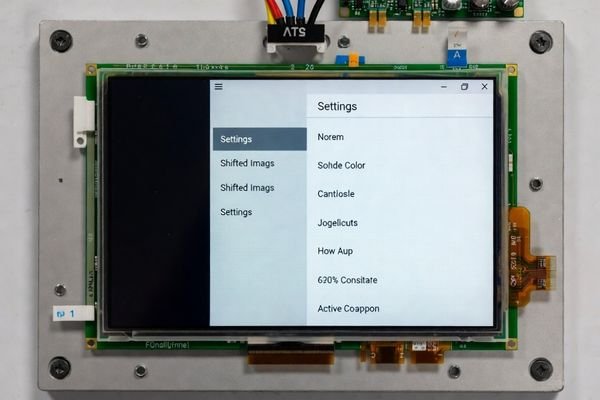
In LCD Module Pro customer integrations, a shifted image is typically a sign of timing mismatch between the host timing generator and the module’s timing controller (TCON). It is rarely a “bad panel” problem. These timing parameters—front porch, back porch, totals, sync widths, and sync polarities—define where the active video window1 sits inside each line and frame.
The good news is that most shift issues are deterministic and fixable in configuration. The key is to avoid guessing: read back the actual timing the host outputs, make one change at a time, and verify the image moves predictably. This article provides a practical workflow to identify whether porches or polarity are responsible and to lock a stable fix.
What shift symptoms point to porch issues versus other causes?
The first step in any diagnosis is to carefully observe the symptoms. The way the image is shifted provides clues that point directly toward or away from porch-related framing.
A stable, repeatable, and clean offset—black bar on one side with clipping or unused margin on the other—is the classic symptom of incorrect porch/totals framing. The shift stays constant regardless of EMI/cable movement and often disappears immediately when reverting to the display’s known-good native timing mode.
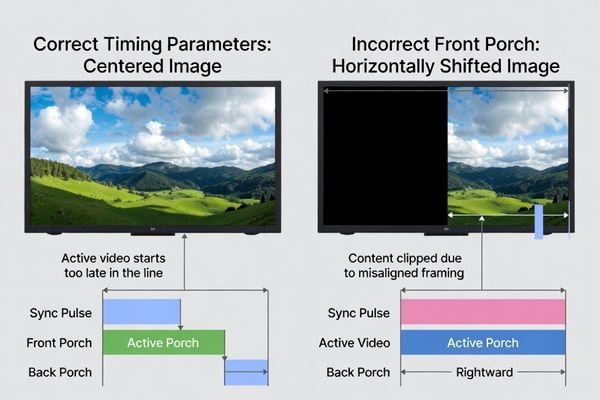
In practice, porch-related shifts have a signature that separates them from noise and link margin problems.
Hallmarks of a Porch-Related Shift
Stability is the tell. If the image is sharp and steady but simply offset, it strongly suggests an active-window framing issue. The offset will be consistent every time you enter that mode. Horizontal-only shift points to horizontal front/back porch or total pixels per line; vertical-only shift points to vertical porch or total lines per frame.
Differentiating from Other Causes
If the image jitters, rolls, drops out, or changes with cable movement or nearby motors, suspect signal integrity2, power noise, or EMI first. If the shift disappears instantly when you switch back to a known-good native mode, you can be confident the non-native/custom timing parameters are the cause.
How do front porch, back porch, and totals mathematically create an image shift?
To fix a shift quickly, it helps to understand how porches position the active window. Porches are pixel-clock counts that define blanking before and after active video.
Porches set where active video starts inside the total line/frame timing. Increasing horizontal front porch delays the start of active pixels and typically pushes the image to the right; changing back porch shifts where the line “ends” relative to active video. The same applies vertically. When host-generated timing uses the wrong porch/totals, the TCON frames the active window in the wrong position.
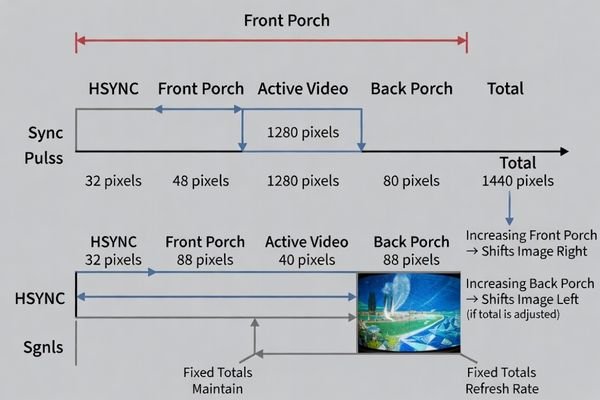
Think of each line as a fixed-length timeline (total pixels per line). Active video is one segment of that timeline. If you change the blanking before active video (front porch), you move the active segment later in time; if you change blanking after active video (back porch3) while keeping totals consistent, you move where the active segment sits relative to the sync boundary.
Many mode-switch shift problems occur because a host SoC or scaler auto-generates non-native timing and silently rounds totals or clamps porch values. A practical diagnostic is to adjust porch values in small increments and see whether the image moves by the same number of pixels/lines—predictable motion confirms porch framing.
When is sync polarity the real culprit, and what does it look like?
Sync polarity issues usually show up as lock sensitivity rather than a clean, fixed offset. Polarity defines whether HSYNC/VSYNC pulses are active-high or active-low.
Sync polarity is most suspect when the display is flaky: intermittent rolling, brief dropouts, flicker, or position changes after power cycles or mode switches. A pure, stable offset is more often porch/totals. In rare cases, polarity can contribute to misframing when margins are tight, so polarity should be validated after porch centering.
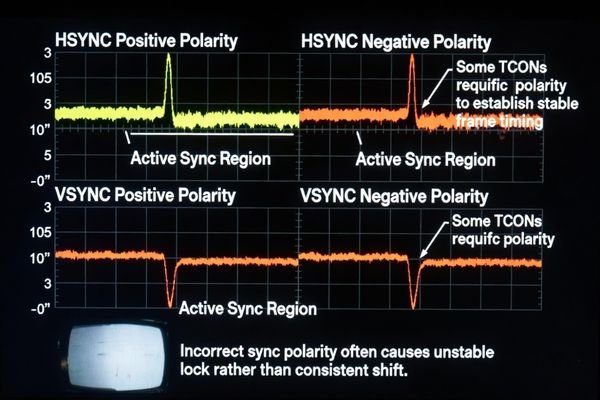
The TCON uses sync edges4 to reset internal line/frame counters. If polarity is wrong, the receiver may fail to detect edges reliably, leading to unstable lock. Some receivers tolerate both polarities but behave differently enough that borderline porch margins become visible as shift or jitter under one polarity.
A strong indicator is sensitivity: flipping HSYNC or VSYNC polarity changes whether the module locks cleanly, changes flicker behavior, or changes the offset dramatically. Polarity problems are also more likely to appear during transitions (boot, resume, mode toggles) when registers are reprogrammed and edges can be briefly out of spec.
What is a practical step-by-step test to fix shift using porch and polarity changes?
Fixing a shifted image should be methodical. A controlled test ensures you identify the right knob quickly and confirm the fix survives real operating conditions.
Start from a known-good native mode, then reproduce the shifted mode and read back the real timing tuple. Use a border/grid pattern, adjust one porch at a time in small steps (keeping totals consistent), and confirm predictable movement. Once centered, verify constraints and then validate HSYNC/VSYNC polarity for stable lock across reboots and mode toggles.
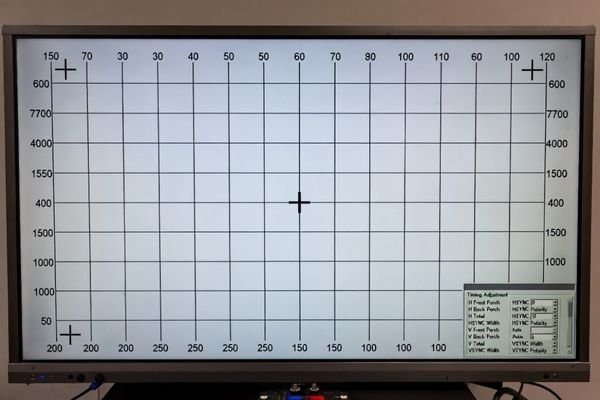
A practical four-step workflow:
1. Establish a Baseline and Use a Test Pattern
Load the display’s native timing to confirm the hardware path is healthy and centered. Then switch to the problematic mode. Use a 1-pixel border or fine grid so offsets and clipping are obvious and measurable.
2. Make Incremental Porch Adjustments
Read back the host timing registers (don’t assume your programmed values are active). Adjust only one parameter at a time. If you add +8 pixels to horizontal front porch and the image moves by +8 pixels, you’ve confirmed porch control. Continue in small steps until centered. Where possible, keep totals constant to avoid changing refresh/line rate while you’re centering.
3. Verify Sync Polarity5 and Constraints
After centering via porches, confirm you still meet minimum blanking and sync width constraints from the module documentation. Then flip HSYNC polarity and observe stability (lock, flicker, drift). Repeat for VSYNC. Choose the polarity that provides the most stable, repeatable lock and preserves the centered position.
4. Validate Stability
Power-cycle multiple times, toggle modes repeatedly, and test across operating temperature if applicable. Borderline timing can look centered once but fail after state transitions. Only lock the configuration after it remains stable through these regression checks.
What module selection and integration practices prevent shift issues across revisions?
The best way to eliminate shift issues long-term is to make timing deterministic and controlled across firmware updates and supply changes.
Prevent recurring shift by choosing modules with clear timing constraints, using a host platform that generates deterministic timing without hidden rounding/clamping, and locking validated mode tables in production firmware. Add quick border-pattern checks for incoming/field diagnostics and run regression tests after any firmware, bridge/scaler, or supply-chain change.

Practical prevention steps include: selecting modules with well-defined acceptable ranges for porches/totals/sync widths/polarity, avoiding “on-the-fly” timing generation, and version-controlling mode tables. If a scaler/bridge exists, document where timing is defined and ensure updates cannot silently change it. Finally, align bezel/window mechanics so small shifts don’t become visible clipping, and keep the signal chain consistent across builds.
FAQ
If the image is shifted but stable, is it always a porch problem?
Often, but not always. Start with porches/totals, but also confirm active area settings and that the mode table matches the module’s expected native timing constraints.
Can wrong sync polarity cause a clean, fixed offset?
Less commonly. Polarity issues more often affect lock stability, but some receivers can misframe under one polarity when margins are tight.
Should I change totals or porches first when centering the image?
Usually porches first, because they move the active window without changing refresh/line rate; adjust totals only if required by the module’s constraints.
Why does the image shift only after mode switching, not at cold boot?
The host may apply different mode tables or rounding during reconfiguration; borderline values can also behave differently after PLL or timing generator state changes.
What test pattern makes shift easiest to see?
A 1-pixel border or fine grid reveals offsets and clipping immediately, making porch adjustments measurable.
When is customization preferable for persistent shift problems?
If the platform cannot generate deterministic timing or your mechanical window constraints are tight, tailoring the integration and validated mode tables can reduce recurring field issues.
Conclusion
A shifted image on an LCD display module is rarely broken hardware. Most cases are deterministic timing-framing problems: incorrect porch/totals move the active window, and polarity issues usually show up as unstable lock or mode-switch sensitivity. The fastest path is to start from a known-good native mode, read back the real timing tuple, use a border/grid pattern, and apply small porch perturbations until the image moves predictably into place—then validate polarity and stability across reboots and mode toggles.
At LCD Module Pro, we help teams resolve and prevent shift issues by aligning module timing expectations with host timing generation and by locking validated mode tables that stay stable across product revisions.
✉️ info@lcdmodulepro.com
🌐 https://lcdmodulepro.com/
-
Exploring the definition of the active video window will enhance your knowledge of LCD display configurations. ↩
-
Exploring signal integrity will provide insights into maintaining high-quality image transmission and avoiding common pitfalls. ↩
-
Exploring ‘back porch’ will help you grasp its role in video signal timing and how it affects image positioning. ↩
-
Understanding sync edges is crucial for troubleshooting video signal issues and ensuring stable lock in receivers. ↩
-
Understanding Sync Polarity is crucial for achieving stable display performance. Explore this link to learn more about its impact. ↩