Choosing between a round LCD module and a square LCD module is not just a styling decision. In a real device project, the display shape affects how users read information, how they interact with the interface, how the front panel is opened, how touch and cover glass are designed, and whether the module can be integrated without mechanical or electrical risk.
The choice between a round LCD module and a square LCD module should start from the UI and interaction method. A round LCD module is usually better for circular, focused, or gauge-style interaction, while a square LCD module is usually better for text, menus, data blocks, and dashboard-style layouts.
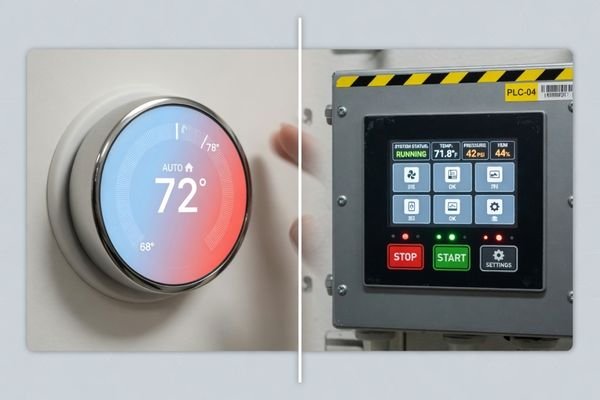
The first question should not be “Which shape looks better?” A better question is: What does the user need to see, adjust, confirm, or monitor on this screen?
A round LCD module can work well when the interface naturally follows a circular layout, such as a control knob, status ring, gauge, or compact icon-based interface. A square LCD module is usually more practical when the device needs readable text, menu navigation, multiple parameters, alarm messages, or grid-style information.
This article explains how to choose between round and square LCD modules from an engineering perspective, including UI layout, mechanical integration, touch design, cover glass, interface review, application scenarios, and project risk.
Start With the Device UI and Interaction Method
The most common mistake is choosing the display shape from the product appearance first. A special-shaped LCD module should support the device workflow, not force the UI team to fit useful information into the wrong shape.
The right LCD module shape should follow the device interaction and information structure. It should not be selected only because a round or square screen makes the front panel look more distinctive.
In round vs square LCD module reviews, our engineering team usually starts by checking the UI content, user action, viewing distance, touch requirement, front-panel opening, and available internal space before recommending a display shape. This early review helps avoid choosing a screen that looks good in a concept image but becomes difficult to use or integrate later.
Information Density and Layout
If the main function is to show one value, a circular progress ring, a gauge, or a small group of icons, a round LCD module can work well. Its geometry naturally supports centered, focused, and rotary-style interaction.
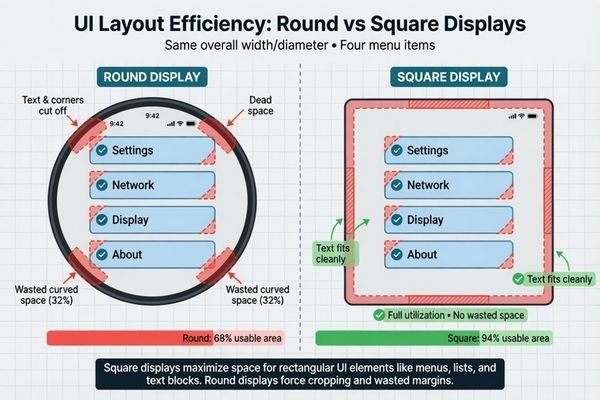
If the device needs several parameters, menu items, warning messages, text labels, or multi-language content, a square LCD module usually gives the UI more usable space.1 It is easier to arrange content into rows, columns, buttons, cards, and dashboard blocks.
Interaction Method
The input method matters as much as the visual layout. A round LCD touch module can support a virtual dial, circular adjustment interface, or icon-based control. A square LCD module is usually easier for menu-style touch operation, rectangular buttons, parameter lists, and multi-step workflows.
Before choosing the shape, the project team should review UI layout, expected user actions, viewing distance, touch requirement, cover glass structure, and front-panel design together.
When a Round LCD Module Makes More Sense
A round LCD module makes more sense when the interface is circular, focused, and simple. It is suitable for devices where users need to check one main value, adjust one function, or read a gauge-style status quickly.
A round LCD module is usually the stronger choice when the device needs gauge-style values, rotary adjustment, status rings, icon-based controls, or a compact centered interface. It is less suitable when the UI needs long text, dense menus, or multi-column data.
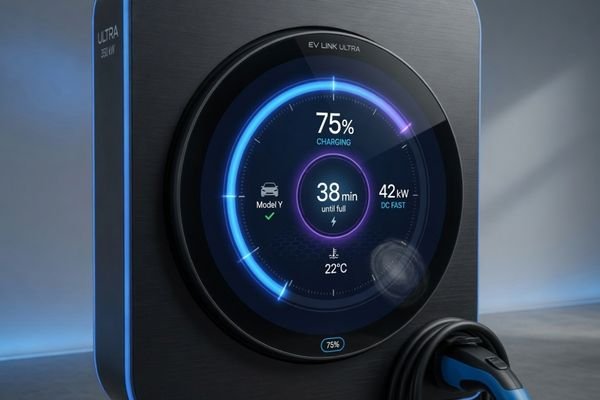
Round LCD modules are often considered for control knobs, appliance dials, compact industrial gauges, smart home controllers, vehicle or marine equipment interfaces, and focused status indicators. In these cases, the round shape is not just decorative. It matches the way users expect to turn, adjust, check, or confirm a single function2.
When reviewing a round LCD module project, our engineering team usually checks the visible circle, active area, cover glass shape, black border printing, touch coordinate mapping, FPC direction, and rear mechanical space together. A round front window may look simple, but the actual module outline, connector area, PCB position, and mounting method still need drawing-level confirmation.
A practical warning: a round visible area does not always mean the whole LCD module is circular. The display may still have a non-round module outline, FPC cable, connector, backlight structure, or PCB area behind the front panel. This is especially important when the device has a fixed enclosure or limited internal space.
When a Square LCD Module Is the Better Choice
A square LCD module is often the better choice when the interface needs readable information, flexible layout, or a balanced 1:1 display area. It works well for industrial control panels, smart terminals, compact dashboards, menu-based interfaces, icons with text, and multi-parameter screens.
A square LCD module is usually a better fit when the UI needs text, menus, parameter lists, alarm messages, data blocks, dashboard layouts, or multi-language content.
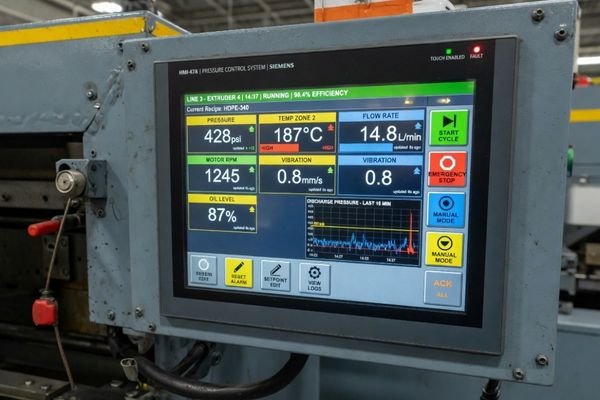
Better Space for Text and Data
A square LCD module gives designers a more efficient canvas for text, icons, charts, and organized information. It is easier to divide into grids, rows, columns, buttons, and status areas. This makes it useful for industrial UI, smart terminal interfaces, compact control panels, and equipment that requires users to read or adjust multiple values.
Square LCD modules are also helpful for multi-language UI3, because word length can vary across languages. A square format usually gives more layout flexibility than a circular display area.
A Special Shape, Not a Standard Display
A square LCD module is still a special-shaped LCD format compared with common 16:9 displays. Its 1:1 aspect ratio may affect UI scaling, resolution selection, interface bandwidth, and long-term supply planning.
When reviewing a square LCD module project, our engineering team usually checks active area alignment, visible window, resolution, controller output, interface bandwidth, touch cover glass, mounting method, and lifecycle plan. A square module is often easier to use than a round module for text-heavy UI, but it still needs a proper integration review before prototype development.
High-resolution square LCD modules may require more careful interface review, especially when the controller board, driver board, or cable design has bandwidth limitations.
Key Engineering Differences Between Round and Square LCD Modules
Round and square LCD modules should be compared by more than shape. The real differences appear in UI geometry, visible area, cover glass, touch design, interface timing, mechanical structure, and production feasibility.
A round LCD module usually needs more attention to circular UI design, touch mapping, cover glass shape, and rear-space constraints. A square LCD module usually needs more attention to information layout, 1:1 resolution, interface bandwidth, and active-area alignment.
| Project Need | Choose Round LCD Module When | Choose Square LCD Module When |
|---|---|---|
| UI layout | Circular, centered, gauge-like | Grid, menu, dashboard, text-based |
| Information density | One key value or limited icons | Multiple parameters or text blocks |
| Touch interaction | Dial, ring, icon control | Buttons, lists, menus, settings |
| Mechanical design | Round front window or knob-style design | Square opening or balanced panel layout |
| User workflow | Quick check or single adjustment | Reading, selecting, configuring, monitoring |
| Factor | Round LCD Module | Square LCD Module |
|---|---|---|
| UI Layout | Dial, icon, circular status, gauge UI | Menu, dashboard, text, grid, data blocks |
| Display Area | Less efficient for long text and dense data4 | Better area utilization for text and menus |
| Mechanical Opening | Circular visible window or round front design | Square front opening and 1:1 layout |
| Touch Design | Round UI and coordinate mapping should be reviewed | Easier for menu-style touch interaction |
| Cover Glass | Round glass, circular printing, edge control | Square glass, window alignment, border control |
| Interface | Timing, driver, and UI mapping should be reviewed | High-resolution 1:1 formats may need bandwidth review |
| Supply / Lifecycle | Availability depends on size and customization | Availability depends on resolution, interface, and lifecycle plan |
| Best Use | Knobs, gauges, status indicators | Control panels, smart terminals, data interfaces |
Both round and square LCD modules should be reviewed for LVDS, eDP, MIPI, RGB, or driver board compatibility before sample development. A shape that fits the front panel does not automatically mean the signal path, timing, touch mapping, and mechanical stack are ready for production.
Application Scenarios for Round and Square LCD Modules
Round and square LCD modules are both useful in special-shaped LCD projects, but they serve different application needs.
For applications such as transportation systems, smart terminals, industrial control equipment, and appliance control panels, the display shape should be selected around the actual operating environment and interaction method.
Typical Applications for Round LCD Modules
Round LCD modules are usually suitable for focused and circular interfaces. Typical use cases include smart home control knobs, appliance dials, compact industrial gauges, vehicle or marine equipment interfaces, equipment status indicators, rotary adjustment panels, and circular icon-based controls.
In these applications, the round shape supports a specific interaction style. The user is often checking one value, adjusting one setting, or reading a centered status. The UI should stay simple enough to fit the circular viewing area without forcing long text or dense data into the screen.
Typical Applications for Square LCD Modules
Square LCD modules are usually suitable for information-rich and menu-based interfaces. Typical use cases include industrial HMI panels, smart terminal interfaces, compact vending or kiosk controls, building access interfaces, retail equipment controls, test and measurement equipment, and dashboard-style panels.
In these applications, the square shape gives the UI more usable space for text, icons, menus, parameter lists, alarm messages, and multi-data layouts. It is often easier to scale from prototype UI to production UI without major layout compromise.
How to Reduce Risk Before Choosing a Special-Shaped LCD Module
Choosing a round LCD module, square LCD module, or another special-shaped LCD module introduces risks that are different from standard rectangular LCD module projects. The most effective way to reduce these risks is to review the display shape before the enclosure, controller board, touch cover glass, and production plan are locked.
Before confirming a round or square LCD module, the project should review UI layout, mechanical drawings, active area, visible area, interface type, cover glass design, touch mapping, brightness environment, expected quantity, and lifecycle plan together.
| Project Input | Why It Matters |
|---|---|
| UI layout | Confirms whether round or square shape supports the interaction |
| Mechanical drawing | Checks front opening, visible area, module outline, and mounting |
| Target visible area | Helps match active area, cover glass window, and UI safe area |
| Interface type | Confirms LVDS, eDP, MIPI, RGB, or driver board feasibility |
| Touch requirement | Affects cover glass, sensor area, cable route, and coordinate mapping |
| Brightness environment | Helps review backlight, optical bonding, AG/AR, and reflection |
| Cover glass design | Affects thickness, printing, visible window, and optical performance |
| Expected quantity | Helps evaluate customization feasibility and production planning |
| Lifecycle plan | Reduces supply continuity and EOL risk |
Before confirming a special-shaped LCD module, our engineering review usually checks mechanical drawings, UI layout, active area, interface type, cover glass design, touch mapping, brightness environment, expected quantity, and lifecycle plan together. This helps determine whether an available module can be used directly or whether customization is needed.
If brightness, cover glass, optical bonding, or outdoor readability is part of the requirement, you can Explore high brightness display modules to understand available module directions before finalizing the display structure.
Special-shaped LCD modules should not be selected only from a visual concept drawing. The module outline, connector position, cable path, touch structure, brightness environment, and interface compatibility should be reviewed together.
Discuss your custom display project before confirming the display shape.
Round vs Square LCD Module FAQ
Is a round LCD module better than a square LCD module?
Not universally. A round LCD module is better when the UI is circular, icon-based, centered, or gauge-like. A square LCD module is usually better when the device needs text, menus, data blocks, or flexible layout space.
Which is easier to integrate, round LCD or square LCD?
Square LCD modules are often easier for menu-style UI and square mechanical layouts. Round LCD modules usually need more review of cover glass shape, visible area, circular UI design, FPC direction, and touch coordinate mapping.
Can round LCD modules support touch?
Yes. Round LCD modules can support touch integration, but the cover glass shape, touch sensor area, edge response, cable routing, and UI coordinate mapping should be reviewed before prototype development.
Are square LCD modules better for industrial UI?
In many cases, yes. Square LCD modules provide more practical space for text, icons, parameters, alarms, menus, and dashboard-style layouts.
Does a round LCD module reduce usable UI space?
Yes. Compared with a square LCD module of similar size, a round LCD module usually provides less efficient space for long text, menus, and multi-data layouts. It is better for focused, circular, or icon-based UI.
Is a square LCD module a standard display?
Not exactly. A square LCD module uses a 1:1 aspect ratio, which is still a special-shaped display format compared with standard 16:9 LCD modules. Interface, active area, UI scaling, and supply continuity should still be reviewed.
Do round and square LCD modules require custom cover glass?
Many projects require custom cover glass, especially when the device has a fixed front-panel design, touch integration, printed border, special thickness, or optical bonding requirement.
What information is needed before choosing a special-shaped LCD module?
Useful information includes the application, UI layout, target shape, visible area, mechanical drawing, interface type, brightness requirement, touch requirement, cover glass design, expected quantity, and production schedule.
Conclusion
A round LCD module is usually better when the device interaction is circular, focused, icon-based, or gauge-like. A square LCD module is usually better when the device needs text, menus, data blocks, dashboard layouts, or more flexible UI space.
Neither shape is universally better. The right choice depends on UI design, mechanical structure, touch requirements, interface compatibility, brightness environment, cover glass design, production quantity, and lifecycle plan.
Not sure whether a round LCD module or square LCD module fits your device? Start by preparing your application, UI layout, mechanical drawing, target visible area, interface type, touch requirement, cover glass design, brightness environment, expected quantity, and production schedule.
→ Start your custom display project
✉️ info@lcdmodulepro.com
🌐 https://lcdmodulepro.com/
-
IADIS. “Radial vs. Rectangular: Evaluating Visualization Layout Impact on User Experience.” ↩
-
Kaptelinin & Nardi. “Affordances in HCI: Toward a Mediated Action Perspective.” ↩
-
UX Design. “Learnings from Designing for Multi-Language User Interfaces.” ↩
-
Nielsen Norman Group. “Legibility, Readability, and Comprehension: Making Users Read Words.” ↩