
Systematic troubleshooting of backlight failures requires isolating the backlight subsystem from display data paths to identify power, control, or protection issues.
When LCD display modules show images but lack backlighting, the panel data path typically functions correctly while the backlight power and control subsystem has failed. Effective troubleshooting involves confirming the symptom through external illumination tests, validating backlight driver command signals and power supplies, checking LED string continuity and protection states, then determining whether issues require rework, process control, or design modifications.

In my LCD display module integration work at LCD Module Pro, I’ve found that “image present but no light1” failures are usually solvable quickly when you follow a tight isolation flow instead of chasing interface timing. A practical SOP is: confirm the image with a flashlight test, then verify backlight enable/dimming commands, then capture the backlight driver VIN behavior during the attempted turn-on (including droop and ripple), and only then check boost output, LED string continuity, and fault flags (if available). If the symptom is intermittent—after warm-up, after vibration, or when the harness is routed near a switching supply—treat it as a margin problem and reproduce it under production-like conditions before deciding on rework versus design changes.
What does it mean when the image is present but the backlight is off?
Image visibility without backlight illumination indicates functional panel data paths with failed backlight power or control subsystems.
When images are faintly visible under external light while the screen appears dark, the LCD panel timing and data path typically function correctly while the backlight LED driver subsystem has failed. This symptom isolates the fault domain to backlight driver ICs, input power rails, enable and PWM control lines, LED string connections, or protection mechanisms including overvoltage, undervoltage, overcurrent, or thermal latches that disable output.
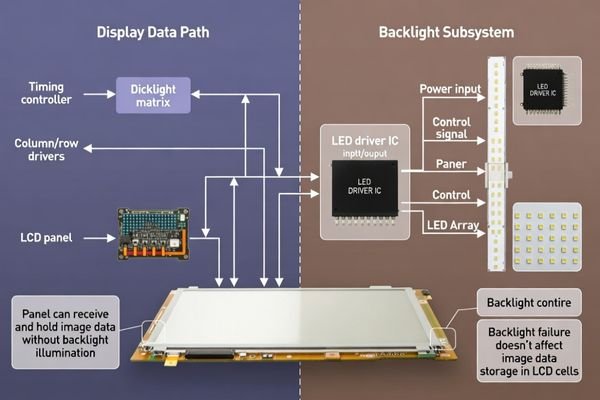
From an engineering standpoint, I usually explain that LCD modules have two distinct paths: the image path (panel timing/data) and the illumination path (LED + driver). When the image is still present, it’s a strong clue that the display interface and timing are not the primary fault domain. Your job is to prove whether the backlight driver is being commanded on, has a valid supply under load, and can sustain LED current without entering protection.
Subsystem Independence
LCD panel timing and data processing operate independently from backlight LED driver circuits, allowing image generation to continue even when backlight power or control systems fail completely. This separation is helpful for troubleshooting because it lets you rule out many “video” causes early and focus on power, enable, dimming, and LED-string integrity. In practice, you should assume the data path is healthy until proven otherwise, then treat the backlight as its own power-controlled subsystem with its own rails, thresholds, and fault behavior.
Fault Domain Isolation
Backlight-specific symptoms narrow troubleshooting focus to driver circuits, power supplies, enable signals, dimming controls, and LED string integrity2 rather than interface timing or pixel data issues. If the UI is visible under a flashlight but the module remains dark, start with: driver VIN under attempted start, EN assertion, dimming input validity, and any reset/configuration requirements. This approach prevents common misdiagnosis where teams spend hours adjusting timing parameters while the backlight driver is simply unpowered, disabled, or latched in fault.
How do you quickly confirm it’s a backlight path issue, not a display data issue?
Simple isolation tests distinguish between backlight failures and display data problems without complex measurement equipment.
Use flashlight illumination at an angle to verify image visibility, then test brightness control responsiveness to confirm backlight system status. Check system brightness control behavior and backlight enable signal toggling during adjustment commands, followed by validation of dimming signal presence and proper logic levels at expected frequency and duty cycle ranges for PWM or analog voltage levels for analog dimming systems.
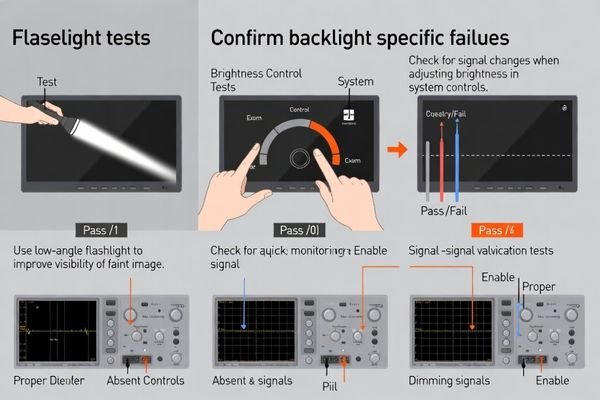
Based on the projects I support with display troubleshooting, the fastest time-saver is a disciplined “don’t overthink it” confirmation step. If the image is visible with a flashlight, treat it as a backlight problem first. Then change brightness through the system UI (if present) and observe whether EN toggles and whether PWM duty (or analog dimming level) changes as expected. If there is no change on control lines when software commands change, suspect firmware initialization sequencing3, GPIO routing, or level compatibility rather than LED hardware.
Which power rails and control signals should you measure first?
Priority measurements should focus on backlight driver input power, enable signals, and dimming control validation under actual operating loads.
Start with backlight driver input supply voltage verification within operating range under load conditions, then validate enable pin logic threshold compliance and dimming input signal characteristics including PWM frequency, duty cycle range, and logic level compatibility or analog voltage range and source impedance assumptions. For I²C or SPI configured drivers, confirm successful programming and absence of reset or fault states affecting driver operation.
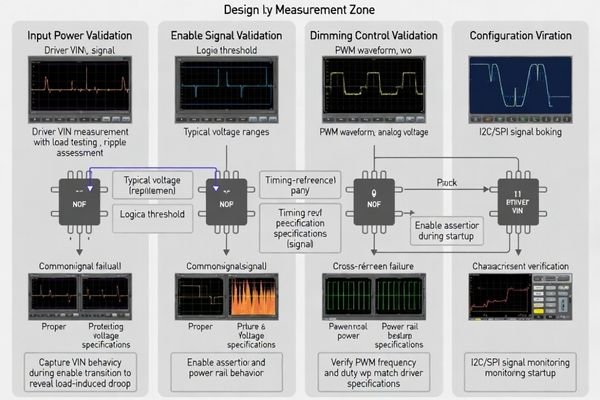
When I troubleshoot backlight systems4, I prioritize measurements that can “fail fast” and point to the responsible block. Measure VIN at the driver and capture it during the instant the backlight should start—many issues hide in droop, startup inrush, or ripple that only appears during the enable event. Next confirm EN meets threshold and timing requirements, then validate the dimming input is within expected frequency/level ranges. If the driver requires digital configuration, verify the bus transactions happen and that the device is not stuck in reset or a persistent fault state.
| Measurement Priority | Signal Type | Key Validation Points |
|---|---|---|
| Primary Power | Driver VIN supply | Voltage within operating range under load, ripple limits |
| Enable Control | Logic enable pin | Logic threshold compliance, proper assertion timing |
| Dimming Input | PWM or analog | Frequency/duty cycle for PWM, voltage range for analog |
| Configuration | I²C/SPI communication | Successful register programming, fault flag status |
Systematic measurement progression from power through control to output prevents misdiagnosis of downstream symptoms caused by upstream signal integrity problems.
For comprehensive backlight troubleshooting support and driver validation assistance during complex failure analysis, engineering teams can contact info@lcdmodulepro.com when systematic diagnosis requires expert analysis.
What hardware faults most commonly disable the backlight driver?
Common backlight driver failures include LED string discontinuity, protection circuit activation, and marginal power supply or interconnection issues.
Most frequent causes include open circuits in LED string paths from connector or FPC problems, shorted LEDs triggering overcurrent protection, miswired string configurations pushing drivers into voltage protection, input supply problems including brownouts from undersized supplies or excessive ripple, poor grounding causing fault cycles, and thermal or mechanical stress creating intermittent connections during operation under real environmental conditions.
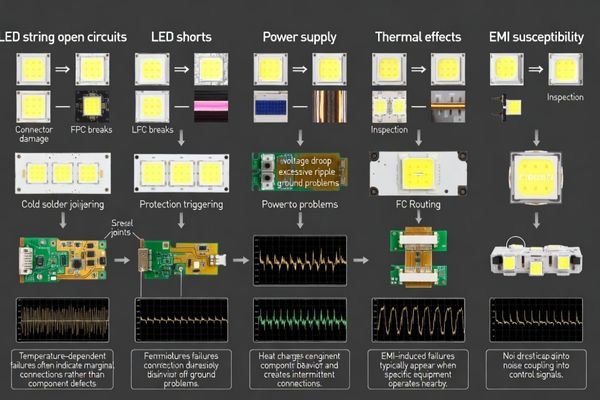
I’ve observed that backlight failures that appear only after warm-up or under vibration are rarely “mystery electronics”—they’re often marginal interconnects or borderline margin amplified by temperature and mechanical stress. In cabinets or compact enclosures, repeated brownouts, noisy grounds, or switching ripple can make a healthy design look like a dead backlight. Reproduce the symptom under realistic temperature and harness placement before concluding the driver or LED string is inherently defective.
LED String Circuit Issues
Open or shorted LED connections5 cause driver protection activation, while incorrect string configuration can force drivers beyond voltage or current operating limits resulting in shutdown protection. An open string often presents as a boost output that ramps aggressively and then the driver stops or retries, while a shorted segment may trip overcurrent and latch off. Connector seating, FPC damage, and cold joints are common roots, especially if the failure changes with bending or handling. Where possible, use the driver’s fault indicators (if available) to distinguish open-string versus overcurrent behavior instead of guessing from one voltage snapshot.
Power Supply and Interconnection Problems
Marginal input power supplies, grounding issues, or mechanical stress on connections create intermittent operation patterns that appear as random backlight failures during extended operation. A concrete cabinet example: an EN/PWM line routed alongside a noisy switching node or a high-current harness can pick up spikes that momentarily disable the driver, while a poor return path can make the driver “see” undervoltage even when the supply looks fine elsewhere. Likewise, high ripple on VIN during boost startup can trip UVLO or fault detection. These problems often show up only with the real cable length, bend profile, and enclosure grounding, so bench setups can falsely pass.
How to decide whether to repair, rework, or redesign the backlight subsystem?
Decision criteria should distinguish between assembly defects, margin problems, and fundamental design limitations affecting long-term reliability.
Decision framework requires confirming driver has valid VIN, enable, and dimming signals but cannot sustain LED current without protection activation, then categorizing issues as assembly defects requiring rework and process control, margin problems needing design changes in grounding, filtering, or protection thresholds, or fundamental design limitations requiring complete subsystem redesign including LED string count, driver topology, and thermal management optimization.
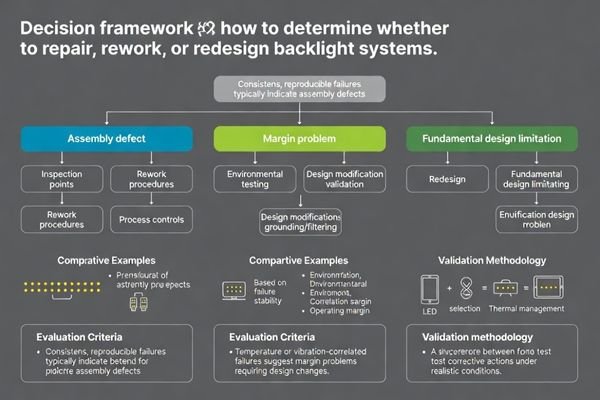
Based on my experience with backlight system optimization, the most important step is drawing a clear boundary between “fixable defect” and “system margin.” If a failure is stable and reproducible with a consistent electrical signature, it often points to an assembly or component defect that rework can solve. If the failure correlates with temperature, vibration, EMI exposure, or harness routing changes, treat it as a margin problem and validate corrective actions under those same stresses. If the driver routinely operates near its voltage/current limits at your required brightness (especially as parts age), redesign becomes the safer long-term option.
Backlight Subsystem Decision Framework:
- Assembly Defect Category: Clear connector seating problems, damaged FPC connections, cold solder joints, or obvious LED string opens requiring rework procedures and enhanced quality control implementation
- Margin Problem Category: Temperature-correlated failures, EMI-induced instability, or borderline voltage/current operation requiring design modifications in grounding, filtering, cable routing, or protection threshold adjustments
- Design Limitation Category: Repeated field failures showing driver operation near specification limits requiring comprehensive redesign of LED string configuration, driver topology selection, dimming methodology, thermal management, and protection strategy optimization
- Validation Requirements: Real operating condition testing including temperature variation, EMI exposure, mechanical stress, and lifecycle aging simulation to confirm corrective action effectiveness
FAQ
How can I tell if the backlight is completely off versus just very dim?
Shine a flashlight at an angle to confirm the image is present, then increase brightness to maximum and check for any glow at the edges. Measuring the backlight enable and dimming signals can confirm whether the driver is being commanded to a low level or not commanded on at all.
If VIN and EN are correct, why might the backlight still not turn on?
The driver may be in a latched fault state due to an open/short in the LED string, incorrect string configuration, or missing initialization over I²C/SPI. Some designs require a power-cycle or fault-clear sequence before output resumes.
What measurements help confirm an open LED string?
Check whether the driver boost output rises toward a high voltage and then shuts down, and inspect the LED string continuity. If available, read the driver fault flags to see whether it reports open-string detection.
Can EMI inside a control cabinet cause "image but no backlight" symptoms?
Yes. Noise can disturb enable/dimming lines or the driver’s power rail, causing repeated fault trips. Proper grounding, filtering, and cable routing are critical for stable backlight operation.
When should I suspect a software/firmware issue rather than hardware?
If backlight behavior changes with firmware versions, initialization timing, or brightness commands—and the hardware measurements look healthy—then configuration sequencing or driver register settings may be the root cause.
What should I document to prevent repeated backlight issues in production?
Record the validated measurement conditions, known-good signal levels (including VIN droop/ripple during start), fault signatures, and a clear rework/inspection checklist for connectors, LED strings, and power rails. If your design includes boost outputs or elevated voltages, document safe measurement practices (probe grounding, ESD handling, and where to measure) to avoid causing secondary damage during diagnosis, and keep change control for driver and backlight-related parts so fixes remain repeatable.
Conclusion
When LCD display modules show images but lack backlighting, the panel data path typically operates correctly while the backlight power and control subsystem has failed in specific, diagnosable ways. Effective troubleshooting follows systematic isolation beginning with flashlight confirmation tests, progressing through driver command signal and power supply validation under load, then checking LED string continuity and protection circuit status. Success requires treating mechanical stress, EMI exposure, and thermal behavior as design factors that can transform marginal implementations into field failures, demanding validation under realistic operating conditions rather than bench-only testing.
LCD Module Pro can support backlight troubleshooting for LCD display module integration projects by helping teams structure a repeatable diagnostic flow, review power/control margin risks, and align validation conditions with real deployment environments. Contact our technical specialists when illumination failures require deeper system-level analysis to achieve stable backlight behavior across temperature, EMI exposure, and long-term operation.
✉️ info@lcdmodulepro.com
🌐 https://lcdmodulepro.com/
-
Understanding the causes of this issue can help you troubleshoot and resolve similar problems effectively. ↩
-
Exploring LED string integrity helps ensure proper functionality of the backlight, which is essential for display performance. ↩
-
Exploring firmware initialization can provide insights into troubleshooting display issues effectively, enhancing your technical knowledge. ↩
-
Explore this link to gain insights into effective troubleshooting techniques for backlight systems, enhancing your diagnostic skills. ↩
-
Understanding LED connection issues can help you troubleshoot and prevent circuit failures effectively. ↩