
A 1000+ nits LCD module looks strong on a datasheet. For many outdoor or high-ambient-light projects, it is a reasonable starting point. The problem is that the user does not see the bare module in a lab. The user sees the display after it is installed behind cover glass, touch layers, coatings, seals, and the final device structure.
1000 nits is not the same as sunlight readability. A 1000+ nits rating shows that the LCD module can produce strong luminance under defined test conditions, but it does not guarantee clear readability under direct sunlight, strong reflection, thick cover glass, touch integration, or high-temperature operation.
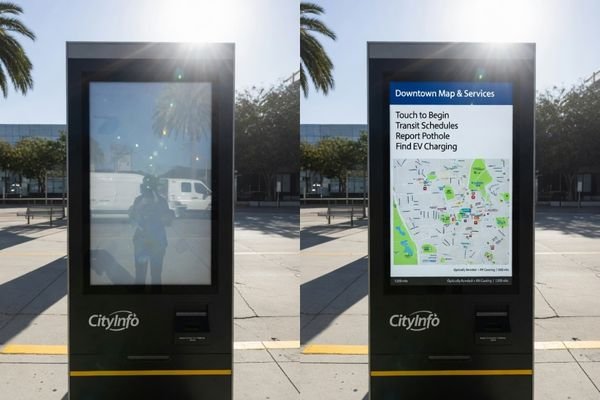
In high-brightness LCD module projects, the surprise often appears during field testing. A screen that looked bright on the bench may still look faded in sunlight. The reason is usually not one single failure. Reflected light, optical loss, front-stack design, installation angle, and thermal buildup can all reduce the final readable contrast.
This article explains why 1000+ nits may still fall short in some applications1, and how project teams should evaluate brightness together with reflection control, cover glass, touch structure, power budget, and thermal design.
1000+ Nits Is a Starting Point, Not a Guarantee
The specification of “1000+ nits” has become a common reference for outdoor LCD modules. It is useful, but it should not be treated as a pass/fail standard for sunlight readability.
A 1000+ nits LCD module provides a strong brightness base, but final readability depends on the complete device. Direct sunlight, reflection, front-layer loss, installation angle, thermal limits, and duty cycle can all change the result after integration.
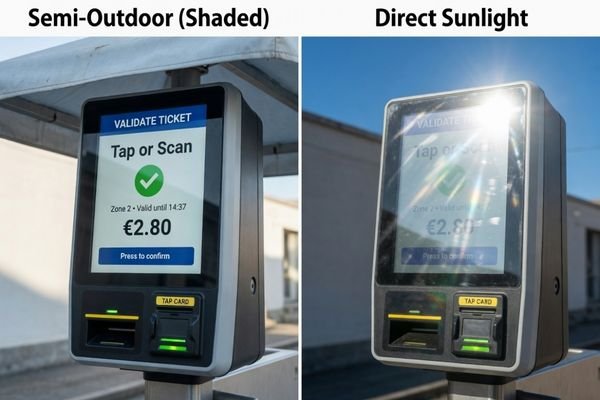
In high-brightness LCD module reviews, our engineering team usually avoids confirming a brightness target from the nit value alone. We first check the application environment, expected sunlight exposure, cover glass structure, touch stack, installation angle, duty cycle, and enclosure condition. These details often explain why a 1000+ nits module works well in one project but falls short in another.
You can Explore high brightness display modules to compare available module directions, then review dedicated high brightness LCD modules when sunlight readability becomes a core requirement.
| Why 1000+ Nits May Still Fail | What Happens in the Device | What to Review |
|---|---|---|
| Strong reflection | Contrast looks washed out | AG/AR treatment, optical bonding, cover glass |
| Thick front stack | Final visible brightness drops | Cover glass, PCAP touch, air gap, coating |
| Poor installation angle | Sunlight reflects into the user’s eyes | Mounting angle, shading, user position |
| Thermal buildup | Brightness cannot stay stable | Enclosure, thermal path, duty cycle |
| Long operating hours | Backlight stress increases | Dimming strategy, power budget, lifecycle |
Nits vs. Perceived Readability
Nits measure luminance under defined conditions.2 In the final device, light from the backlight must pass through the LCD, touch sensor, adhesive, air gap, cover glass, coating, and outer surface before reaching the user. Each layer can reduce transmission or add reflection.
That is why module-level brightness and final device readability are not the same. A display can have enough luminance but still lose usable contrast after it is installed.
Contrast Ratio in Bright Environments
Outdoor readability is mostly about perceived contrast. In bright ambient light, reflections raise the apparent black level of the display. When black areas look gray, the image loses depth and text becomes harder to read.
If a 1000+ nits LCD module is still difficult to see, the root cause is often reflection or optical loss, not only insufficient backlight power.
Reflection Can Reduce Real Outdoor Readability
Reflection is one of the main reasons a 1000+ nits LCD module may still look weak outdoors. Users see both the display image and reflected light from the environment.
Increasing brightness can help, but it does not remove reflection. Front-surface glare, internal reflection, air gaps, cover glass reflection, and surrounding reflective surfaces can all reduce real outdoor readability.
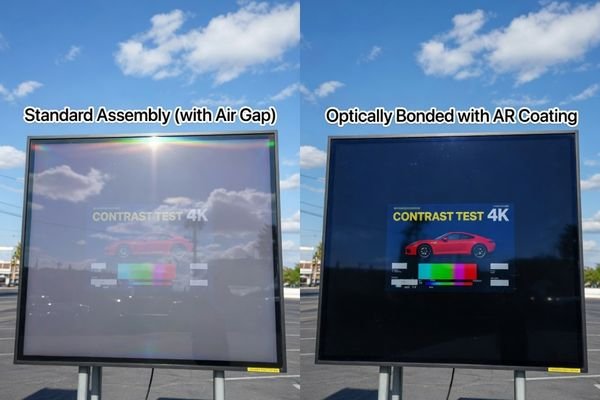
When a high-brightness LCD still looks washed out during field testing, our engineering review usually checks reflection before increasing the backlight target. Front-surface glare, internal reflection, air gaps, cover glass coating, and nearby reflective surfaces can all reduce perceived contrast. In many cases, improving the optical structure is more effective than simply selecting a brighter module.
Reflection can appear at several points in the front stack. The outer cover glass surface may reflect sunlight. An air gap may create internal reflection. A touch layer may add haze or optical loss. Even the installation surroundings, such as water, metal panels, windows, or light-colored walls, can reflect light back toward the screen.
Optical bonding helps by filling the air gap between the LCD and cover glass with transparent optical adhesive.3 This can reduce internal reflection and improve perceived contrast. Anti-reflective treatment can further reduce glare at the outer surface. In demanding outdoor projects, optical structure can be as important as brightness.
Cover Glass and Touch Layers Change the Final Result
The brightness value in a datasheet usually refers to the LCD module before the final front structure is added. In real equipment, the display is often placed behind cover glass, PCAP touch, decorative printing, protective coatings, or sealing structures.
Every layer in front of the LCD can change transmission, reflection, contrast, and perceived brightness. A 1000+ nits module may look bright before integration but appear weaker after cover glass, touch layers, air gaps, or coatings are added.
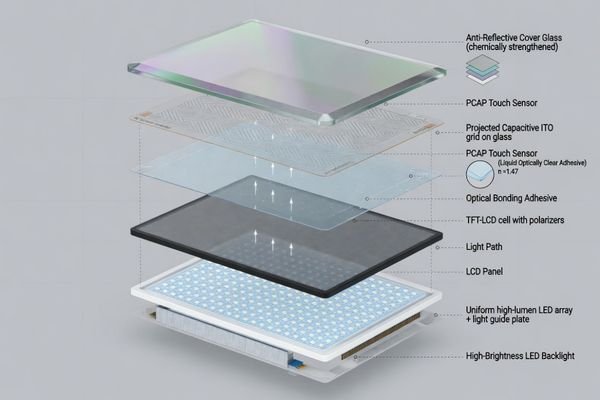
For devices with cover glass or PCAP touch, our engineering team usually reviews the full front stack before confirming the brightness requirement. This includes cover glass thickness, surface treatment, touch sensor structure, air gap or optical bonding, decorative printing, and sealing design. The final visible result depends on the complete stack, not only the LCD module rating.
| Component / Layer | Potential Impact on Readability | Engineering Response |
|---|---|---|
| Cover glass | Transmission loss and surface reflection | Use suitable glass and consider AR treatment |
| PCAP touch sensor | Optical loss, haze, or added reflection | Review touch structure early |
| Air gap | Internal reflection and lower contrast | Consider optical bonding4 |
| Protective coating | May change clarity or glare behavior | Match coating to environment |
| High-brightness backlight | More luminance, but more heat | Review power, thermal path, and dimming |
This is why the brightness target should not be frozen before the front-stack design is reviewed. For sealed panels, touch operation, impact protection, or outdoor readability, the final result depends on how the LCD module, cover glass, touch sensor, and bonding method work together.
Installation Angle and Ambient Light Matter
The same 1000+ nits LCD module can perform very differently depending on installation. A vertical display under shade may remain readable, while the same module angled toward the sky may reflect sunlight directly into the user’s eyes.
Brightness should be evaluated in the real installation environment. Sunlight direction, mounting angle, user position, shading, and nearby reflective surfaces can change readability even when the LCD module specification remains the same.
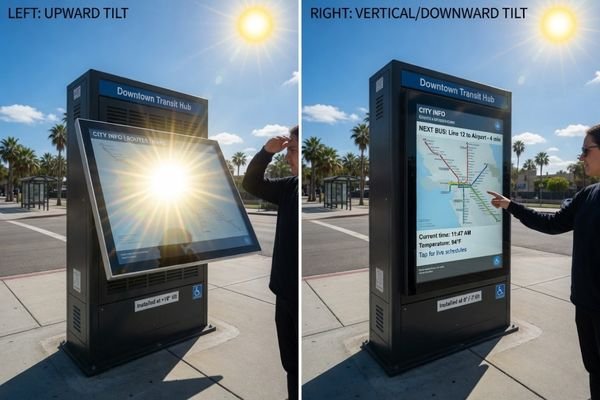
For applications such as transportation systems, marine equipment, smart terminals, and outdoor kiosks, brightness should be reviewed around the actual use case. A transportation display may face changing daylight. Marine equipment may face water reflection. A smart terminal may use thick cover glass. An outdoor kiosk may run for long hours under direct sun.
Direct vs. Indirect Sunlight
A shaded outdoor terminal does not face the same challenge as a device exposed to direct sunlight. A semi-outdoor display under an awning may work well with a moderate high-brightness target. A fully exposed kiosk or deck-mounted device may need stronger optical and thermal planning.
The key is not to classify every outdoor project the same way. The exposure level should guide whether 1000 nits, 1500 nits, 2000 nits, or another target is appropriate.
Viewing Angle and Reflections
LCD viewing angle also matters. As users move off-axis, perceived brightness and contrast may change. Outdoors, off-axis viewing can introduce additional reflections from the surroundings.
For public information terminals, vehicle-mounted equipment, and industrial control devices, the expected user position should be part of the readability review.
Higher Brightness Creates Power and Thermal Challenges
When 1000+ nits is not enough, the first answer is not always “choose 2000 nits.” A better question is: what is reducing usable contrast in the final device?
Higher brightness can improve visibility, but it also increases backlight power, heat, LED load, and thermal design pressure. If the enclosure cannot support the heat, the display may not maintain stable readability during real operation.
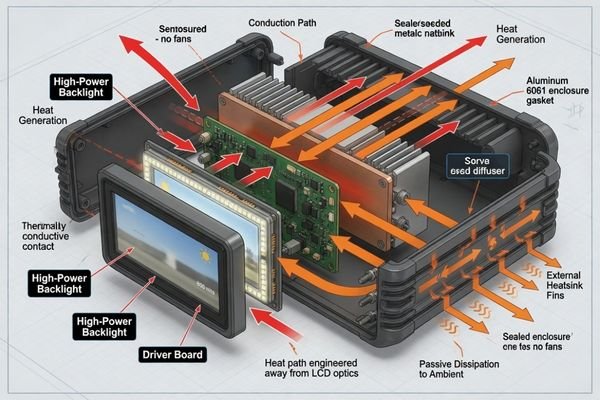
Before moving from 1000 nits to 1500 or 2000 nits, our engineering review usually checks whether the device can support the additional power and heat. We look at enclosure space, thermal path, ambient temperature, operating time, backlight driving, and dimming strategy. If the thermal design cannot support the brightness target, the display may not maintain stable readability in real use.
In sealed outdoor devices, fanless terminals, vehicle-mounted systems, or hot industrial environments, heat can become the limiting factor. The display may look bright during a short test but become unstable after long operation. Some systems may also reduce backlight output to protect components, so the effective field brightness becomes lower than the rated value.
In many projects, improving optical bonding, reducing reflection, adjusting the cover glass, or changing the installation angle can be more effective than simply increasing brightness. When the project involves high brightness, limited internal space, sealed housing, or long duty cycles, it is better to Discuss your custom display project before confirming the final luminance target.
Applications Where 1000+ Nits May Still Fall Short
1000+ nits can be enough for many shaded outdoor or semi-outdoor products. It usually becomes insufficient when several harsh factors appear together.
1000 nits is not inherently inadequate. It may fall short when direct sunlight, strong reflection, thick cover glass, touch integration, high temperature, long duty cycle, or weak thermal paths combine in the same project.
| Application | Why 1000+ Nits May Fall Short | Key Review Point |
|---|---|---|
| Outdoor kiosks | Direct sun, thick glass, long operation | Optical bonding, AR glass, thermal path |
| Marine equipment | Water reflection and glare | Reflection control, sealing, wide temperature |
| Transportation displays | Changing light and wide viewing angles | Mounting angle, viewing distance, brightness stability |
| Vehicle-mounted equipment | Window glare, heat, limited space | Installation angle, thermal path, power budget |
| Smart terminals | Touch and cover glass loss | Front stack, PCAP touch, cover transmission |
| Sealed outdoor devices | Heat buildup inside enclosure | Duty cycle, dimming, thermal design |
Direct Sunlight Outdoor Kiosks
Outdoor kiosks exposed to sun for long periods often need more than a basic 1000 nits target. Brightness should be reviewed with optical bonding, AR cover glass, touch structure, installation angle, and heat dissipation.
Marine Equipment
Marine equipment can be demanding because sunlight reflects from water. In this environment, reflection control and bonding may matter as much as the backlight rating.
Transportation Information Systems
Transportation displays face changing daylight, wide viewing angles, vibration, and varied mounting locations. A 1000+ nits module may work in one position but not another if angle and reflection conditions change.
Smart Terminals With Thick Cover Glass
Smart terminals, payment devices, and outdoor control panels often use thick cover glass, touch layers, sealing structures, or protective coatings. These layers can reduce transmission and raise reflection, making the final readability lower than expected.
High Brightness LCD Module FAQ
Is 1000 nits enough for outdoor LCD applications?
It depends on the application. A 1000 nits LCD module may be sufficient for shaded outdoor or semi-outdoor use, but it may not be enough for direct sunlight, strong reflection, thick cover glass, long operating hours, or sealed devices with limited thermal paths.
Why is my 1000+ nits LCD module still hard to read in sunlight?
The problem is often reflection, optical loss, installation angle, or thermal behavior rather than backlight brightness alone. Air gaps, cover glass glare, touch layer loss, lack of anti-reflective treatment, and heat-related brightness reduction can all affect readability.
Should I choose 1500 nits or 2000 nits instead of 1000 nits?
Not always. Higher brightness may help, but it also increases power consumption and heat. Before increasing the brightness target, review optical bonding, anti-reflective treatment, cover glass structure, power budget, and thermal design.
Can optical bonding improve readability without increasing brightness?
Yes. Optical bonding can reduce internal reflection and improve perceived contrast in outdoor or high-ambient-light conditions. In some projects, it improves readability more effectively than only increasing backlight power.
Does cover glass reduce LCD brightness?
Cover glass can reduce transmission and add surface reflection, especially when combined with touch layers, air gaps, coatings, or decorative printing. The final perceived brightness should be evaluated after the full front stack is defined.
Can higher brightness cause thermal problems?
Yes. Higher brightness usually increases backlight power and heat. In sealed, fanless, or high-temperature devices, thermal buildup may affect brightness stability, backlight lifetime, and long-term reliability.
Conclusion
A 1000+ nits brightness rating is a valuable starting point for LCD modules used in bright environments, but it is not a guarantee of outdoor readability. Real sunlight readability depends on the full optical and thermal design: reflection control, cover glass, touch structure, optical bonding, installation angle, power budget, heat dissipation, and operating time.
Not sure whether 1000 nits is enough for your project? Start by preparing the application environment, sunlight exposure, cover glass structure, touch requirement, operating time, power limit, and thermal conditions. Our engineering team can help review the brightness target before the module is finalized.
→ Start your high-brightness LCD module project
✉️ info@lcdmodulepro.com
🌐 https://lcdmodulepro.com/
-
Skyworth Display. “Outdoor Display Brightness Guide: How to Choose the Right Nits.” ↩
-
Ossila. “What Is Luminance? Units, Principle and Formula.” ↩
-
EIZO. “What Is Optical Bonding? Benefits for LCD Monitors in Bright Environments.” ↩
-
Truly USA. “Optical Bonding vs Air Gap: Enhancing Display Visibility and Durability.” ↩