
Selecting an LCD display module for a ticketing machine is far more complex than choosing a screen for a consumer device. These public-facing terminals run long hours, face heavy touch interaction and frequent cleaning, and often operate under harsh lighting (glass walls, overhead glare) alongside noisy subsystems like printers, cutters, readers, and sometimes wireless. A poor choice can lead to unreadable screens, user frustration, and costly downtime.
Choose a ticketing-machine LCD display module by following an executable loop: define the mission profile (light, distance, duty cycle, thermal, abuse), align UI size/aspect/touch with the front-panel layout, optimize the optical stack for glare, then validate interface, power sequencing, EMI/ESD, and thermal behavior inside the final cabinet with real harnesses and worst-case operating states.
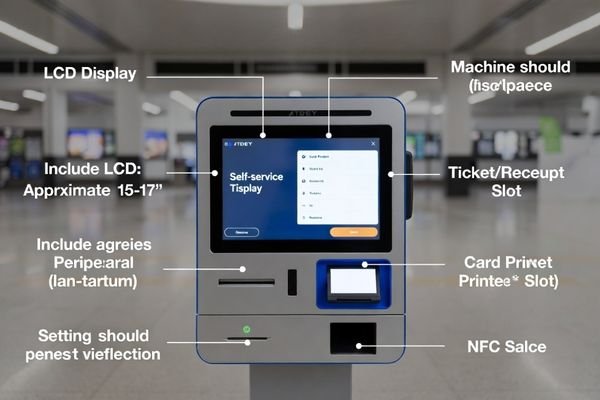
In LCD Module Pro customer integrations, projects often struggle when the display is treated as “just another BOM item.” Ticketing machines are tightly integrated electromechanical systems. The display must coexist with scanners, card readers, printers, and actuators, while surviving public use and abuse. Simply picking the brightest or largest screen is rarely the right answer; reliable results come from a system-level approach1.
That approach starts with a concrete mission profile, then moves through UI-driven form factor decisions, optical stack design for real glare geometry, and finally cabinet-level electrical and thermal validation. The goal is not only a great-looking prototype, but stable, serviceable field performance over years of operation.
What ticketing-machine environment and user behavior should you define first?
Before you look at display datasheets, create a mission profile that turns “ticketing machine” into measurable requirements.
Define the operating envelope first: indoor vs semi-outdoor placement, ambient light and glare sources, viewing distance, long duty cycle, and cabinet thermal profile. Also document user flow (fast taps vs form entry), accessibility needs, cleaning practices, and vandal/impact risk—because these factors drive optical stack, touch, durability, and lifetime decisions.
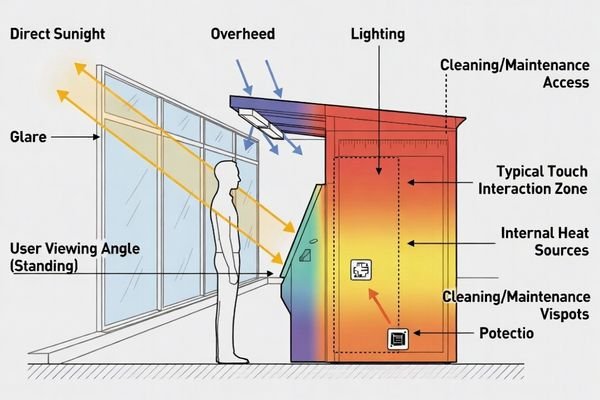
A mission profile prevents two common failures: over-specifying peak brightness without controlling reflections, or under-specifying durability and thermal margin for a harsh deployment.
Key factors to define include:
- Location and lighting: Controlled indoor lighting vs glass-walled terminals with strong glare. This sets reflection control requirements and sets the baseline for brightness targets.
- Duty cycle and thermal profile: Long hours or 24/7 operation increases backlight stress. Define cabinet airflow and internal heat sources so backlight lifetime and thermal shutdown risk are understood early.
- User interaction: Fast transaction flows favor high contrast and easy readability. Form-heavy flows increase the need for stable touch performance and clear UI at common viewing angles.
- Durability and maintenance2: Frequent cleaning and public contact require chemical resistance and smudge control. Impact/vandal risk drives cover lens and mechanical integration choices.
Next step: use these constraints to choose size/aspect/touch together with the front-panel layout.
How do size, aspect ratio, and touch choices affect ticketing UX and integration?
The display is the primary user interface, so physical format and touch decisions must support both UX speed and mechanical integration.
Choose size and aspect ratio to fit the transaction flow at the real viewing distance, minimizing scrolling during critical steps like payment. Decide touch early because it changes reflections, ESD grounding, glove/wet behavior, and serviceability—and it must be designed together with the cover lens, bezel, and front-panel peripherals.
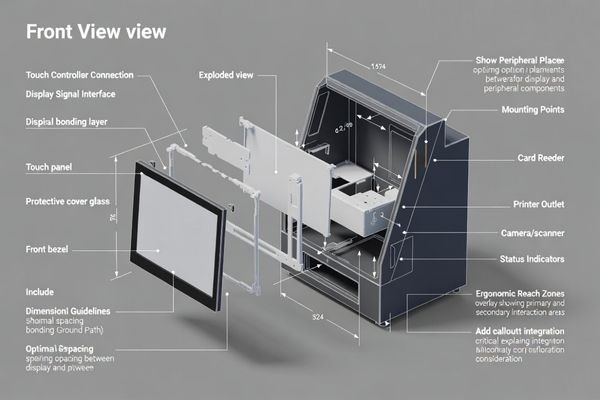
A common integration mistake is designing the UI independently from the cabinet window and peripheral placement. The display area must support legible fonts and clear touch targets at the typical user distance, while leaving space for readers, scanners, speakers, and printers. Aspect ratio should match the UI layout so users do not scroll excessively during time-sensitive steps.
Touch selection (often projected capacitive in public terminals) is not just a “feature.” It is part of the optical and electrical stack. It affects reflection behavior and requires a validated ESD/ground path through the bezel and cover lens. Serviceability also matters: technicians must be able to replace the assembly without disturbing grounding, harness routing, or adjacent devices.
Next step: optimize the optical stack3 so the UI remains readable under real glare and fingerprints.
What brightness and optical stack choices keep tickets and payments readable under glare?
In public spaces, glare and reflections often matter more than raw brightness.
Readability under glare comes from the full optical stack—reflection control (AR/AG surfaces), cover lens choice, and optical bonding—more than from pushing backlight brightness. A balanced stack preserves contrast across off-axis viewing and resists fingerprints, while a brightness policy (manual profiles or ambient sensing) keeps the screen readable by day without being harsh at night.
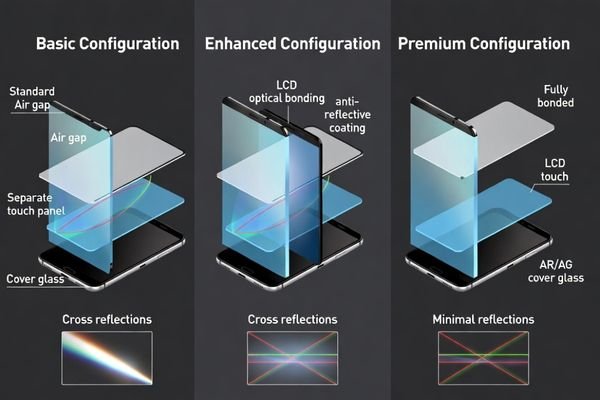
Many “washed out” screens fail because reflections dominate the user’s view. Increasing brightness to overpower reflections raises power and heat, which can reduce backlight lifetime and tighten cabinet thermal margin. Reflection management is usually the higher-leverage step: AR coatings reduce mirror-like reflections, AG treatments diffuse glare (with a possible sharpness trade-off), and optical bonding reduces internal interface reflections and improves perceived contrast.
Frequent touch requires smudge resistance4. Fingerprints and cleaning residue quickly degrade perceived clarity, so surface treatments and a realistic cleaning plan matter. Finally, define a brightness control strategy that matches the deployment: daytime readability without unnecessary nighttime glare helps reduce average thermal load and supports long service life.
Next step: validate the full electrical and thermal behavior in the final cabinet, not just on the bench.
How do interface, power, EMI/ESD, and reliability validation reduce field downtime?
Ticketing machines are electrically and mechanically noisy, and grid events are real. Validation must reflect the actual cabinet environment.
Reduce downtime by validating the display as part of the full system in the final enclosure: confirm interface timing and signal integrity, design brownout-tolerant power sequencing, verify ESD grounding through the full front stack, and run thermal/EMI tests with all subsystems active. Most “works on the bench” failures are integration margin issues revealed only in the cabinet.
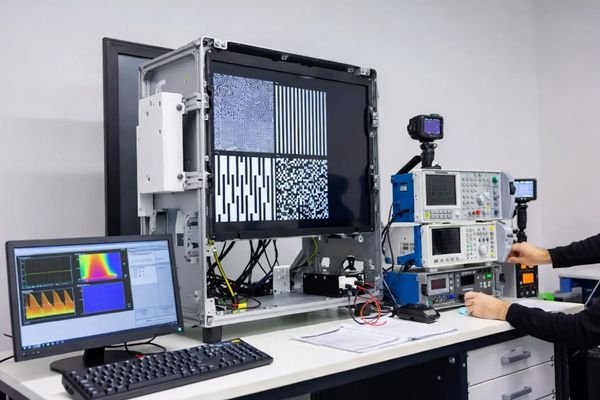
Field “blank screen” incidents often trace to power sequencing and enable behavior under dips or transients. Ticketing machines also combine motors, printers, cutters, and readers that inject noise and load steps. A robust plan includes:
- Interface and timing: Confirm the host output matches the module interface definition, and verify margin at the final cable length and routing used in production.
- Power integrity and sequencing5: Validate stable rails under load transients (printers/cutters) and confirm the display recovers cleanly after brownouts and rapid power cycles.
- ESD and EMI: Validate a low-impedance grounding path across bezel, cover lens, and touch stack. Run EMI checks with all subsystems active to catch interference and coupling.
- Thermal validation: Perform cabinet thermal soak at required brightness and worst ambient conditions to ensure backlight and electronics remain within safe operating limits.
Next step: apply a scenario-based selection strategy and lock interface/lifecycle controls so the solution stays stable across revisions.
What LCD module selection strategy fits common ticketing machine scenarios?
A strong selection strategy starts with scenario segmentation and margin planning, then locks interface definition and lifecycle controls.
Shortlist by scenario: indoor deployments prioritize wide viewing angles, stable contrast, and smudge resistance; high-glare or semi-outdoor deployments prioritize reflection control and validated thermal headroom; high-abuse deployments prioritize mechanical durability, chemical resistance, and serviceability. Across all scenarios, lock timing/mapping/harness constraints and manage lifecycle change control because replacements are rarely drop-in.
At LCD Module Pro, a practical selection process focuses on the constraints that drive field outcomes, not just headline specs.
Indoor, Controlled Lighting Scenario
In locations like malls or indoor lobbies, glare is manageable and thermal load should be minimized.
- Focus on: Wide viewing angles, stable contrast, good legibility from common approach angles.
- Priority: Smudge resistance and easy cleaning. Avoid unnecessary peak brightness that increases heat and power.
Semi-Outdoor or High-Glare Scenario
In stations with glass walls, skylights, or strong overhead glare, reflection management dominates readability.
- Focus on: Optical stack design (cover lens, AR/AG choices, optical bonding) validated under representative glare geometry.
- Priority: Thermal headroom at the required brightness level, proven in the actual cabinet with real airflow and harness routing.
High-Abuse or Industrial Scenario
For harsh locations with higher vandal/impact risk or aggressive cleaning.
- Focus on: Mechanical robustness6, front-surface chemical resistance, and quick service replacement without breaking grounding or cable integrity.
- Priority: Repeatable field service procedures and regression tests after any build change.
In all scenarios, treat interface definition and lifecycle governance as first-class requirements: timing, mapping, cable constraints, revision identification, and change notification prevent “silent” shifts that reintroduce integration risk.
FAQ
Do ticketing machines always need high-brightness LCD modules?
Not always. Indoor machines may prioritize contrast stability and reflection control, while semi-outdoor or glass-walled stations often need higher luminance with verified thermal margin.
Why does a ticketing screen look washed out even at high brightness?
Reflections and internal interfaces often reduce effective contrast more than brightness can compensate; improving the optical stack (AR/AG, bonding) usually helps more than overdriving the backlight.
What’s the biggest integration risk with touch on public ticket machines?
ESD/grounding and serviceability. The full stack (cover lens, bezel, touch) must have a validated grounding path and be replaceable without creating new noise paths.
How do motors and printers affect display reliability?
They inject conducted and radiated noise and cause load transients that can upset power rails or interfaces; validate EMI and power sequencing with all subsystems active.
Should acceptance be validated on the bare module or the final cover lens stack?
Validate what users see. Optical stacks change reflections and contrast, so prototype the final stack under real lighting to avoid surprises.
When is customization preferable for ticketing machine displays?
When glare conditions, window geometry, durability requirements, or lifecycle commitments make standard modules risky, customizing the module and integration can reduce downtime risk.
Conclusion
Choosing an LCD display module for a ticketing machine is a system-integration decision. Start with a mission profile, align size/aspect/touch with the front-panel layout, optimize the optical stack for real glare, and validate power, EMI/ESD, and thermal behavior inside the final cabinet with all subsystems active. The most reliable programs also lock interface definitions, brightness policies, and lifecycle change control so the solution remains stable across revisions and service cycles.
At LCD Module Pro, we support ticketing machine programs by helping teams translate deployment conditions into display requirements and validate the full integration chain for long-term uptime.
✉️ info@lcdmodulepro.com
🌐 https://lcdmodulepro.com/
-
Understanding the system-level approach can enhance your integration strategy, ensuring better performance and longevity of your LCD modules. ↩
-
Exploring methods for enhancing durability and maintenance can significantly improve the lifespan and usability of public displays. ↩
-
Understanding the optical stack is crucial for optimizing UI readability and performance in various environments. ↩
-
Exploring smudge resistance will help you learn about maintaining display clarity and longevity. ↩
-
Understanding power integrity and sequencing is crucial for ensuring device reliability and performance, especially in complex systems. ↩
-
Exploring mechanical robustness can help ensure durability and longevity in harsh environments. ↩