In retail and self-service kiosk projects, the display is often at the center of the user experience. Yet the most common choice—a standard 16:9 screen—can create significant design challenges when the equipment structure, front-panel space, and user interaction flow do not support that format well. The problem is not that a standard screen cannot show information. The problem is that its shape may force the entire product layout to work around the display.
A stretched LCD is not a better screen by default. It becomes the better choice only when the device structure, front-panel space, content flow, and user interaction logic all benefit from a wider, more integrated display format. The goal is to fit the screen to the device, not force the device to fit the screen.
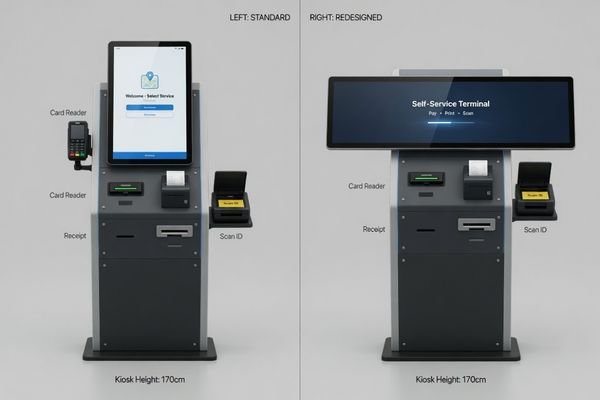
In LCD module integration projects, we often see equipment teams start with a standard screen before realizing that the front-panel layout does not support it efficiently. Once scanners, card readers, printers, speakers, cameras, buttons, and branding areas are added, the front panel can quickly become a puzzle of misaligned components. The equipment may become taller, wider, or deeper than necessary simply to accommodate the display’s conventional shape.
A stretched LCD, also known as a bar-type display, offers a different approach. It allows the display to serve the product’s design rather than dominate it. This article explains why standard screens can create structural compromises, when a stretched LCD becomes a more practical fit, and what project teams should evaluate before choosing this direction. For a project-level starting point, you can also review our 15.6-Inch Stretched LCD Module for Retail & Self-Service Systems page.
Why standard screens often fail in kiosk layouts
In retail and kiosk equipment, a standard screen often fails not because of its display capability, but because of its physical footprint. A 16:9 display requires a meaningful amount of vertical space. In a compact self-service device, that vertical height can disrupt the entire front-panel layout. The display is only one part of the equipment, not the only component that needs space.
Standard screens frequently create structural compromises in kiosks because their vertical height can force a larger enclosure and disrupt the placement of other essential hardware such as card readers, printers, scanners, cameras, and speakers. In these cases, the screen’s shape becomes the primary design constraint.
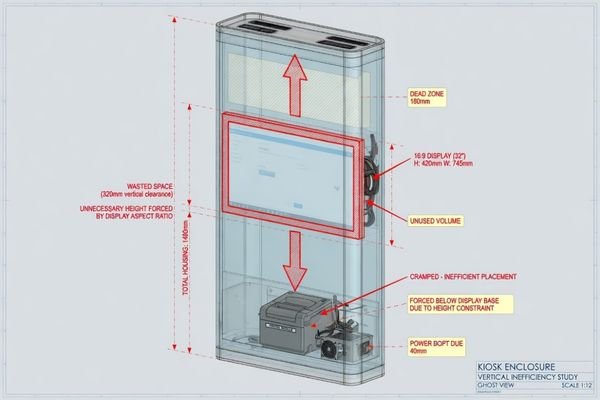
From an engineering standpoint, this creates a domino effect. To accommodate the screen’s height, the housing may need to be enlarged.1 That can increase material usage, affect the product footprint, and reduce the flexibility of the remaining component layout. A card reader or receipt printer that should have a logical position may be pushed into an awkward location because the display occupies the most useful area of the front panel.
This is why display selection should not be treated as a screen-size decision alone. In kiosk and retail equipment, the display format directly affects enclosure design, component placement, service access, cable routing, and the final user experience.
When a stretched LCD becomes a better fit
A stretched LCD becomes a more practical and logical choice when the project priority shifts from accommodating a standard component to creating a well-integrated device. This happens when the display is expected to follow the equipment’s structure, not the other way around.
A stretched LCD becomes worth evaluating when the equipment has a narrow front-panel window, the content is naturally horizontal, a standard screen wastes too much vertical space, or the display must be embedded into the device rather than treated as an external screen.
A stretched format is valuable because it allows the product to present key information in a constrained space without requiring unnecessary enclosure changes or awkward UI compromises. The value is not that it looks different. The value is that it solves a real integration problem.
A stretched LCD becomes a stronger direction when:
- the available display window is long and narrow;
- the information is naturally arranged from left to right;
- the device needs a compact display zone above, below, or beside other components;
- a standard screen would make the enclosure larger than necessary;
- the display must support a specific user workflow rather than generic media playback.
For a device that needs to fit a narrow horizontal window, a stretched display can become a natural fit. When information such as queue numbers, status updates, pricing, payment prompts, or step-by-step instructions is naturally arranged from left to right, a wider format can improve readability and user flow2.
This is where a stretched display direction becomes different from simply choosing another screen size. It becomes a way to align the display shape with the equipment structure and the actual user interaction path.
Retail and kiosk scenarios where stretched LCD modules work well
Stretched LCD modules are most effective when used as dedicated information strips, status windows, instruction areas, or embedded communication zones. In these roles, they deliver targeted information precisely where it is needed in the user journey, using a format that is highly space-efficient.
Stretched LCDs work especially well in retail and kiosk applications where a wide, narrow format can deliver critical information without disrupting the overall product design or user workflow. The strongest use cases are usually information strips, status windows, payment prompts, and compact front-panel display zones.
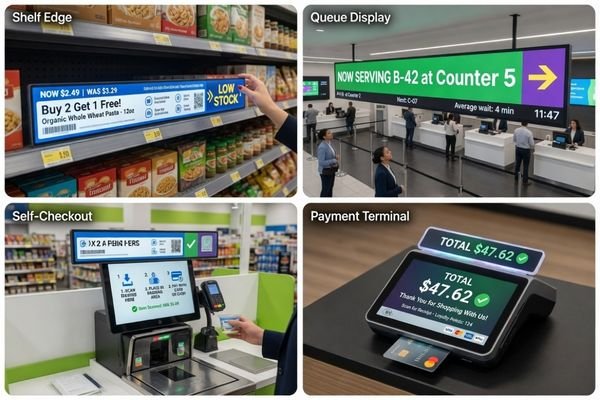
In these applications, the goal is rarely to show full-screen video. The goal is to communicate specific information clearly and efficiently. A stretched LCD module can help when the display must fit into a defined space while still remaining visible and useful.
| Application / Scenario | Primary Function | Why a Stretched LCD Works Well |
|---|---|---|
| Shelf-Edge Displays | Pricing, promotions, product information | Fits long, narrow shelf spaces and can create a continuous digital information strip. |
| Queue Management Terminals | Ticket numbers, counter status, service updates | Presents horizontal information clearly and can remain readable from a distance.3 |
| Self-Service Kiosks | Instructions, payment prompts, workflow status | Can be placed above or below scanners, card readers, printers, or cameras without increasing kiosk height. |
| Storefront Signage | Welcome messages, store hours, brand information | Uses wide, shallow spaces such as entryway headers or window transom areas. |
| POS / Payment Terminals | Transaction prompts, payment status, service messages | Supports compact front-panel layouts where a standard screen may occupy too much vertical space. |
In these contexts, the stretched format is not simply an alternative. It can become a more practical direction because it aligns the display’s shape with the information flow and installation space.
For broader format options, you can also review our Bar & Ultra-wide LCD Display Modules page.
What to evaluate before choosing a stretched LCD
Making the right display choice goes beyond picking a screen shape. A stretched LCD might look like the perfect solution, but successful integration depends on a practical review of the equipment structure, controller path, brightness environment, and validation stage. Ignoring these details early can still lead to redesigns even after selecting what appears to be the right display format.
The decision to use a stretched LCD should start with a review of the front-panel window, content direction, interface path, brightness environment, mounting method, touch requirement, and validation stage. These factors influence mechanical fit, cable routing, optical design, and production readiness.
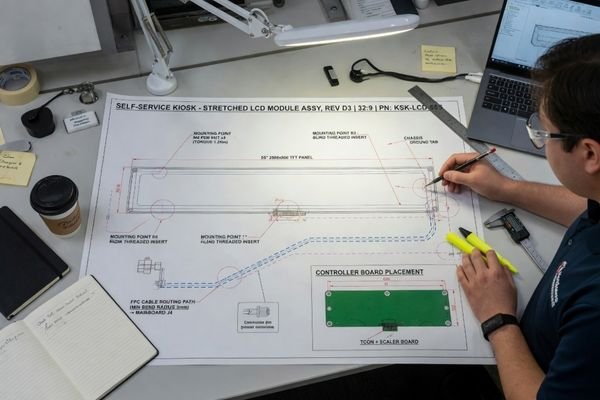
A system-level review is important because a stretched LCD is not only a different display shape. It can affect the mechanical stack, the front surface, the cable path, the interface board, and the sample validation process.
| Evaluation Factor | Why It Matters | What to Confirm |
|---|---|---|
| Front-panel window | Determines whether the stretched format physically fits the equipment design. | Exact display opening, bezel allowance, component spacing, and enclosure constraints. |
| Content direction | Determines whether the UI truly benefits from a wider display area. | Pricing, status, instructions, queue numbers, payment prompts, or horizontal messages. |
| Interface path | Affects controller-board compatibility and cable routing. | LVDS, eDP, MIPI, HDMI, or project-specific controller requirements. |
| Brightness environment | Impacts readability in retail stores, entryways, or semi-outdoor locations. | Indoor, bright indoor, window-facing, or high ambient-light installation conditions. |
| Mounting structure | Determines whether the display can be installed repeatedly and reliably. | Brackets, screw positions, adhesive stack, frame support, and service access. |
| Touch requirement | Changes the optical and mechanical stack. | Touch type, cover glass, bonding requirement, front-surface treatment, and user interaction mode. |
| Validation stage | Influences how much design flexibility still exists. | Concept, prototype, pilot, or production redesign stage. |
Front-panel fit is especially important. If the display window is already defined, the stretched LCD must be evaluated against the real mechanical opening, not only the diagonal size4. If the project is still at the concept stage, the display direction can influence the front-panel layout more freely. If the project is already near pilot production, the risk of redesign becomes higher.
The interface path also needs early attention. A stretched display may use a different signal path or cable direction from a standard screen. This can affect FPC routing, controller-board placement, and the internal stack of the device. If the display is part of a compact kiosk, payment terminal, or self-service system, these decisions should be reviewed together with the mechanical structure.
For projects where front-panel fit, enclosure layout, and mounting structure are already becoming constraints, our mechanical integration for LCD modules page can provide additional context on equipment-level display integration.
When a standard screen may still be the better choice
A stretched LCD should not be treated as a universal upgrade for all retail and kiosk projects. There are many situations where a traditional, standard-format screen is still the most practical and effective solution. The key is to make a decision based on the project’s actual requirements, not on the novelty of a particular display format.
A standard screen may still be the better choice when the equipment has enough vertical space, the UI is designed around standard 16:9 content, the display window is not structurally constrained, or standard availability and cost are more important than layout optimization.
A standard screen often remains practical when the product can accommodate it without forcing changes to the enclosure or the user interface. If the equipment is designed to show full-screen video, rich graphics, or content already built around a 16:9 layout, using a stretched format may create more problems than it solves.
Availability can also matter. In some projects, a standard-size display may offer easier sourcing, lower upfront cost, or a simpler validation path. If the display does not create mechanical compromise and the user experience does not require a horizontal information strip, the standard screen may remain the more reasonable choice.
The goal is not to avoid standard screens. The goal is to avoid using them when the equipment structure clearly asks for another format. Ultimately, the choice is not about "stretched vs. standard." It is about selecting the display format that best supports the equipment structure, user experience, and project goals.
Final Takeaway: Choose the display format around the device, not the screen
The practical value of a stretched LCD in retail and kiosk projects appears when it helps the design team create a cleaner structure, a more efficient front panel, and a more natural information flow. It allows the display to become part of the device rather than an obstacle the design must work around.
For OEM equipment teams, this is rarely just a panel-shape decision. It is a module-level integration decision involving interface matching, mechanical fit, front-surface design, brightness direction, touch requirements, and the path from sample to production. This is where working with a manufacturer-oriented, engineering-driven partner for custom LCD module development and integration can help project teams evaluate whether the stretched LCD direction is truly practical before committing to enclosure tooling or final mechanical design.
For teams evaluating this direction, our 15.6-Inch Stretched LCD Module for Retail & Self-Service Systems page provides a project-level starting point for brightness, interface, structure, and integration discussion.
FAQ
Is a stretched LCD always better than a standard screen for kiosks?
No. A stretched LCD is only better when the device layout, information flow, and front-panel space benefit from a wider display area. If the equipment can use a standard screen without structural or UI compromise, a standard display may still be the more practical choice.
What types of retail equipment can use stretched LCD modules?
Stretched LCD modules can be evaluated for shelf-edge displays, self-service kiosks, queue terminals, check-in devices, payment equipment, retail signage zones, POS terminals, self-checkout systems, and embedded commercial equipment where a long horizontal display area improves space efficiency.
Should I choose the screen size or display format first?
For equipment projects, display format and screen size should be evaluated together. The project team should first review the front-panel space, content orientation, interface path, mounting structure, and user interaction flow before locking the final display size.
Can a stretched LCD module be customized for brightness and interface?
Yes. Brightness direction, interface path, mechanical structure, touch option, cover glass, front-surface treatment, and mounting details can be evaluated according to the actual retail or self-service equipment project.
Can a stretched LCD be used in touch-based self-service kiosks?
Yes, but touch integration should be reviewed early because it affects the front-surface stack, cover glass, optical design, mechanical fit, and validation process. In compact kiosk projects, touch requirements should be evaluated together with the display format rather than added later.
Next step for retail and kiosk projects
If your retail device, self-service kiosk, or embedded commercial system needs a stretched display direction, review our 15.6-Inch Stretched LCD Module for Retail & Self-Service Systems page or share your project requirements for a practical feasibility review.
-
Designers Show. “Your Design Dimensions: Size Matters!.” ↩
-
Designary. “UX Tip #12: The Optimal Text Line Length for Readability.” ↩
-
MiQi Display. “Innovative Stretched Bar LCD Display for Modern Advertising.” ↩
-
Facebook Group Discussion. “Determining Screen Dimensions.” ↩