
In outdoor and marine equipment projects, display selection often starts with one question: “How bright is it?” Brightness is important, but it is not the full answer. A high-nit LCD that looks strong on a datasheet can still become difficult to read when it is installed behind cover glass, exposed to sunlight, or affected by strong ambient reflections.
Outdoor LCD readability should be evaluated by usable contrast under real ambient-light conditions, not by brightness alone. High brightness helps, but the final result also depends on reflection control, glare reduction, cover glass, optical-stack design, viewing angle, and installation environment.
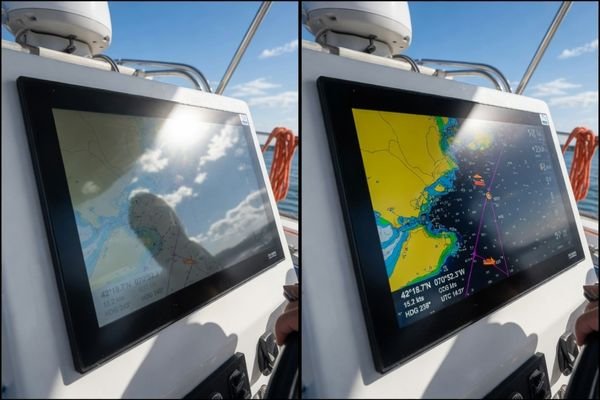
In outdoor LCD module integration projects, readability failures are often caused less by luminance itself and more by uncontrolled reflections. When sunlight hits the front surface of the screen, the user may see the sky, surrounding objects, or their own reflection more clearly than the displayed content. Once reflected ambient light washes out the contrast between dark and light areas, increasing brightness alone may not solve the real problem.
This article explains why true sunlight readability depends on a system-level approach that considers brightness, reflection control, optical design, and the installation environment together. For teams evaluating a practical module direction, our 23.8-Inch Sunlight-Readable LCD Module for Marine & Outdoor Equipment page provides a project-level starting point.
Why brightness alone is a misleading starting point
Many outdoor display projects begin by comparing LCD brightness specifications in nits. This is understandable because brightness is simple to compare. It appears to offer a clear answer: a higher number should mean better outdoor visibility. In practice, that assumption is incomplete.
Focusing only on brightness is misleading because it ignores the impact of reflection and glare. A display’s real-world outdoor performance depends on how much usable contrast remains after strong ambient light interacts with the front surface and optical stack.
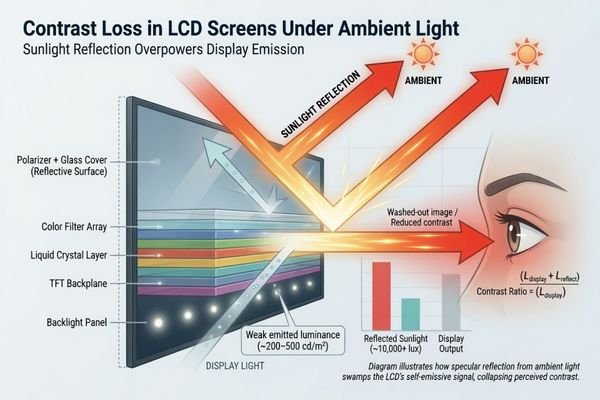
A common failure scenario is not insufficient brightness, but contrast loss1. The user may report that the screen looks washed out, mirror-like, or difficult to read from certain angles. This happens when light from the environment reflects off the screen surface and becomes stronger than the darker parts of the displayed image. In that situation, increasing the backlight may help only to a limited degree. The real issue is the optical path between the LCD, cover glass, environment, and viewer.
In outdoor LCD project reviews, we usually treat brightness as an important starting point rather than the final answer. Before defining a brightness target, we first look at the installation environment, front-surface structure, viewing angle, and reflection risk. This helps avoid selecting a high-brightness panel that still becomes difficult to read after it is integrated into the final equipment.
The problem with datasheet comparisons
Datasheet brightness is usually measured under controlled conditions. It may not represent how the display performs after cover glass, touch layers, air gaps, surface treatment, and real ambient light are added. A bare-panel brightness number can be useful as a starting reference, but it does not fully describe the readability of the finished device.
In a real product, the LCD is usually placed behind protective glass, a touch sensor, or other front-surface components. Each layer can introduce reflection or reduce transmitted light. The more complex the front stack becomes, the more important it is to evaluate readability as a complete display module rather than as a panel specification alone.
Real-world failure scenarios
A high-brightness marine display can still become difficult to read when cover-glass glare dominates the visible image. An outdoor payment terminal may look acceptable in a shaded test area but fail when placed near direct sunlight or bright reflections from surrounding surfaces. A semi-outdoor device installed near a large window may be technically “indoors” but still experience strong ambient light that reduces contrast.
These failures happen when the design prioritizes the brightness number but does not sufficiently evaluate reflection, front-surface treatment, installation angle, or the real viewing environment.
What actually determines outdoor LCD readability
Outdoor readability is not the result of a single specification. It is the outcome of several optical, environmental, and mechanical factors working together. Brightness provides the display’s light output, but that light must still compete against ambient light, surface reflections, internal reflections, and viewing-angle effects.
Outdoor LCD readability is determined by how much usable contrast remains after brightness, ambient light, reflection, cover glass, surface treatment, optical stack, viewing angle, and installation direction interact in the final equipment.
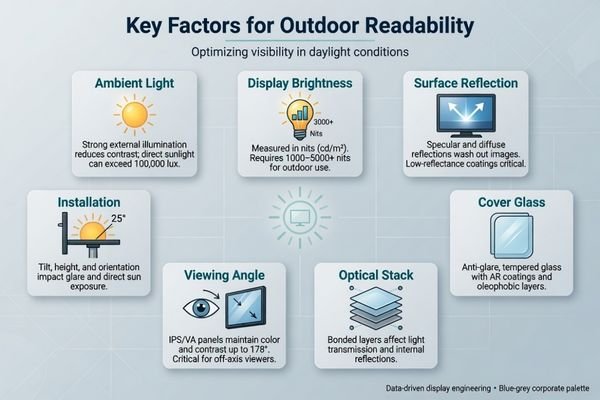
A high brightness rating can support readability, but it cannot control every condition by itself. If the cover glass reflects too much ambient light, the dark areas of the image may become washed out. If the display faces a strong reflection source, the user may see reflected surroundings instead of the displayed content. If the installation angle is not considered, glare may appear exactly where the operator needs to read critical information.
For broader high-brightness module directions, you can also review our High-Brightness Industrial LCD Display Modules page.
| Factor | Why it matters | What to review |
|---|---|---|
| Display brightness | Provides the display’s light output, but does not eliminate reflection. | Target luminance, backlight efficiency, power and heat conditions. |
| Ambient light | Determines how much external light competes with the display content. | Indoor, semi-outdoor, outdoor, direct sunlight, reflected sunlight. |
| Reflection | Can reduce visible contrast even when the display is bright. | Front-surface reflection, surrounding surfaces, user viewing position. |
| Cover glass | Protects the display but may increase glare2 if not selected properly. | Glass thickness, material, surface finish, bonding method. |
| Surface treatment | Helps control how light reflects from the front surface. | AG, AR, or other front-surface treatment options. |
| Optical stack | Internal layers can create reflections or contrast loss. | Air gap, touch layer, optical bonding direction, adhesive stack. |
| Viewing angle | Affects how the user sees both content and reflected light. | User position, mounting height, operating distance, off-axis viewing. |
| Installation direction | Determines how sunlight and reflections hit the screen. | Mounting angle, orientation, sun exposure path, shading conditions. |
The stronger the ambient light, the more these factors matter. A sunlight-readable LCD module should therefore be evaluated as part of the final device, not as a brightness number isolated from the enclosure, glass, touch layer, and installation environment.
How reflection and glare reduce usable contrast
The core problem in outdoor readability is often usable contrast. In strong ambient light, the front surface of the display can act like a mirror. When sunlight, skylight, or surrounding objects reflect from the cover glass, unwanted light is added on top of the displayed image. This reduces the difference between dark and light areas, making text, icons, maps, or control information harder to distinguish.
Reflection and glare reduce usable contrast by lifting the apparent black level of the display. When reflected light becomes stronger than the dark areas of the screen content, the image appears washed out even if the LCD itself has high brightness.
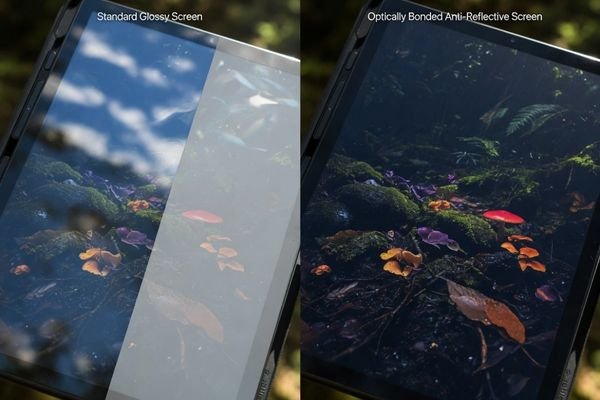
In practical terms, the viewer is no longer seeing only the LCD content. They are seeing a combined image: the screen content plus the reflected environment. This is why a display can have a strong backlight but still fail in real-world outdoor use. The bright areas may remain visible, but if dark areas are lifted by reflection, the overall contrast becomes too weak for reliable reading3.
| Condition | Brightness-only approach | Integrated approach | Likely result |
|---|---|---|---|
| Direct sunlight | Use a higher-brightness panel with standard cover glass. | Combine suitable brightness with reflection control and front-surface review. | The brightness-only design may still wash out; the integrated design may remain more readable. |
| Bright overcast sky | Increase brightness without changing the front surface. | Use an anti-glare direction to diffuse reflected ambient light. | The untreated surface may appear mirror-like; controlled diffusion may improve usability. |
| Window-facing installation | Rely on brightness to overpower reflections. | Review air gap, touch layer, cover glass, and bonding direction. | The display may show glare or double reflections unless the optical path is controlled. |
This is why reflection control is often as important as brightness. A well-designed optical system helps preserve the display’s native contrast, which is what the user actually needs in the field.
Why optical design matters as much as brightness
A sunlight-readable LCD project should not be reduced to selecting a brighter panel. Brightness matters, but the optical design around the LCD determines whether that brightness becomes useful to the viewer. The cover glass, surface treatment, touch layer, air gap, bonding direction, and installation environment all influence how ambient light interacts with the display.
Optical design matters because it controls how ambient light reaches, reflects from, and passes through the display stack. In some projects, reducing reflection can improve perceived readability more effectively than simply increasing backlight output.
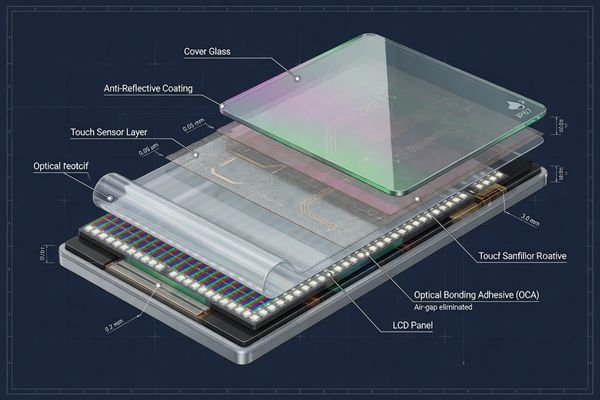
The goal is not always to apply the most complex optical treatment. The goal is to match the optical design to the actual readability risk. For some equipment, higher brightness and a controlled surface treatment may be enough. For others, cover glass, touch integration, and internal reflection may require a more complete optical-stack review.
The role of the front surface
The front surface is the first place where ambient light interacts with the display. Cover glass protects the LCD, but it can also introduce glare if the material, thickness, or surface finish is not suitable for the environment.
Anti-glare treatment can help diffuse mirror-like reflections, making reflected light less sharp and less distracting. Anti-reflective treatment can reduce the intensity of reflections from the front surface. The right direction depends on the environment, the required image sharpness, the user’s viewing distance, and the installation angle.
The impact of the internal optical stack
The internal structure also affects readability. An air gap between the LCD and cover glass can create additional reflection surfaces. Optical bonding can reduce internal reflections by replacing the air gap with a transparent adhesive layer. However, optical bonding is not a universal answer. It should be evaluated together with cover glass, touch requirements, surface treatment, brightness target, and mechanical structure.
For engineering-level considerations around high-brightness display design, see our high-brightness LCD module design page.
Where outdoor readability problems usually appear
Outdoor readability problems usually appear in equipment where lighting conditions are strong, changing, or difficult to control. The issue is not limited to devices placed directly under open sunlight. It can also appear in marine systems, outdoor terminals, semi-outdoor installations, window-facing equipment, and bright industrial environments.
Readability problems are common in marine systems, outdoor terminals, semi-outdoor devices, and bright industrial equipment because these applications must remain usable under changing light, reflection, viewing-angle, and installation conditions.
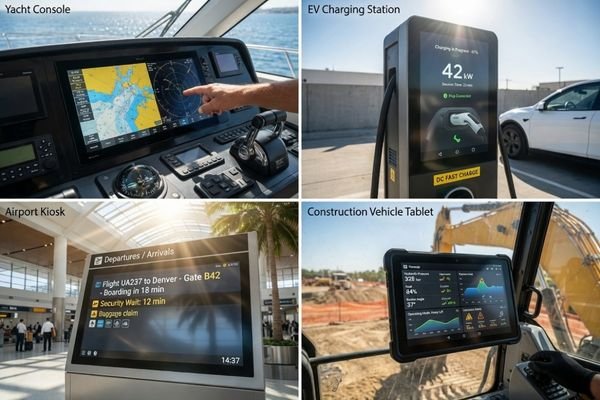
Marine and maritime systems often face direct sun, reflected light from water, spray, and changing operator positions.4 In these environments, display readability can be operationally important because users need to interpret information quickly and confidently.
Outdoor kiosks and terminals, such as ticketing machines, EV chargers, access terminals, and information points, may be exposed to sun from different directions throughout the day. A display that works well in the morning may become difficult to read in the afternoon if the installation angle creates strong glare.
Semi-outdoor equipment can be just as challenging. Devices installed in atriums, storefront windows, station halls, or covered outdoor areas may not be exposed to rain, but they can still face strong natural light and reflections.
Bright industrial environments create another type of readability challenge. Factory floors, vehicle-mounted panels, or equipment near large doors and windows may not be fully outdoor, but the display still needs to remain usable under high ambient light.
In all these cases, the key issue is not whether the LCD is bright in isolation. The key issue is whether the final equipment can maintain usable contrast in its real deployment environment.
What to evaluate before choosing a sunlight-readable LCD module
To avoid common selection mistakes, the project review should start with the environment and readability risk, not with a target brightness number. The better question is not only “How bright should the LCD be?” but “Under what conditions must the display remain readable and usable?”
Before choosing a sunlight-readable LCD module, project teams should evaluate ambient light, sunlight exposure, cover glass, touch requirements, viewing angle, mounting direction, optical treatment, thermal condition, interface path, and validation stage. This review reduces the risk of selecting a bright panel that still fails in the field.
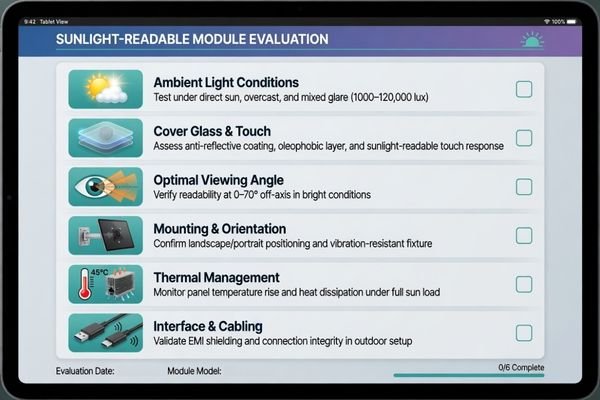
Our review process usually starts with the actual equipment context: where the display will be installed, how users will view it, whether cover glass or touch is required, and how the module will be validated in the enclosure. This approach helps connect brightness, optical treatment, mechanical fit, interface planning, and production readiness before the sample stage.
A practical project review should start with these questions:
| Evaluation item | Question to ask | Why it matters |
|---|---|---|
| Environment | Is the device indoor, semi-outdoor, or fully outdoor? | Defines the real ambient-light level and exposure risk. |
| Sunlight exposure | Will the display face direct sunlight, indirect sunlight, or reflected sunlight? | Determines whether brightness alone is likely to be enough. |
| Front surface | Is cover glass required? Is there a touch layer? | Affects reflection, glare, thickness, and optical stack design. |
| Viewing angle | From what distance and angle will users read the display? | Influences perceived contrast and glare sensitivity. |
| Mounting direction | How will the screen be installed relative to light sources? | Can increase or reduce reflection depending on orientation. |
| Optical treatment | Is AG, AR, bonding, or another surface direction worth evaluating? | Helps control reflection and improve usable contrast. |
| Thermal condition | Can the enclosure manage heat from a high-brightness backlight? | Supports long-term stability and avoids overheating risk. |
| Interface path | How will the display connect to the mainboard or controller? | Affects integration, cable routing, and validation timing. |
| Validation stage | Is the project in concept, prototype, pilot, or redesign? | Determines how much flexibility remains before production decisions. |
Answering these questions first leads to a more realistic specification. It shifts the display decision from a single brightness number to a complete module-level direction that can be validated in the actual device.
When higher brightness may still be enough
It is also important not to over-engineer every project. Not every outdoor or high ambient-light display needs a complex optical stack. In some situations, choosing a higher-brightness LCD may be a sufficient and cost-effective direction.
Higher brightness alone may be enough when reflection is not the dominant problem, the viewing angle is controlled, the display is used in bright indoor or protected semi-outdoor conditions, and the UI content has strong contrast. The goal is to match the solution to the real readability risk.
Higher brightness may work well in bright indoor environments, semi-outdoor locations shielded from direct glare, or applications where users can adjust their viewing angle. A display inside a vehicle cabin, for example, may face strong ambient light but not constant direct sunlight. A handheld or movable device may allow users to tilt the screen away from reflections.
UI design also matters. High-contrast text, clear icons, larger fonts, and simple information hierarchy can improve readability without requiring the most complex optical treatment. If the environment is controlled and the user interaction is predictable, a higher-brightness display may provide enough improvement.
The goal is not to specify the most advanced solution for every project. The goal is to match brightness and optical control to the actual risk. Sometimes that means higher brightness. Sometimes it means reflection control. In many real equipment projects, it means evaluating both together.
Final Takeaway: Design for usable contrast, not brightness alone
Outdoor readability should be judged by whether the display remains readable and usable under real ambient-light conditions, not by brightness alone. A high-brightness LCD is often necessary for sunlight-readable applications, but it becomes truly effective only when reflection, glare, cover glass, optical treatment, viewing angle, installation environment, and thermal conditions are reviewed together.
For OEM equipment teams, sunlight-readable LCD selection is a module-level integration decision rather than a simple panel specification choice. It affects optics, mechanics, interface planning, validation, and production readiness. A manufacturer-oriented, engineering-driven partner for custom LCD module development and integration can help evaluate whether the brightness and optical direction are practical before the project moves into sample, enclosure, or production planning.
For a project-level starting point, review our 23.8-Inch Sunlight-Readable LCD Module for Marine & Outdoor Equipment page.
FAQ
Is higher brightness always enough for outdoor LCD readability?
No. Higher brightness can improve visibility, but it cannot solve every outdoor readability problem. Reflection, glare, cover glass, surface treatment, viewing angle, and installation conditions can still reduce usable contrast even when the display is bright.
What makes an LCD display sunlight-readable?
A sunlight-readable LCD usually requires suitable brightness, controlled reflection, proper cover glass, optical treatment, viewing-angle consideration, thermal review, and validation under real ambient-light conditions. It is not defined by brightness alone.
Does optical bonding always solve outdoor readability problems?
No. Optical bonding can reduce internal reflection in some designs, but it is not a universal solution. It should be evaluated together with cover glass, surface treatment, brightness target, touch requirement, mechanical structure, and installation environment.
What should be reviewed before choosing an outdoor LCD module?
Project teams should review ambient light level, direct or indirect sunlight, cover glass, touch requirement, viewing angle, mounting direction, optical treatment, thermal condition, interface path, and validation stage before choosing an outdoor LCD module.
Next step for marine and outdoor equipment projects
If your marine system, outdoor terminal, or high ambient-light equipment needs a sunlight-readable LCD direction, review our 23.8-Inch Sunlight-Readable LCD Module for Marine & Outdoor Equipment page or share your project requirements for a practical feasibility review.
-
PMC. “Investigation of Enhanced Ambient Contrast Ratio in Novel Micro-Structured Displays.” ↩
-
Amazon. “Anti-Glare Screen Protector.” ↩
-
ScienceDirect. “Reflectance and Contrast Measurements of Reflective Liquid Crystal Displays.” ↩
-
CDTech LCD. “Marine LCD Displays: A Deep Dive into Sunlight-Viewable Technology.” ↩