
In transportation terminal projects, the display is a critical interface for passengers and operators. It may show route status, ticketing prompts, gate information, queue updates, service messages, or short operating instructions. However, transportation terminals also have strict layout constraints. The screen must share limited front-panel space with ticket printers, card readers, QR scanners, payment modules, cameras, speakers, buttons, enclosure frames, and service labels.
Standard displays fail in transportation terminals when their fixed format conflicts with the terminal structure, component layout, and passenger-facing information flow. The issue is usually physical integration, not display capability.
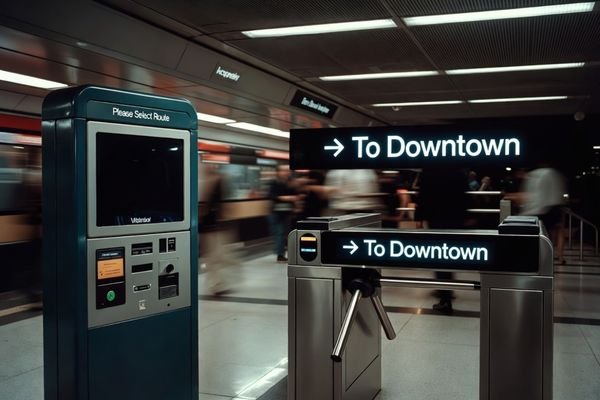
In LCD module integration projects, standard displays often become a bottleneck when terminal structure, component layout, and display window direction are not reviewed together. A screen may look suitable based on diagonal size, but later prove too tall for the enclosure, difficult to align with a ticketing module, or inefficient for short horizontal information.
This article explains why standard displays often create layout problems in transportation terminals, how transportation information flow changes the display decision, and when a bar-type LCD direction becomes more practical. For a project-level starting point, review our 12.3-Inch Bar LCD Module for Transportation Systems page.
Why transportation terminals often create display format constraints
Transportation terminals create display format constraints because the screen is only one part of a component-dense system. Unlike a standalone monitor, a display in a ticketing machine, gate reader, or station-side terminal must be integrated into a housing that also supports functional hardware. Each component has its own mounting position, access requirement, cable path, and service clearance.
The available display area is often not a flexible rectangle1. It may be a narrow horizontal window above a ticketing module, a compact display zone beside a service panel, or a limited area inside a platform-side terminal. In these cases, the display window is often defined by the equipment architecture rather than by the preferred screen size.
When the terminal structure is already constrained, a standard 16:9 display can become difficult to integrate cleanly even if its diagonal size seems acceptable. The problem is not that the standard screen cannot show the required information. The problem is that the screen format may not match the physical opening, component layout, or expected user flow.
In many transportation terminal discussions, the display issue appears only after front-panel components have already been arranged. At that point, the screen is no longer a standalone part; it becomes part of the terminal layout, cable path, and service-access design.
For broader transportation display application context, you can also review our Transportation Vehicle Displays solution page.
Where standard displays usually fail
Standard displays usually fail in transportation terminal layouts when their physical shape creates unnecessary design compromises. A display that works well on a desk, wall, or general information panel may become inefficient when embedded into a purpose-built terminal.
A standard display can create integration risk when its vertical height forces a larger enclosure, wastes usable display area, or disrupts the placement of essential components such as readers, scanners, printers, payment modules, and cameras.
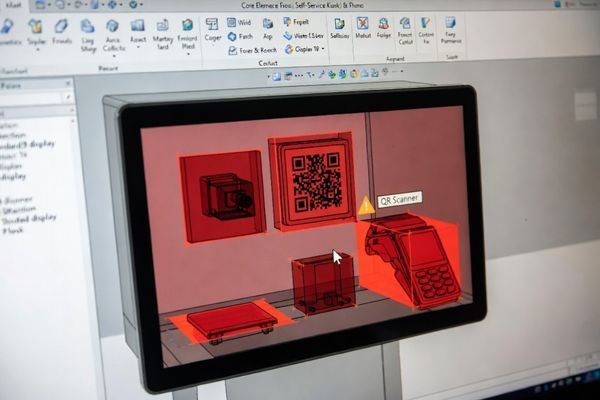
From an engineering standpoint, the failure usually appears in three ways:
- Wasted vertical space: A standard screen may be used to show a route number, short ticketing prompt, or single-line status message. The remaining vertical area may be unused or filled with low-priority content, while the enclosure still needs to accommodate the full screen height.
- Component placement conflicts: To fit a standard screen, the design team may need to move a card reader, QR scanner, ticket printer, speaker, or camera away from its most logical position.
- Larger enclosure requirements: The terminal may become taller, deeper, or wider than necessary, which can affect material use, installation footprint, and service accessibility in crowded station environments.2
The display format should therefore be evaluated together with the terminal structure. If the screen shape does not match the real display window and component layout, the project may face late-stage redesign even when the display itself performs normally.
How transportation information flow changes the display decision
Transportation terminal content is often status-based, directional, or sequential. Passengers and operators usually need to scan information quickly rather than study a complex interface. Route names, platform numbers, gate status, ticketing prompts, queue updates, and service messages are usually short, direct, and time-sensitive.
Transportation information is usually scanned quickly, not studied deeply. When route status, gate information, ticketing prompts, or next-step instructions naturally flow horizontally, a bar-type display can present the information more efficiently than a standard 16:9 screen.
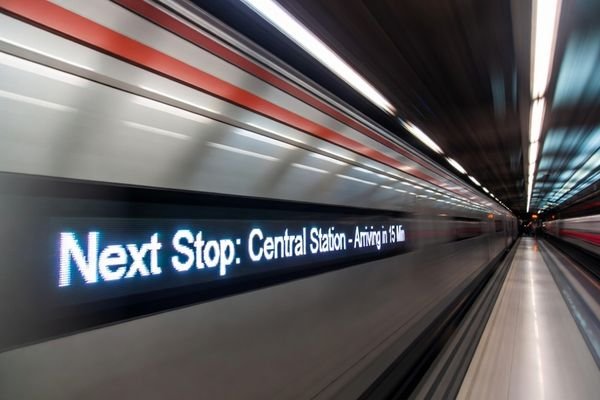
In transportation display project reviews, the first step is often to map the information hierarchy. The key question is not only “What screen size is available?” but “What does the terminal need to communicate, and how will users read it?”
Common transportation information types include:
- Route and status updates: Route names, platform numbers, gate status, departure changes, and service alerts often work well in a horizontal information strip3.
- Ticketing prompts: Short instructions such as selecting a destination, scanning a code, inserting payment, or collecting a ticket usually need clear step-by-step presentation.
- Directional guidance: Arrows, gate prompts, service counter directions, and boarding instructions often benefit from wide layouts that match passenger movement.
- Queue and service messages: Queue numbers, counter status, and service availability can be displayed clearly in a compact horizontal zone.
Because this information is often short and linear, a large rectangular display may provide more area than the content actually needs. The display format should match the information structure rather than forcing the content into a default screen ratio.
When a bar-type direction becomes more practical
A bar-type or stretched LCD becomes more practical when the terminal needs a wide but shallow information zone. This often happens when the display must be installed above, below, or beside other functional components without increasing the terminal enclosure height.
A bar-type LCD becomes practical when the terminal needs a wide but shallow information zone that fits around ticketing, scanning, payment, or service components without increasing enclosure height.
A bar display can be useful for route status, ticketing instructions, queue information, gate prompts, and service messages. It allows the display area to follow the terminal’s mechanical structure and passenger-facing information flow more closely.
A bar-type direction may be worth evaluating when:
- the available display window is long and narrow;
- the displayed information is mainly status-based or directional;
- a standard display would waste vertical space;
- the screen must fit around ticketing, scanning, payment, or service components;
- the project needs a compact embedded display zone rather than a full-screen interface.
The value of a bar LCD is not that it looks different from a standard screen. Its value is that it can align the display area with the actual terminal layout and information flow. For broader bar and ultra-wide display options, see our Bar & Ultra-wide LCD Display Modules page.
For teams evaluating this direction, our 12.3-Inch Bar LCD Module for Transportation Systems page provides a project-level starting point for display format, interface, structure, and integration discussion.
When a standard display may still be the better choice
A bar-type display should not be treated as the correct answer for every transportation terminal. Standard displays may still be more suitable when the system needs maps, video, detailed ticketing interfaces, complex touch interaction, full-screen instructions, or rich visual content.
A standard display can be the better option when the terminal has enough installation space and the content is already designed around a standard rectangular layout. For example, an interactive wayfinding kiosk or a ticketing interface with multiple options may need the flexible canvas of a standard screen. In those cases, forcing the interface into a bar format could reduce usability.
The goal is not to replace standard displays wherever possible. The goal is to choose the display format that best matches the terminal’s information structure, user behavior, and mechanical constraints.
This balanced view is important. A bar-type LCD can be practical for compact horizontal information zones, while a standard display remains useful for complex interaction and full-screen visual content. The right choice depends on how the display fits the whole terminal system.
What to review before choosing a transportation display module direction
Before choosing a transportation display module direction, project teams should evaluate the terminal as a complete system rather than selecting a screen by size alone. A display that appears suitable in isolation may create late-stage integration risk once housing, mounting, cabling, front-panel components, brightness environment, and validation stage are considered.
Before choosing a transportation display module direction, project teams should review content type, information flow, display window, viewing distance, front-panel components, brightness environment, interface path, mounting structure, touch or cover glass requirements, and validation stage.
In transportation display project reviews, we usually separate the decision into four practical questions: what the terminal must communicate, where the display can physically fit, how passengers or operators will read the information, and which structure or interface constraints are already fixed. This helps avoid choosing a standard screen that looks available but later creates problems with visible area, mounting, cable routing, or enclosure design.
This review is especially useful when the terminal already has a defined display window, a fixed component layout, or a limited controller-board location. In those cases, the display format cannot be judged only by diagonal size or panel availability. It has to be evaluated together with mechanical fit, cable path, visible area, brightness environment, touch or cover glass requirements, and the remaining flexibility in the project schedule.
| Evaluation Item | Key Question | Why It Matters |
|---|---|---|
| Content Type | Is the content route-based, ticketing-based, status-based, or interactive? | Determines whether a bar-type or standard format is more suitable. |
| Information Flow | Does the content move horizontally, vertically, or through multiple zones? | Helps match the display shape to the transportation information structure. |
| Display Window | Is the available space wide, narrow, tall, or already fixed by the terminal housing? | Determines whether the display can be integrated without enclosure redesign. |
| Viewing Distance | Will passengers read the display close-up or from a short public-facing distance? | Affects text size, contrast, layout density, and display format. |
| Front-Panel Components | Does the display share space with readers, scanners, printers, buttons, cameras, or payment modules? | Impacts usable display area and component layout. |
| Brightness Environment | Is the terminal used indoors, near station windows, on platforms, or in semi-outdoor areas? | Impacts readability and brightness direction. |
| Interface Path | How will the display connect to the controller or mainboard? | Affects signal compatibility, cable routing, and validation timing. |
| Mounting Structure | How will the display module be fixed into the terminal? | Influences mechanical repeatability and production stability. |
| Touch / Cover Glass Requirement | Does the terminal require touch, protective glass, or a sealed front surface? | Changes the optical stack, front-surface design, mechanical thickness, and validation path. |
| Validation Stage | Is the project in concept, prototype, pilot, or redesign? | Determines how much flexibility remains before production decisions. |
By working through these questions early, teams can reduce the risk of choosing a screen format that looks suitable on paper but becomes difficult to integrate in the final terminal. For equipment-level fitting, mounting, enclosure alignment, and cable-clearance considerations, see our mechanical integration for LCD modules page.
Final Takeaway: fit the display format to the terminal layout
Standard displays often fail in transportation terminal layouts when their fixed format does not match the terminal’s mechanical structure, information flow, component density, or display window. A bar-type LCD can be a practical direction when the project needs a compact horizontal information zone for route status, ticketing prompts, queue updates, gate information, or service messages.
However, a standard display remains the better choice for maps, full-screen interfaces, detailed ticketing screens, or complex touch interaction. For OEM equipment teams, this makes transportation display selection a module-level integration decision rather than a simple screen-size choice.
A manufacturer-oriented, engineering-driven partner for custom LCD module development and integration can help evaluate whether the display format is practical before enclosure, interface, or production decisions are locked. For teams evaluating a bar LCD direction for transportation terminals, review our 12.3-Inch Bar LCD Module for Transportation Systems page.
FAQ
Why do standard displays fail in transportation terminal layouts?
Standard displays usually fail when their shape does not match the terminal structure, display window, information flow, or component layout. The issue is often not display capability, but integration efficiency.
When is a bar LCD better for transportation terminals?
A bar LCD is usually more practical when the terminal needs a wide but shallow display area for route status, ticketing prompts, queue updates, gate information, or service messages.
Should transportation terminals always use bar-type displays?
No. Standard displays may still be better for maps, detailed ticketing interfaces, video, full-screen instructions, or complex touch interaction.
What should be reviewed before choosing a transportation display module?
Project teams should review content type, display window, viewing distance, front-panel components, brightness environment, interface path, mounting structure, touch or cover glass requirements, and validation stage before selecting a display module direction.
Next step for transportation terminal display projects
If your transportation terminal, ticketing device, or station-side equipment needs a bar LCD direction, review our 12.3-Inch Bar LCD Module for Transportation Systems page or share your project requirements for a practical feasibility review.
Next step for transportation terminal display projects
If your transportation terminal, ticketing device, or station-side equipment needs a bar LCD direction, review our 12.3-Inch Bar LCD Module for Transportation Systems page or share your project requirements for a practical feasibility review.
-
RedyRef. “Digital Kiosk Guide: Types, Features & Deployment Considerations.” ↩
-
Springer. “Accessible Public Transport: A Case Study of Warsaw.” ↩
-
Texas A&M Transportation Institute. “Bus Route Guidance Information Design.” ↩