
When developing a product with a custom display, the aspect ratio is far more than a simple technical specification. It is a product-level design decision that affects enclosure fit, UI layout, information readability, interface compatibility, and long-term production feasibility. Choosing the right aspect ratio is not only about how the screen looks, but also about how the display works inside the complete product system.
In custom display projects, aspect ratio should be driven by the product structure, application scenario, UI content, viewing distance, resolution requirements, and engineering feasibility. It should not be selected only from standard display formats such as 16:9, 4:3, or 1:1.
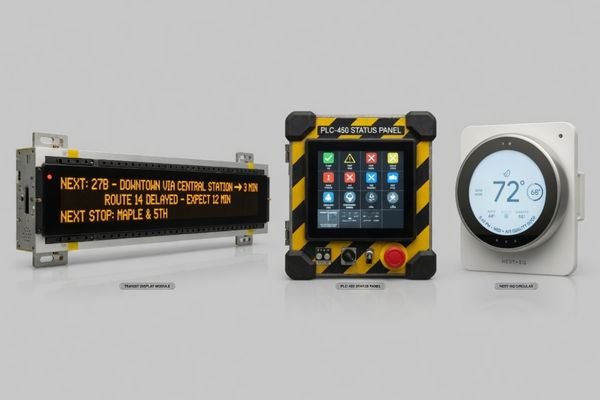
In real equipment projects, aspect ratio problems often appear when the display format is treated as an afterthought. A team may select a standard 16:9 panel early in the design process, only to find later that it does not fit the compact enclosure, creates unused UI space, or forces the product housing to become larger than necessary. The better starting point is the product itself: available mechanical space, displayed content, viewing direction, and system integration requirements.
This article explains how to approach aspect ratio design in custom displays from a practical engineering perspective. It covers why standard ratios are not always suitable, how aspect ratio affects UI readability1, why resolution and interface compatibility matter, and when a custom display ratio should be reviewed before the product design is locked.
Aspect Ratio Is a Product-Level Design Decision
In custom display projects, aspect ratio is not just a parameter selected from a datasheet. It influences the mechanical enclosure, front-panel design, UI layout, viewing experience, touch integration, and overall product appearance. Treating it as a simple display specification can create integration problems later in the project.
The right aspect ratio should come from the product’s physical constraints and functional goals. It should be determined by the enclosure space, application environment, information layout, and user interaction requirements rather than by defaulting to a standard screen format.
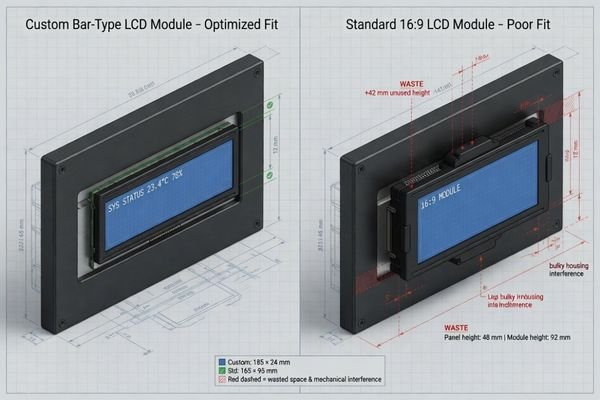
In project reviews, aspect ratio issues usually come from a mismatch between the display format and the product’s actual function. For example, a narrow status panel does not always need a tall 16:9 screen. Forcing a standard format into that type of design can waste space, increase the enclosure size, and make information harder to read.
A more practical question is not “Which standard display can we use?” but “What display shape best supports the information we need to show within the available product space?” This shifts the decision from component selection to system design. For projects where the display format is tied closely to the application environment, it can also help to review broader application solutions before finalizing the display direction.
Why Standard Display Ratios Are Not Always Suitable
Standard aspect ratios such as 16:9, 4:3, and 1:1 are useful in many projects. They are common, widely supported, and often easier to source. However, they are not always the best fit for industrial devices, smart terminals, transportation systems, compact control panels, or equipment with non-standard front-panel structures.
Standard display ratios may become unsuitable when the product has limited installation space, a non-standard front panel, a specialized UI layout, or a display area that must match the equipment structure. In these cases, bar-type, ultra-wide, square, vertical, or other custom display formats may be more practical.
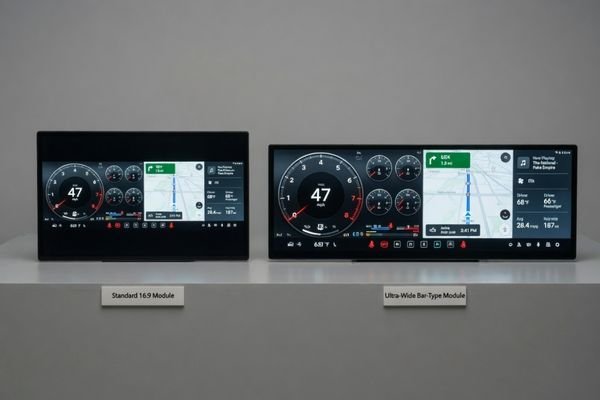
Physical and Mechanical Constraints
Many devices do not have enough space for a conventional display shape. An industrial control panel may only have a narrow horizontal slot. A transportation information unit may need a long display area to show route or status information. A compact terminal may need a square or vertical display to fit the front structure.
In these cases, a non-standard display ratio2 is not only an appearance choice. It can be a mechanical requirement. The display format must fit the available space without forcing unnecessary changes to the product housing, mounting structure, or front-panel design.
UI and Information Flow
The information shown on the screen often defines the best display shape. A route map, warning message, machine status bar, or multi-zone dashboard may work better on a wide or bar-type display. A compact industrial controller with icons, menus, or status indicators may work better on a square display.
Forcing this content into a standard ratio can create wasted space, awkward layouts, distorted content, or reduced readability. When the display ratio, UI layout, mechanical space, and interface constraints need to be evaluated together, it is better to discuss your custom display project before locking the display format.
How Aspect Ratio Affects UI Layout and Readability
The aspect ratio of a display has a direct impact on how information is organized, presented, and understood by the user. A poor aspect ratio choice can lead to a crowded interface, oversized empty areas, distorted graphics, or text that is too small to read comfortably.
Aspect ratio directly shapes the user interface. Wide formats can work well for dashboards, status bars, and transportation information, while square or vertical formats may be better for icon-based menus, compact panels, or portrait-oriented terminals. A mismatch between aspect ratio and UI design can reduce readability and usability.
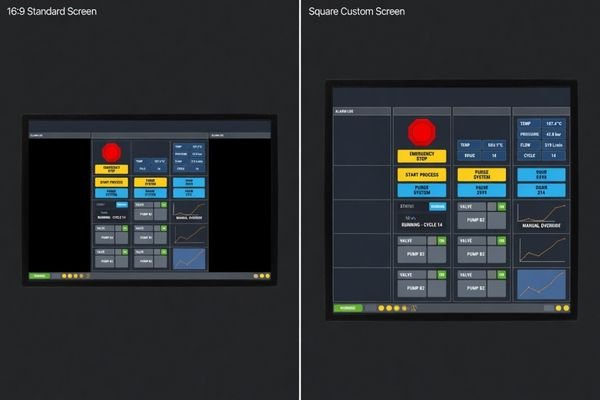
The key is to match the display shape to the structure of the content. A bar-type display can be effective for linear information such as route updates, machine status, progress indicators, or multi-section dashboards3. However, it may not be suitable for dense paragraphs, large menu systems, or content that requires vertical space.
Square displays can be efficient for grid-based layouts, icons, control buttons, meters, and compact interfaces. Vertical displays can be useful for terminals, handheld-style devices, and interfaces designed around scrolling or portrait interaction. The wrong aspect ratio forces the UI designer to compensate through scaling, cropping, rearranging, or leaving unused space, all of which can reduce the quality of the final user experience.
Aspect Ratio and Resolution Must Be Designed Together
Aspect ratio and resolution cannot be evaluated separately. A display format may fit the product mechanically, but the resolution must still support readable text, clear graphics, suitable pixel density, and correct UI scaling. This becomes especially important for non-standard display formats.
A successful custom display requires the aspect ratio and resolution to work together. The resolution must support visual clarity at the intended viewing distance while remaining compatible with the mainboard output, controller timing, and display interface.
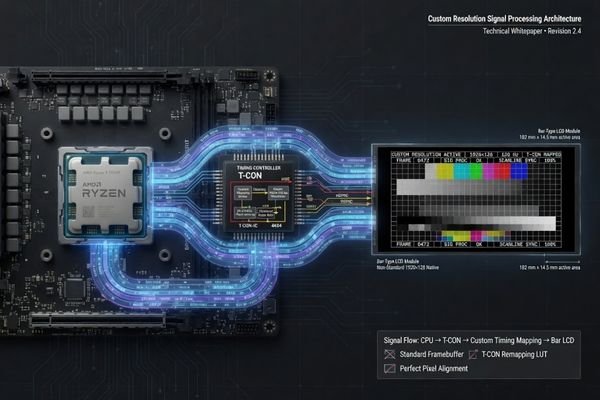
In practical evaluation, a panel may have the right physical shape but the wrong pixel structure. If the native resolution is too low, text may appear pixelated and graphics may lose detail4. If the resolution is too high for the screen size or viewing distance, UI elements may become too small unless the software interface is redesigned.
In aspect ratio reviews, our engineering team usually checks the display format together with native resolution, pixel density, UI scaling, viewing distance, and mainboard output. This prevents a common mistake: choosing a screen shape that fits the enclosure but creates problems in software layout, image mapping, or readability after integration.
Non-standard aspect ratios may also require careful review of timing, signal mapping, controller support, and mainboard output. LVDS, eDP, MIPI, HDMI, or other interfaces must be evaluated based on the actual display resolution and system architecture. The goal is not only to make the image appear on the screen, but to ensure that the display format, resolution, and system output work reliably together.
Mechanical and Interface Constraints Can Limit Aspect Ratio
A visually ideal aspect ratio still has to pass real engineering and production constraints. Custom display design is limited by panel resources, active area, outline dimensions, bezel width, mounting position, cable location, touch sensor design, cover glass structure, interface support, controller options, and long-term supply conditions.
Custom aspect ratio design is constrained by mechanical, electrical, and commercial feasibility. A display ratio that looks ideal in concept may not be practical if panel resources, tooling feasibility, interface support, mechanical integration, or lifecycle supply cannot support it.
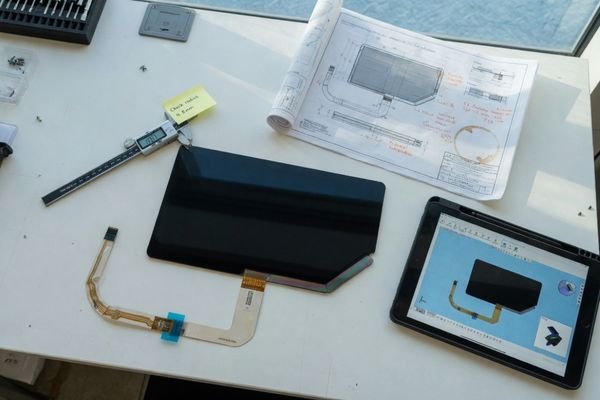
In custom display projects, feasibility review should be more rigorous than simply asking whether a shape can be made. Important factors include existing panel resources, tooling feasibility, minimum order requirements, active area design, driver IC support, touch sensor availability, cover glass design, and long-term supply stability.
During feasibility reviews, our engineering team usually checks the active area, outline size, FPC location, connector direction, mounting method, cover glass structure, touch sensor availability, interface type, and supply continuity before confirming whether a proposed aspect ratio is realistic. This helps avoid approving a display format that looks good in drawings but becomes difficult to build, integrate, or supply later.
Mechanical integration also matters. The active display area is only one part of the module. The overall outline, bezel width, FPC location, connector direction, mounting method, cover glass size, touch sensor structure, and front-panel opening all influence whether a display ratio can be integrated cleanly into the final product.
Interface constraints can also limit the design. The selected aspect ratio and resolution must match the system’s output capability and display interface. If the mainboard cannot support the required timing or resolution, additional controller design or interface adaptation may be needed. For projects where signal output and display format need to be reviewed together, display module types can provide a useful starting point before moving into engineering evaluation.
Common Aspect Ratio Directions for Custom Displays
Different product requirements naturally lead to different display ratio directions. Most custom display projects do not start from unlimited possibilities. They usually fall into several practical format categories based on product space, information layout, and user interaction.
Bar-type and ultra-wide displays are useful for narrow spaces and linear information, while square displays are efficient for compact control interfaces. Vertical, round, and other custom-shaped formats can support specific product designs, but they require more careful review of UI, active area, tooling, and feasibility.
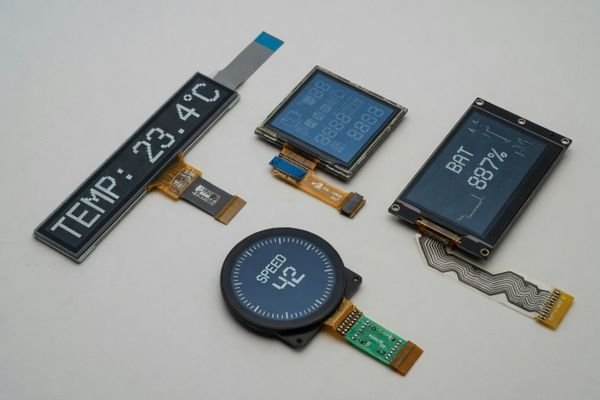
The table below summarizes common aspect ratio directions and the main considerations behind each option.
| Product Need | Suitable Aspect Ratio Direction | Main Consideration |
|---|---|---|
| Narrow equipment panel | Bar type or ultra-wide display | UI scaling and text readability |
| Compact control interface | Square display | Panel availability and layout efficiency |
| Multi-zone dashboard | Wide or ultra-wide format | Resolution mapping and information separation |
| Portrait terminal design | Vertical display | Touch interaction and viewing distance |
| Unique product appearance | Round or custom-shaped display | Active area, tooling, and UI limitations |
| Space-constrained device | Custom display ratio | Mechanical feasibility and supply stability |
By starting with the product’s core need, teams can narrow down the most realistic display format direction. This prevents the early design stage from becoming too abstract and helps connect the display ratio to practical constraints such as interface output, UI layout, mechanical installation, and long-term supply.
When to Use Custom Aspect Ratio Design
The decision to use a custom aspect ratio should be driven by clear project requirements, not only visual preference. Customization becomes necessary when standard display formats create unacceptable compromises in product structure, UI layout, readability, installation, or system integration.
Custom aspect ratio design becomes necessary when standard display formats cannot match the product enclosure, UI layout, viewing direction, information density, front-panel design, interface output, or long-term production requirements. The decision should be based on project constraints, not only appearance.
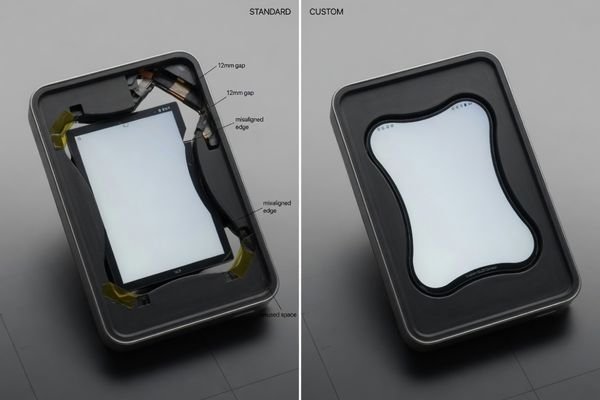
A custom ratio may be justified when the product has a narrow front panel, a unique industrial design, a dashboard-style UI, a specific viewing direction, or a display area that cannot be served efficiently by standard formats. It may also be required when the display must be evaluated together with touch integration, cover glass, mounting structure, signal interface, and lifecycle supply.
In project reviews, our engineering team usually separates this decision into practical checkpoints: what can be solved with a standard module, what requires a modified display structure, and what needs a more customized LCD module design. This prevents unnecessary over-customization while still addressing real constraints that standard display formats cannot solve.
When aspect ratio, resolution, mechanical fit, interface output, touch, and cover glass must be reviewed together, it is better to discuss your custom display project before locking the display format. An early engineering review can help identify whether the project should use an available module direction, a modified format, or a fully customized structure.
Aspect Ratio Design Checklist
Before committing to a specific aspect ratio, project teams should define the mechanical, visual, electrical, and supply requirements clearly. This process turns an abstract display shape idea into a practical engineering requirement that can be evaluated for feasibility.
A successful custom display project begins with a clear definition of mechanical space, displayed content, UI structure, viewing distance, resolution, interface output, touch requirements, cover glass design, operating environment, and lifecycle expectations.
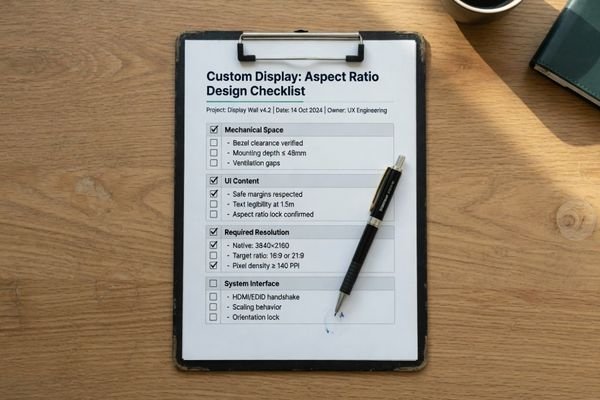
Before defining the final display ratio, clarify these questions:
- What mechanical space is available for the display module?
- What target active area is required?
- What information needs to be shown on the screen?
- Is the UI horizontal, vertical, dashboard-style, icon-based, or multi-zone?
- What viewing distance and viewing angle are required?
- What resolution and pixel density are needed for readability?
- What interface does the mainboard support, such as LVDS, eDP, MIPI, or HDMI?
- Is touch integration required?
- Will the display need protective cover glass or optical bonding?
- What are the environmental conditions and operating temperature range?
- Is long-term supply stability important for this product?
This is also the type of information our engineering team usually reviews before recommending a display direction. The clearer these project conditions are, the easier it is to decide whether the project can use an existing display module, needs a modified ratio, or should move into custom LCD module engineering.
In early-stage aspect ratio evaluation, we usually use this information to reduce uncertainty before the project moves into sampling or mechanical design freeze. Clear requirements make it easier to align the display ratio with the enclosure, UI layout, interface output, touch structure, and supply plan, instead of discovering conflicts after the product design has already progressed too far.
Aspect Ratio Design FAQ
What is the best aspect ratio for a custom display?
There is no universal best aspect ratio. The right ratio depends on product structure, displayed content, viewing distance, UI layout, resolution, interface, mechanical feasibility, and long-term supply requirements.
Is 16:9 always the best choice?
No. 16:9 is common and useful, but many industrial devices, terminals, dashboards, transportation systems, and compact equipment panels require bar type, square, vertical, ultra-wide, or other non-standard formats.
Does aspect ratio affect resolution?
Yes. Aspect ratio and resolution must be matched together. A non-standard ratio may require special resolution mapping, timing review, controller support, UI scaling, and mainboard output evaluation.
Can any aspect ratio be customized?
Not always. Custom aspect ratio design depends on panel resources, tooling feasibility, touch design, cover glass, interface support, production volume, and long-term supply stability. A visually attractive ratio is not always practical for production.
What information is needed before designing a custom display ratio?
Important information includes mechanical space, target active area, displayed content, UI layout, resolution, interface, touch requirements, cover glass design, operating environment, mounting structure, and lifecycle expectations.
Conclusion
Aspect ratio design in custom displays should be approached as part of the complete product system, not as a simple selection from a standard catalog. The right ratio should support enclosure fit, UI readability, resolution clarity, interface compatibility, mechanical integration, touch and cover glass design, and long-term production feasibility.
Before locking a display format, it is usually better to review the product structure, UI content, available module directions, interface output, and supply requirements together. If your project requires a non-standard display ratio or needs engineering review across structure, resolution, interface, and lifecycle planning, custom LCD module engineering is the most practical next step.
→ Start your custom display project
✉️ info@lcdmodulepro.com
🌐 https://lcdmodulepro.com/
-
"Aspect ratios in UX design: Tips, guide, and case study", https://blog.logrocket.com/ux-design/aspect-ratios-ux-design/. This article explains how aspect ratio affects screen layout, content presentation, and UI readability. ↩
-
"Display Aspect Ratios: Which are Best for Industrial Use? – AbraxSys", https://www.abraxsyscorp.com/industrial-display-aspect-ratios-explained/. This guide discusses how industrial display aspect ratios are often influenced by enclosure space, mounting requirements, and application constraints. ↩
-
"Bar Type Panels – Crystal Display Systems", https://crystal-display.com/bar-type-panels/. This page explains common use cases for bar-type displays, including applications that require wide, narrow, or linear information layouts. ↩
-
"Blurry text, not an anti-aliasing or resolution issue – Adobe Community", https://community.adobe.com/questions-712/blurry-text-not-an-anti-aliasing-or-resolution-issue-1087633. This discussion supports the point that display resolution and pixel density can affect text clarity and visual sharpness. ↩